
AULA WIN68 HE Mechanical Gaming Keyboard 60%
4.5Editor score
Adjustable actuation points
Web-based driver support
Compact 60% layout
Discover the top keyboards for Valorant with rapid trigger and magnetic switches to improve counter-strafing and reduce input lag for competitive play.
Finding the right keyboard for Valorant requires precision and speed. Competitive players need devices that respond instantly to every keystroke. Magnetic switches and rapid trigger technology help you land shots faster.
We compared ten top keyboards based on polling rates, actuation points, and build quality. Each model offers unique features like customizable RGB, compact layouts, and durable materials for long gaming sessions.
Each pick shows key specs and performance traits to help you decide. Prices and availability change often so check the latest details before purchasing. Your setup deserves the best tools for ranked matches.
4.5Editor score

4.1Editor score

4.6Editor score
This comparison highlights the strongest contenders in the market today. We analyzed specifications like polling rates, switch types, and layout sizes to ensure you find the perfect match for your play style and desk space.
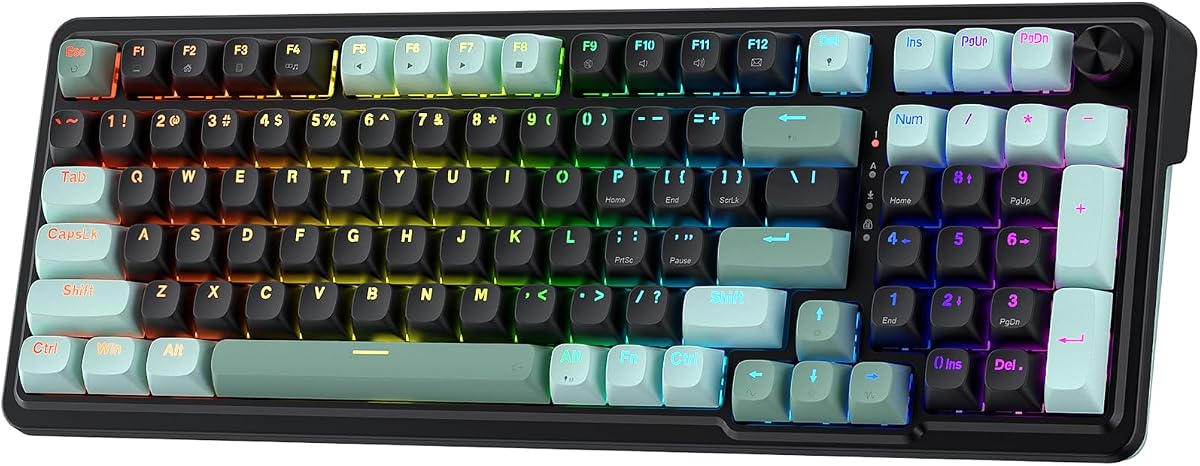
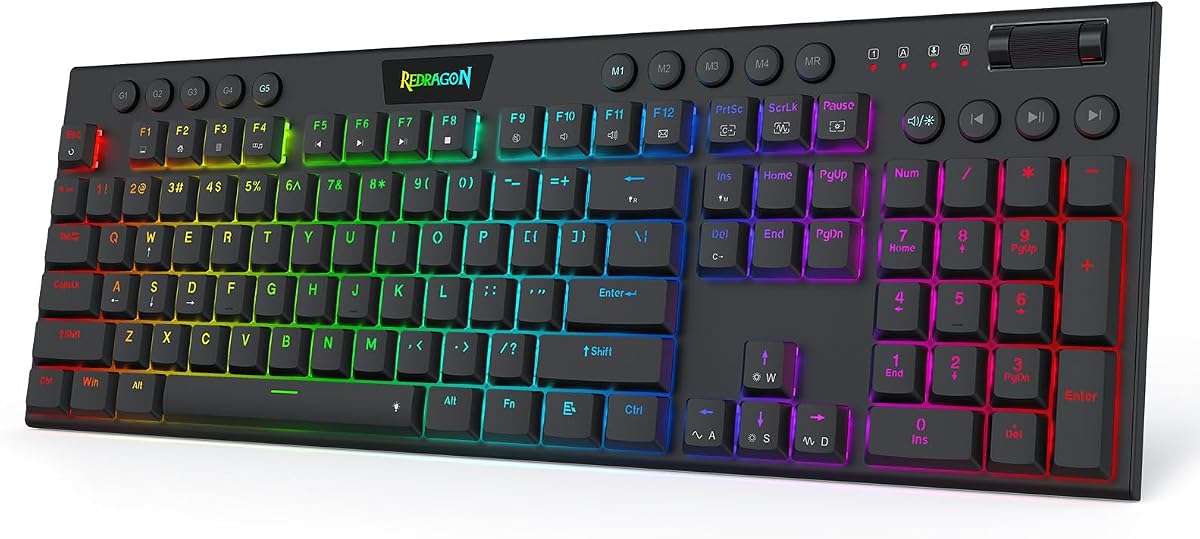




This keyboard delivers high-speed performance with its magnetic switches and rapid trigger tech. It is designed for competitive play where timing matters. The rating of 4.1 stars reflects its strong appeal among FPS fans.
We may earn a commission when you buy through this link, at no additional cost to you.
The UltraMag switches allow for precise keypress detection without physical contact. This means you can stop and shoot with better timing. Software tuning lets you save profiles between 0.1mm and 3.4mm for consistent setup across games.
While the driver requires some setup time the benefits are worth it. The one-knob control simplifies volume and brightness adjustments quickly. These trade-offs are acceptable given the performance gains in ranked matches.
It is ideal for players seeking an edge in aim and movement. If you want fast actuation and durability this model stands out. We recommend it as the top choice for Valorant competitors today.
This feature allows keys to reset instantly enabling faster movement and firing sequences during intense rounds.
Independent switch-plate design paired with dampening layers provides a soft bounce instead of harsh noise.
We may earn a commission when you buy through this link, at no additional cost to you.
Similar to its sibling this model offers a strong magnetic switch experience for gaming. The 4.4 rating highlights user satisfaction with its speed and responsiveness. It is built for moments where quick reactions win rounds.
We may earn a commission when you buy through this link, at no additional cost to you.
The dual-module floating structure reduces wobble for a smoother typing feel. You can adjust actuation profiles through a driver for tailored precision. The one-knob simplifies lighting and playback without extra key combos.
Its main limitation is the lack of advanced software features. You may need to rely on on-the-fly macros for customization. Still the core gaming performance remains solid for budget-conscious gamers.
This keyboard suits players who want magnetic tech without overspending. It balances cost and function well for daily use. Choose it if you prioritize speed and noise control in your setup.
Magnetic switches sense presses without contact improving peek-and-fire timing in tactical shooters like Valorant.
Dampening layers and anti-wobble design reduce harsh clacks making it quieter during long sessions.
We may earn a commission when you buy through this link, at no additional cost to you.
This keyboard is built for counter-strafing with its low-profile magnetic switches. A perfect 5.0 rating shows how users love its speed and smooth feel. It shortens travel distance for quicker keystrokes.
We may earn a commission when you buy through this link, at no additional cost to you.
A dedicated macro zone lets you record combos without software. The one-knob wheel handles brightness and volume instantly. Its slim design makes typing feel lighter on your wrists during long plays.
Some users may need time to adapt to the shorter travel. The actuation tuning range is between 0.1mm and 2.8mm. Still the performance gains in FPS titles make this trade-off worthwhile.
If you prefer a compact wrist-friendly board this is the pick. It combines speed with ergonomic comfort well. We recommend it for gamers valuing quick reaction times and ease of use.
A 4×5 macro zone plus media controls let you record combos and adjust volume without installing drivers.
Low-profile switches and keycaps shorten travel distance so inputs register faster and typing feels light.
We may earn a commission when you buy through this link, at no additional cost to you.
This mini board offers advanced hall effect control for competitive FPS. Its 4.4 rating reflects strong performance in rapid taps and movement. The 60% layout maximizes mouse space for low-sensitivity aiming.
We may earn a commission when you buy through this link, at no additional cost to you.
MGX hyperdrive switches provide adjustable actuation and zero drift. FlashTap SOCD enables cleaner directional inputs for sharper counter-strafing. PBT double-shot keycaps resist wear through extended sessions.
Lacking arrow keys may limit productivity tasks outside gaming. The price is higher than some budget models. Still the durability and precision features justify the cost for serious players.
Choose this if you want a clean minimal setup. It fits small desks well without sacrificing speed. We suggest it for those who value compact design and high-end specs.
FlashTap SOCD ensures every movement and shot lands exactly when needed with cleaner input registration.
IP57 rating and PBT caps handle water dust and wear so the keyboard lasts through intense gameplay.
We may earn a commission when you buy through this link, at no additional cost to you.
This keyboard uses optical switches to register presses at light speed. A 4.6 rating shows it is among the most popular gaming boards. The compact 60% design saves space while keeping performance high.
We may earn a commission when you buy through this link, at no additional cost to you.
Razer Optical switches offer 1.0 mm actuation for rapid responses. Snap Tap in Synapse prioritizes the latest input for smoother movement. The full RGB ecosystem syncs with games and other hardware easily.
You need Synapse software to unlock all features. Some users may find the setup complex for quick changes. However the speed and customization options remain top-notch for dedicated players.
Ideal for fans of Razer gear and optical tech. It delivers speed and immersion through advanced lighting. Recommend it if you want a reliable top-tier board with strong software support.
Optical beam-based tech records presses 15 to 30 percent faster than other linear switches.
Chroma RGB syncs with games and gear from 30 partners for immersive lighting effects.
We may earn a commission when you buy through this link, at no additional cost to you.
This board brings rapid trigger tech to budget players seeking speed. The 4.5 rating indicates solid performance and value. Its magnetic switches avoid wear and tear for long life.
We may earn a commission when you buy through this link, at no additional cost to you.
Web-based drivers allow remapping without heavy downloads. The 0.02mm RT step ensures lightning-fast responses. Hot-swap support lets you change switches easily for custom feel.
The driver is functional but lacks advanced features. Design is basic compared to premium boards. Still the raw performance and price make it a top pick for beginners.
Great for anyone wanting magnetic tech without high costs. It balances function and affordability well. Choose it if you need speed and flexibility on a tight budget.
Remap keys and customize RGB through a web driver accessible from any device with internet connection.
Switch out magnetic units easily to alter feel without soldering or buying a new keyboard.
We may earn a commission when you buy through this link, at no additional cost to you.
This keyboard delivers 8000Hz polling for instant command response. It boasts a 4.5 rating for its speed and customization options. The design saves desk space while keeping essential keys for gaming.
We may earn a commission when you buy through this link, at no additional cost to you.
Hall effect switches allow actuation from 0.02mm to 3.44mm. You can set press/reset sensitivity via software to match habits. Dynamic RGB lighting provides 16.8 million colors for ambiance.
Mac users face driver limitations as it only supports Windows. The lack of wireless options restricts portability. Still the performance in gaming is unmatched for the price.
Best for PC gamers needing fast inputs and compact form. It suits coders and typists too. Pick it if you want speed and customization without premium cost.
Fast trigger mode ensures commands take effect instantly with ultra-low latency for competitive edge.
60 percent layout saves up to 40 percent of desktop space while retaining key commands.
We may earn a commission when you buy through this link, at no additional cost to you.
This keyboard offers tri-mode connection for versatility across devices. A 4.6 rating confirms its quality and smooth typing. It features hot-swappable base for custom switch options easily.
We may earn a commission when you buy through this link, at no additional cost to you.
Pre-lubricated stabilizers provide creamy sound and fast response. The multi-function knob adjusts brightness and volume conveniently. Side-printed PBT keycaps offer durability without fading over time.
Wireless mode may add slight latency versus wired. The setup process can be complex for new users. However the flexibility and build quality remain strong for daily use.
Ideal for those wanting wireless freedom without losing gaming features. It suits office and gaming modes well. Recommend it if you prioritize connectivity options and build style.
Connect via Bluetooth 5.0, 2.4GHz, or USB to switch between up to five devices seamlessly.
Supports 3-pin or 5-pin switches so beginners can DIY without soldering issues.
We may earn a commission when you buy through this link, at no additional cost to you.
This model offers rapid trigger function to bind 4 functions per key. It has a 4.6 rating for ultra-accurate keystrokes. The polling rate reaches 8000Hz for true speed in gaming.
We may earn a commission when you buy through this link, at no additional cost to you.
Web driver allows full remapping without installing software. Adjustable actuation lets you tweak from light 0.1mm to strong 3.4mm. South-facing LEDs improve shine-through capabilities for an immersive look.
You must access the web driver for customization which takes time. The design is simple compared to other premium boards. Still the responsiveness and control make it stand out.
Perfect for FPS fans needing fine-tuned movement and aim. It fits tight desks well with arrow keys retained. Choose it if raw performance matters more than extra features.
Adjust actuation from 0.1mm to 3.4mm and bind multiple functions to one key for flexibility.
Aluminum alloy positioning plate and double-layer PORON ensure quiet stable typing feel.
We may earn a commission when you buy through this link, at no additional cost to you.
This keyboard offers 96 percent full-size functionality in a compact frame. It features tri-mode connectivity for versatile connection options. The 4.6 rating reflects its high build quality and performance.
We may earn a commission when you buy through this link, at no additional cost to you.
Hot-swappable pre-lubed switches allow easy customization. Wireless options include 2.4GHz with ROG SpeedNova for low latency. PBT keycaps and sound-dampening foam improve acoustics and feel.
It is heavier and costs more than budget models. The size may not fit smaller desks easily. Still the battery life and features justify the investment for professionals.
Ideal for streamers and work gamers needing full keys. It supports both PC and Mac seamlessly. Recommend it if you prioritize quality and connectivity options.
Connect via Bluetooth, 2.4GHz, or USB with exceptional battery life up to 1500 hours.
Integrated foam and dampening pads absorb noise for improved keystroke acoustics.
We may earn a commission when you buy through this link, at no additional cost to you.
Selecting the right keyboard requires understanding key factors. This guide helps you match features to your play style.
Magnetic and optical switches offer faster actuation than mechanical ones. They reduce latency and improve response in FPS games.
Look for adjustable actuation points to fine-tune your speed.
Higher polling rates like 8000Hz send inputs to your PC more often. This ensures your movements register instantly during matches.
Prioritize keyboards with rates of 1000Hz or higher.
This feature lets keys reset as soon as you lift your finger. It allows faster movement and strafing without delay.
Choose models with rapid trigger if you value mobility.
Compact layouts save desk space for mouse movement. Full-size boards offer numeric pads for productivity.
Decide based on your workspace and game needs.
Frames made from aluminum resist wear better than plastic. Durable keycaps maintain texture over time.
Select boards with strong construction for longevity.
Good software lets you customize lighting and macros easily. Web drivers simplify access without bulky installs.
Ensure the brand offers reliable tools for setup.
Wired connections offer the lowest latency for gaming. Wireless options provide flexibility for clean desks.
Pick based on whether you prioritize speed or convenience.
Prices vary widely across brands and features. Determine your spending limit before shopping for options.
Focus on core gaming traits within your range.
Begin by connecting your keyboard to a stable USB port. Download any necessary drivers to enable full features and customization.
Adjust actuation settings to suit your preferred sensitivity. Test these changes in practice matches to find the best fit.
Keep your board clean by wiping dust gently with a soft cloth. Store it away from liquids to avoid potential damage.
A good keyboard has low latency, rapid trigger, and adjustable actuation. These features help with fast movements and precise shooting. High polling rates also ensure inputs are registered quickly.
Yes, magnetic switches reduce wear and allow instant key reset. They offer consistent actuation which helps in high-stakes moments. This makes them ideal for competitive FPS play.
It is not mandatory but gives a competitive edge. Rapid trigger enables quicker counter-strafing and reaction. If you want speed and precision this feature is valuable.
A 75% or 96% layout balances compactness with arrow keys. This saves space while keeping essential keys for productivity. It is great for dual-purpose setups.
Yes if it uses low-latency wireless like 2.4GHz. Wired is still safer for absolute minimal lag. Check specs to ensure gaming-grade wireless support.
Use the manufacturer software to set actuation points. Adjust the distance your finger presses before registering. This ensures your setup stays consistent across games.
We reviewed ten top models offering rapid trigger and fast polling. These choices help you aim better and move faster in ranked matches.
Prioritize switch type and polling rate when shopping. Your setup should match your play style and budget.
Prices and stock change often so check current details before buying. With the right tool you can improve your performance significantly.