
Cherry KC 1000 Smartcard Keyboard
4.6Editor score
FIPS 201 Approved security
One-handed smart card operation
Driver support for multiple OS
This guide compares the top ten keyboards with integrated smart card readers for secure authentication in enterprise government and healthcare environments
Securing access to sensitive data requires more than just a strong password. A keyboard with a smart card reader provides a robust physical layer of security for logging into systems and authenticating transactions. These devices streamline workflows while protecting critical information from unauthorized access.
We analyzed ten top-rated models based on security certifications ergonomic design and build quality. Our comparison includes options from Dell Cherry and Kensington to help you find the right fit. Each product was evaluated for compatibility with major operating systems and adherence to industry standards.
Each pick highlights unique strengths like spill resistance or mechanical switches. We also note any limitations to ensure transparency. Prices and availability can change frequently so please check the official links for the most current information before making your final purchasing decision.
4.6Editor score
4.6Editor score

4.1Editor score
The following table provides a side by side comparison of all ten products. It highlights key specifications and features to help you distinguish between the various models available on the market.


The Dell KB813 stands out as a top contender in the secure keyboard market. With a rating of 4.6 stars it delivers reliable performance for enterprise users. Its integrated smartcard reader ensures seamless authentication while maintaining a sleek and modern design.
We may earn a commission when you buy through this link, at no additional cost to you.
This keyboard excels in durability and comfort. The spill-resistant design protects against accidental liquid damage which is crucial in busy office environments. The detachable palm rest offers ergonomic support reducing strain during long typing sessions. Wired USB connectivity ensures fast and secure data transfers without the need for batteries.
While it lacks extensive multimedia keys the focus on security and reliability is clear. The smartcard module is easy to use and integrates well with Dell systems. Users looking for a straightforward and secure typing experience will find this model highly satisfactory for daily tasks.
Ideal for corporate and government settings this keyboard balances security with usability. It is perfect for organizations that require robust authentication methods without compromising on comfort. We recommend this model for anyone seeking a dependable and secure input solution.
The built-in smartcard reader supports secure logon and identification systems ensuring robust protection for sensitive data.
Low-profile keys and a detachable palm rest provide a comfortable typing experience for extended work hours.
We may earn a commission when you buy through this link, at no additional cost to you.
The Adesso TruForm AKB-150SB-TAA is designed for strict compliance requirements. With a TAA compliant rating it is suitable for government agencies and military suppliers. The integrated smartcard reader enhances security for web applications and secure logon processes efficiently.
We may earn a commission when you buy through this link, at no additional cost to you.
This keyboard features a split ergonomic design that promotes natural hand and wrist positioning. The integrated palm rest helps relieve joint pain and spinal discomfort during extended use. It supports multiple international standards including ISO7816 and PC/SC 2.0 ensuring broad compatibility across systems.
While the design is excellent for health the price reflects its specialized compliance features. The membrane key switches offer a quiet typing experience but may lack the tactile feedback some users prefer. Multimedia hotkeys add convenience for accessing common tools quickly.
Best suited for federal and government users this keyboard meets high regulatory standards. Its ergonomic design supports employee health while maintaining strong security protocols. We recommend it for organizations prioritizing compliance and comfort in their IT infrastructure.
Designed to meet U. S. Trade Agreement Act Specifications this device is ready for use in federal institutions.
Split key zones and a gently sloped shape encourage a natural posture to reduce long-term strain.
We may earn a commission when you buy through this link, at no additional cost to you.
The Cherry KC 1000 offers high-end security features at a budget friendly price. With a rating of 4.6 it is approved for FIPS 201 and EMV 2000 standards. Its integrated chip card terminal provides a secure PIN entry point for sensitive authentication tasks.
We may earn a commission when you buy through this link, at no additional cost to you.
This model supports a wide range of protocols and smartcard standards including T=0 and T=1. The thin design and low contacting unit make it a slim addition to any workspace. Driver support for Windows Mac and Linux ensures flexibility across different operating environments.
While it may lack the premium build of more expensive models it delivers reliable performance. The one-handed operation of the smart card module adds convenience for users who need speed and efficiency. It is a practical choice for organizations needing security without breaking the budget.
Perfect for small businesses and budget conscious buyers this keyboard balances cost and security effectively. We recommend it for teams that require certified authentication methods and multi-platform support. It stands out as a value leader in the smartcard keyboard category.
FIPS 201 and EMV 2000 Level 1 approvals ensure compliance with rigorous security protocols.
Driver support for Windows macOS and Linux allows versatile deployment across diverse IT landscapes.
We may earn a commission when you buy through this link, at no additional cost to you.
The Adesso EasyTouch 130SB brings mechanical keyboard benefits to secure environments. With red switches and a 50 million keystroke lifecycle it offers durability for intensive use. The smartcard reader supports EMV and ISO7816 standards for reliable transaction security.
We may earn a commission when you buy through this link, at no additional cost to you.
This keyboard includes a dedicated Copilot AI hotkey for instant access to Microsoft Copilot. This feature aids in coding and language tasks without navigating software menus. The large print keycaps improve legibility making it easier to read characters during long sessions.
While the mechanical switches provide great feedback they may be louder than membrane options. The full-size layout includes ample hotkeys for multimedia and internet functions enhancing productivity. The secure authentication module is certified for banking and logon processes.
Best for developers and tech professionals this keyboard combines modern features with security. It is ideal for users who value tactile feedback and AI tools in their workflow. We recommend it for offices needing high durability and advanced functionality.
Red mechanical switches rated for 50 million keystrokes ensure long-lasting performance in demanding environments.
A dedicated hotkey provides instant access to Microsoft Copilot for enhanced productivity and assistance.
We may earn a commission when you buy through this link, at no additional cost to you.
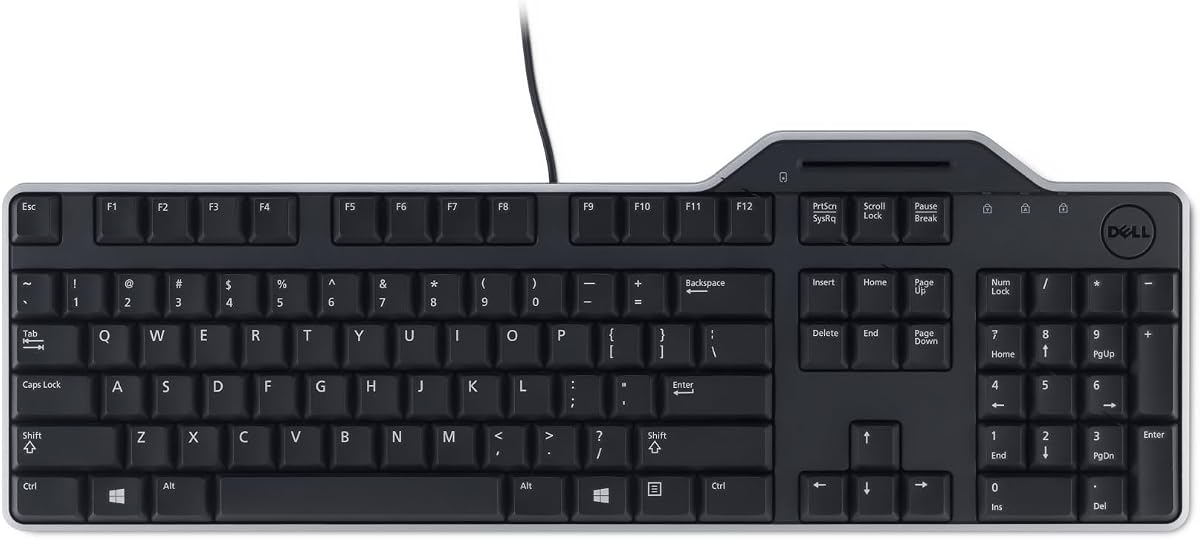
The Dell Keyboard Smartcard USB is a straightforward option for secure typing. With a high rating of 4.7 it offers reliable performance for daily office tasks. Its wired USB connection ensures secure data transfers and eliminates the need for batteries entirely.
We may earn a commission when you buy through this link, at no additional cost to you.
Comfort is a key focus with low-profile keys and a detachable palm rest. The keyboard is designed to be quiet and smooth reducing distractions in shared workspaces. The spill-resistant feature adds an extra layer of protection against accidental liquid damage.
While it does not offer advanced multimedia features it excels in simplicity and reliability. The smartcard integration supports secure authentication for various systems. Users appreciate the smooth typing experience and the dependable Dell build quality.
Perfect for general office use this keyboard balances security and comfort effectively. We recommend it for users who prioritize a quiet and reliable typing environment. It is a solid choice for businesses needing standard secure input devices.
Low-profile keys and a detachable palm rest create a smooth and quiet typing experience.
Spill-resistant design protects the keyboard from accidental liquid mishaps ensuring longevity.
We may earn a commission when you buy through this link, at no additional cost to you.
The Kensington KB201C is designed for organizations requiring Common Access Card support. It is TAA compliant and supports FIPS 201 and PC/SC standards for robust authentication. The full-size keyboard includes a numeric keypad for enhanced productivity in data entry tasks.
We may earn a commission when you buy through this link, at no additional cost to you.
This model features a quiet-click mechanism that minimizes disturbance in office environments. The USB-A connection ensures reliable performance without batteries. A three-year limited warranty provides peace of mind for long-term deployment in institutional settings.
While the rating is lower than some competitors it delivers on compliance and warranty support. The design is functional and focused on regulatory needs rather than advanced features. It is suitable for federal agencies and organizations needing strict adherence to sourcing standards.
Best for government and federal use this keyboard ensures secure and compliant access. We recommend it for procurement teams seeking TAA compliant devices with strong warranty coverage. It is a practical choice for secure administrative workflows.
Supports FIPS 201 and PC/SC standards for reliable and secure Common Access Card authentication.
A three-year limited warranty ensures long-term support and confidence in product reliability.
We may earn a commission when you buy through this link, at no additional cost to you.
The Lenovo Smartcard Wired Keyboard II is a lightweight and secure option for typing. With a rating of 4.4 it offers a reliable experience for secure environments. The US English layout ensures familiarity and ease of use for most users.
We may earn a commission when you buy through this link, at no additional cost to you.
This keyboard focuses on essential features with a wired connection for secure data transfer. The lightweight design makes it easy to move and deploy across different workstations. It supports smartcard authentication for secure logon processes effectively.
While it lacks advanced multimedia keys it performs well for standard administrative tasks. The build quality is solid and meets the expectations for Lenovo products. Users looking for a no-frills secure keyboard will find this model suitable.
Perfect for general office environments this keyboard provides secure and reliable typing. We recommend it for users who need a lightweight and straightforward smartcard solution. It is a solid choice for everyday secure work tasks.
Wired USB connection ensures secure and fast data transfers without the need for charging.
The lightweight build makes it easy to transport and deploy across multiple workstations.
We may earn a commission when you buy through this link, at no additional cost to you.
The HP USB Business Slim Smartcard Keyboard is designed for professional environments. With a rating of 4.5 it offers reliable performance with a slim profile. The membrane keyswitch ensures quiet typing while the key light indicators provide visual feedback.
We may earn a commission when you buy through this link, at no additional cost to you.
This model includes a built-in spill drain to protect against liquid damage. The 6 ft cable length allows for flexible desk setups. The USB interface ensures compatibility with standard systems without software installation.
While it is a traditional business keyboard it delivers on functionality and durability. The spill drain is a unique feature that adds practical value. Users appreciate the slim design and reliable performance for daily tasks.
Best for corporate and office settings this keyboard offers secure and practical typing. We recommend it for businesses needing a durable and spill-resistant smartcard solution. It is a solid choice for professional work environments.
The built-in spill drain helps protect the keyboard from accidental liquid spills.
A 6 ft cable length provides ample reach for various desk configurations.
We may earn a commission when you buy through this link, at no additional cost to you.
The Cherry Secure Board 1.0 is an intelligent security keyboard with integrated reader capabilities. It supports smart cards and tags with RF/NFC interface for enhanced authentication. The GS Approval ensures high security standards for thin clients and secure environments.
We may earn a commission when you buy through this link, at no additional cost to you.
This model features a secure mode with authentication and encryption to protect data. It supports protocols like T=0 and T=1 for reliable smartcard operations. The CCID compatibility ensures broad software integration across systems.
While it is more complex it offers robust security features for specialized use. The authentication mode is ideal for organizations needing strong encryption. Users looking for high security and certified protection will find this model valuable.
Best for high security environments this keyboard provides certified authentication and encryption. We recommend it for organizations with strict security requirements. It is a solid choice for secure workstations and thin clients.
Supports smart cards and tags with RF/NFC interface for versatile authentication options.
Secure mode with authentication and encryption protects sensitive data in thin client setups.
We may earn a commission when you buy through this link, at no additional cost to you.
The NEW OEM Dell KB813t offers a reliable secure typing experience. With a rating of 4.4 it provides quality input for daily tasks. The new unopened package ensures the product is in pristine condition for installation.
We may earn a commission when you buy through this link, at no additional cost to you.
This keyboard features a smartcard reader for secure authentication processes. It uses a standard USB connection for easy plug and play setup. The Dell OEM quality ensures consistent performance and durability.
While details are limited it aligns with the features of standard Dell secure keyboards. The new condition is a benefit for procurement teams seeking fresh stock. Users appreciate the reliability of Dell hardware for secure environments.
Perfect for organizations needing OEM quality this keyboard is a dependable secure option. We recommend it for procurement and bulk deployment. It is a solid choice for businesses seeking reliable smartcard keyboards.
Dell OEM quality ensures consistent performance and durability for secure enterprise use.
Integrated smartcard reader supports secure logon and authentication for sensitive systems.
We may earn a commission when you buy through this link, at no additional cost to you.
Selecting the right keyboard with a smartcard reader requires careful consideration of several factors. This guide outlines the key aspects to evaluate to ensure you choose the best fit for your needs.
Security compliance is the most critical factor for secure keyboards. Look for certifications like FIPS 201 EMV and PC/SC to ensure the device meets industry standards. These certifications guarantee that the smartcard reader can handle secure authentication protocols reliably.
Prioritize models that explicitly state compliance with the specific security standards your organization requires.
Ensure the keyboard supports your operating system. Many secure keyboards work with Windows but you may need Mac or Linux compatibility. Check the product specifications for driver support to avoid integration issues.
Choose a keyboard with broad OS support to ensure seamless deployment across different devices.
Ergonomics play a major role in user comfort and productivity. Look for keyboards with wrist rests or split designs to reduce strain. Features like low-profile keys also contribute to a comfortable typing experience.
Invest in a keyboard with ergonomic features to support long-term health and productivity.
Durability is essential for keyboards in high-use environments. Check for features like spill resistance or durable materials. A high rated lifecycle for the key switches ensures the keyboard will last for years.
Select a keyboard with robust build quality to minimize replacements and maintenance costs.
Connectivity determines how the keyboard connects to your computer. Wired USB is the most secure and reliable option as it eliminates battery concerns. Wireless options may be available but consider their security implications.
Choose wired USB connectivity for the highest level of security and reliability.
User reviews provide insights into real-world performance and reliability. Look for consistent feedback on comfort and smartcard functionality. Avoid models with frequent complaints about driver issues or build failures.
Prioritize keyboards with strong positive user feedback to ensure a satisfactory experience.
Price varies widely depending on features and compliance. Determine your budget but avoid compromising on essential security features. Sometimes investing more upfront in a certified model saves money in the long run.
Balance your budget with the necessary security and ergonomic features for your needs.
A strong warranty provides peace of mind for your investment. Look for manufacturers offering at least a one-year warranty or better. Reliable customer support ensures you can resolve any issues quickly.
Choose a keyboard with a solid warranty and support to protect your purchase.
Start by connecting the keyboard to a USB port on your computer. Ensure the drivers are installed if required by your operating system. Insert the smartcard into the reader slot to begin authentication.
Clean the keyboard regularly to remove dust and debris. Use a soft cloth or compressed air to clean the keycaps and the smartcard slot. Avoid using harsh chemicals that could damage the surface.
Store the smartcard properly when not in use. Avoid bending or exposing it to extreme temperatures. This ensures the smartcard remains functional and reliable for authentication tasks.
A smart card reader on a keyboard is a built-in device that allows you to insert and read smart cards. It enables secure authentication for logging into systems or performing transactions. This eliminates the need for a separate external reader.
Most keyboards support Windows but Mac compatibility should be verified before purchasing. Check the product description for macOS support or specific drivers. Linux compatibility is also available for some models.
Some keyboards require specific drivers or middleware to interact with the smart card reader. These are often provided by the manufacturer or IT department. Ensure your system has the necessary software installed.
Look for certifications like FIPS 201 EMV and PC/SC to ensure robust security. These standards guarantee the device meets industry requirements for authentication. They are essential for government or financial organizations.
Not all smartcards are compatible. The reader typically requires ISO 7816 compliant cards for identification or authentication. Verify your card type matches the supported standards before purchasing.
Most secure keyboards are wired to ensure a secure and reliable connection. Wireless options are less common due to security concerns. Wired models eliminate the need for batteries and reduce lag.
We have reviewed ten top options including the Dell KB813 and Cherry KC 1000. Each model offers unique strengths ranging from budget friendly designs to enterprise compliance. The best choice depends on your specific security and ergonomic requirements.
Prioritize models that meet your organization's security standards and comfort needs. Ensure you verify compatibility with your operating system and software stack. A well-chosen keyboard improves both security and daily productivity.
Remember to check current prices and availability on official links. Deals and stock levels can change frequently. We hope this guide helps you find the perfect secure keyboard for your workflow.