
15.6-inch laptop 8GB DDR
4.5Editor score
Affordable Price Point
8GB RAM and 256GB SSD
15.6 Inch Full HD Screen
Discover the top laptops with numpad for business and productivity in October 2026. This guide compares specs, screens, and keyboards to help you choose the
Finding the right laptop often depends on specific needs like data entry or accounting work. A built-in numeric keypad can significantly boost efficiency for professionals who type numbers frequently throughout their day.
This guide reviews ten top-rated laptops featuring dedicated numeric keypads. We evaluated processors, memory, display quality, and connectivity to ensure each pick delivers reliable performance for various workloads and budgets.
Each recommendation highlights key strengths and potential trade-offs to help you decide. Remember that prices and availability fluctuate regularly, so check current listings before making your final purchasing decision today.
4.5Editor score

4.8Editor score

4.2Editor score
The following table provides a side-by-side look at the key specifications of each laptop reviewed in this guide. Compare processor types, memory sizes, storage capacities, and screen dimensions to find the best fit for your workflow.




The HP 255 G10 stands out as a top contender for professionals seeking reliability and performance. With a high rating of 4.8 stars, it excels in balancing cost and capability for everyday business tasks.
We may earn a commission when you buy through this link, at no additional cost to you.
Its AMD Ryzen 3 7330U processor paired with 16GB of RAM ensures smooth multitasking across multiple applications. The 15.6-inch Full HD IPS display offers vivid colors and wide viewing angles essential for presentations.
While the build is primarily plastic, it maintains a sturdy feel suitable for daily travel. Some users might prefer more USB-C options for modern peripherals, but the available ports cover most standard needs effectively.
This laptop is ideal for office workers and students who need a dependable machine for spreadsheets and reports. We recommend it for those prioritizing value without sacrificing core productivity features.
The 8-core architecture handles video chats and data analysis without lag, keeping workflows uninterrupted during busy days.
The narrow bezel design maximizes screen real estate, allowing you to view more content side-by-side comfortably.
We may earn a commission when you buy through this link, at no additional cost to you.
The Lenovo V-Series V15 delivers robust specifications tailored for heavy multitasking and data-intensive roles. Its 40GB RAM configuration is rare in this price segment, enabling seamless operation of numerous browser tabs and apps.
We may earn a commission when you buy through this link, at no additional cost to you.
Powered by an AMD Ryzen 7 5825U, it handles demanding workloads with ease. The inclusion of a numeric keypad alongside RJ45 connectivity makes it a solid choice for network professionals and accountants.
One trade-off is the weight, which may impact portability for frequent travelers. Additionally, the price point is higher than entry-level models, reflecting its premium memory and storage upgrades.
We suggest this laptop for users who require significant memory for virtual machines or large datasets. It is an excellent investment for stationary workstations where power is prioritized over mobility.
With 40GB of high-bandwidth RAM, you can run enterprise software and heavy spreadsheets simultaneously without slowdown.
The RJ45 port ensures stable wired internet connections, crucial for secure business environments relying on fixed networks.
We may earn a commission when you buy through this link, at no additional cost to you.
This HP model combines a powerful Ryzen 7 processor with standard business features to create a balanced productivity tool. It is well-suited for users needing faster processing speeds than basic quad-core options provide.
We may earn a commission when you buy through this link, at no additional cost to you.
The 16GB RAM and PCIe SSD ensure quick boot times and responsive application launches. Anti-glare coating on the display helps reduce eye strain during long working hours in various lighting conditions.
However, the color gamut is limited to 45% NTSC, which might not satisfy creative professionals needing accurate color reproduction. Brightness is also average, making outdoor usage less ideal compared to premium panels.
For office environments focused on data entry and document processing, this laptop is a strong option. It offers a sweet spot of performance and price for standard business needs.
The 8-core 7730U processor provides ample headroom for complex calculations and running multiple background tasks efficiently.
Wi-Fi 6 ensures reliable wireless speeds, reducing lag during video conferences and large file transfers over the network.
We may earn a commission when you buy through this link, at no additional cost to you.
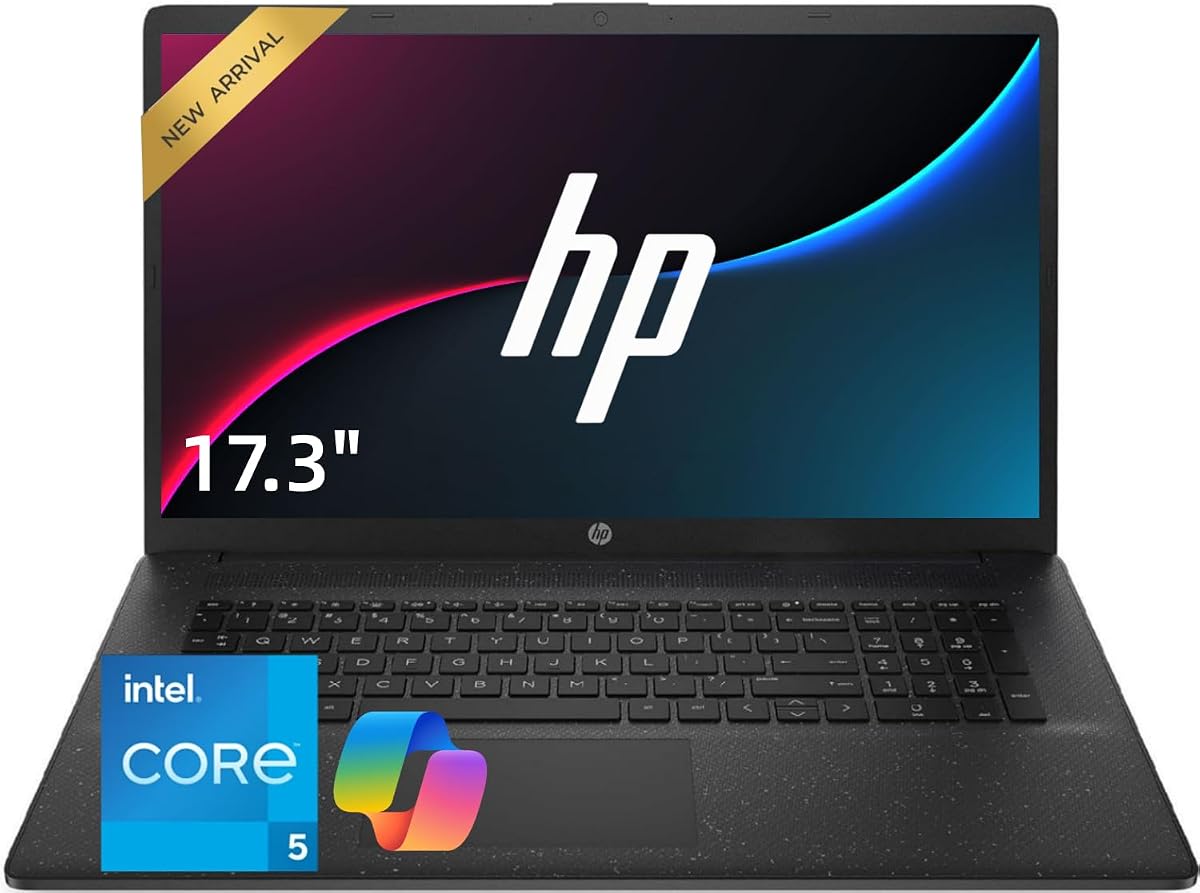
The HP 17.3 model prioritizes screen real estate for users who need to view extensive spreadsheets and documents simultaneously. The larger display allows for a more comfortable workflow without constant scrolling.
We may earn a commission when you buy through this link, at no additional cost to you.
Equipped with 32GB RAM and an Intel Core 5 processor, it handles multitasking with ease. The full-size keyboard including a dedicated numeric keypad makes data entry efficient for accounting and bookkeeping tasks.
Due to its size, this laptop is less portable than 15-inch alternatives. It fits best on a permanent desk setup where screen space and typing comfort are more important than carrying weight.
We recommend this for home office setups or stationary desks where mobility is not a priority. It offers a desktop-like experience in a portable form factor with robust specs.
The 17.3-inch panel reduces the need for external monitors, making it ideal for users needing side-by-side document comparison.
A full-size keyboard layout ensures keys are spaced correctly, reducing typing fatigue during long hours of number crunching.
We may earn a commission when you buy through this link, at no additional cost to you.
This Lenovo model features a 16-inch display with a taller aspect ratio that provides more vertical space for documents. It also includes modern DDR5 RAM for faster data processing compared to older generations.
We may earn a commission when you buy through this link, at no additional cost to you.
The Intel Core i5-13420H processor ensures high performance for business applications and video calls. A privacy shutter on the webcam adds a layer of security for remote workers attending sensitive meetings.
While the resolution is 1920×1200 which offers more height than standard 1080p, some users might prefer 4K for crisp detail. The weight is moderate but acceptable for daily transport in a backpack.
Ideal for students and professionals who value screen efficiency and modern tech specs. The balance of performance and features makes it a versatile choice for various workflows.
DDR5 memory provides higher bandwidth, allowing quicker data access for heavy multitasking and faster loading of large files.
The 16-inch ratio shows more rows in spreadsheets or lines of code, reducing the need to scroll down frequently.
We may earn a commission when you buy through this link, at no additional cost to you.
This HP variant focuses on providing a large workspace for professionals who need to manage multiple windows. The 17.3-inch screen combined with ample memory creates a comfortable environment for complex projects.
We may earn a commission when you buy through this link, at no additional cost to you.
It features a privacy shutter camera and a numeric keypad, addressing both security and productivity needs. The 32GB RAM allows for smooth operation even with many applications open at once.
Portability is reduced due to the large chassis, which makes it better suited for fixed locations. Users looking for a laptop to carry daily might find it cumbersome compared to smaller alternatives.
We suggest this model for home offices or office desks where screen size and memory matter most. It delivers a desktop replacement experience with essential security features.
The spacious display reduces clutter by allowing multiple documents and apps to remain visible without constant switching.
A physical privacy shutter gives you control over camera access, ensuring no unintended recording during sensitive discussions.
We may earn a commission when you buy through this link, at no additional cost to you.
Rated highly by users, this laptop offers a blend of screen size and battery performance ideal for extended use away from an outlet. The numeric keypad supports efficient data entry tasks without extra peripherals.
We may earn a commission when you buy through this link, at no additional cost to you.
The 17.3-inch display provides ample space for viewing spreadsheets or documents clearly. AMD Ryzen 5 processing ensures smooth performance for general business applications and web-based tools like Office 365.
While 512GB storage is adequate for many, power users might need external drives for large media libraries. The weight is a consideration for frequent travel but acceptable for occasional commuting.
This is a great option for users who want a larger screen without compromising on battery life. It suits students and professionals needing a reliable daily driver for work and study.
With long battery life and fast charging, you can work through a full day without hunting for power outlets constantly.
Preparation for Office 365 Web ensures you can edit documents instantly using familiar tools without additional installation steps.
We may earn a commission when you buy through this link, at no additional cost to you.
As a budget-friendly option, this laptop offers essential features like a numeric keypad and Full HD display at a low cost point. It is perfect for basic tasks where high-end performance is not strictly required.
We may earn a commission when you buy through this link, at no additional cost to you.
The ability to expand storage to 1TB makes it versatile for users who need space for files without a massive upfront cost. A 10000mAh battery provides extended usage time for travel or long work sessions.
Performance is limited by 8GB RAM and older WiFi 5 standards which may lag under heavy multitasking. However, for simple spreadsheets and web browsing, it performs well enough for the price.
We recommend this for students or home users needing a secondary machine for basic number entry. It delivers essential functionality without a premium price tag.
Expandable SSD slots let you increase capacity later as your file needs grow without buying a new device immediately.
Slim form factor and low weight make it easy to carry in a bag while keeping costs manageable for tight budgets.
We may earn a commission when you buy through this link, at no additional cost to you.
This laptop emphasizes portability with a lightweight chassis suitable for students and travelers needing a compact device. It includes Windows 11 to ensure modern software compatibility and a clean interface for daily use.
We may earn a commission when you buy through this link, at no additional cost to you.
An SD card reader adds convenience for users needing quick data transfers from external sources. The display offers decent clarity for documents, though the base storage is modest compared to higher-end models.
Limited RAM might slow down performance if too many applications are opened simultaneously. Upgrading storage is recommended for those with large media or document libraries to avoid space constraints.
It serves well as a secondary device for light work or study on the go. The combination of weight and features makes it practical for specific low-demand scenarios.
Weighing under four pounds, it slips easily into backpacks, making commuting and travel seamless without added bulk.
Adding external storage via SD cards helps manage files when internal drive space becomes tight over time.
We may earn a commission when you buy through this link, at no additional cost to you.
This flagship model prioritizes memory and storage capacity over raw processor speed. With 32GB RAM and a 1TB NVMe SSD, it handles large datasets and extensive file storage effectively.
We may earn a commission when you buy through this link, at no additional cost to you.
Fast charging technology ensures minimal downtime during busy workdays, keeping you productive without long waits for power. The included numeric keypad supports efficient data entry for accounting or administrative roles.
While the processor is an entry-level Core i3, the high RAM compensates well for multitasking needs. The screen offers standard clarity which is sufficient for document work but not for high-end graphic design.
We recommend this for users needing significant storage and memory without breaking the bank. It is an ideal choice for data-heavy workflows where capacity matters more than CPU clock speeds.
With 32GB RAM, you can run multiple heavy applications at once without slowing down system responsiveness.
Fast Charge technology reduces wait times, allowing you to get back to work quickly when battery runs low.
We may earn a commission when you buy through this link, at no additional cost to you.
Selecting the right laptop involves evaluating several factors that impact daily productivity. This guide outlines the key aspects to consider when shopping for a model with a numeric keypad.
The processor determines how well your laptop handles multitasking and complex computations. Look for modern AMD Ryzen or Intel Core processors that provide enough cores and threads for your workflow without unnecessary cost.
Choose a processor with sufficient speed to avoid lag during video calls and spreadsheet calculations.
Random Access Memory (RAM) affects how many applications you can run simultaneously. For data entry and office work, 8GB is the minimum, but 16GB or more ensures smoother performance with many browser tabs open.
Prioritize 16GB RAM or higher if you plan to run multiple heavy applications at once.
Solid State Drives (SSD) offer faster boot times and file access than traditional hard drives. Ensure your laptop has at least 256GB of storage, but 512GB or 1TB is better for storing large files and backups locally.
Opt for NVMe SSDs for the fastest performance in everyday file handling tasks.
A Full HD (1920×1080) screen is essential for clear text and sharp details. Anti-glare coatings help reduce eye strain during long work sessions, and larger screens like 17-inch models provide more workspace for side-by-side document viewing.
Select a display with at least Full HD resolution and anti-glare properties.
A dedicated numeric keypad is crucial for professionals entering numbers frequently. Check that the keyboard has good travel and feedback to prevent typing fatigue over extended periods.
Ensure the numeric keypad is integrated into a full-size layout for comfort.
Look for a mix of USB-A and USB-C ports to connect peripherals like mice and external drives. HDMI and Ethernet ports are useful for connecting to monitors and wired networks in office environments.
Verify that the available ports meet your daily connection needs.
For users working away from a desk, battery life is a critical factor. Aim for a laptop that offers at least six to eight hours of usage on a single charge to maintain productivity throughout the day.
Choose models with fast charging capabilities to minimize downtime.
Windows 11 Pro provides enhanced security and management tools for business users. Ensure your device comes with a genuine license to access updates and enterprise features needed for professional work.
Confirm that the laptop runs the latest stable version of Windows for security.
Start by configuring Windows settings to enable the numeric lock feature if it does not activate automatically. This ensures that pressing number keys on the right side of the keyboard inputs digits rather than cursor navigation commands.
Keep your laptop on a hard, flat surface to maintain proper airflow and prevent overheating. Avoid placing it on soft surfaces like beds or couches where the ventilation vents might get blocked during long use.
Regularly clean the keyboard and screen with a microfiber cloth to remove dust and oils. Use compressed air gently to blow out debris from the numeric keypad keys to ensure smooth and accurate typing.
Not all laptops include a dedicated numpad key. Many 15-inch and larger models feature a full numeric keypad integrated into the keyboard, while smaller 13-inch models often lack this feature entirely to save space.
For accountants, data entry professionals, and researchers who type numbers frequently, a numeric keypad is highly beneficial. It significantly speeds up data entry compared to using the number row across the top of the keyboard.
Yes, you can connect an external USB numeric keypad to any laptop via a USB port. This is a cost-effective solution if your current laptop lacks a built-in numpad but you require one for work tasks.
A 15.6-inch or 17.3-inch screen is generally best for data entry as it provides enough space to view complex spreadsheets without excessive scrolling. Larger displays improve productivity by showing more data at once.
For basic spreadsheet work with standard Excel files, 8GB of RAM is usually sufficient. However, if you work with large datasets or multiple applications simultaneously, upgrading to 16GB ensures smoother performance.
Both AMD and Intel processors are excellent for business laptops. AMD often offers better battery life and value, while Intel typically provides strong single-core performance for specific enterprise applications.
Yes, most modern business laptops include HDMI or USB-C ports that support external monitors. Connecting an extra screen allows you to expand your workspace significantly for better multitasking efficiency.
Some laptops without a dedicated NumLock key use a function key combination to activate the numpad. Check your keyboard for a secondary function icon on the letters like U, I, O, P, M, J, K, L, or 7, 8, 9.
Choosing the right laptop with a numeric keypad depends on your specific work requirements and budget. Our top picks like the HP 255 G10 and Lenovo V-Series V15 offer strong performance and reliability for various professional scenarios.
Prioritize screen size and memory if you deal with large spreadsheets daily. For users focused on portability, the Lenovo 16-inch or 15.6-inch models provide a great balance of features without compromising comfort.
Remember that prices and stock levels change frequently. Always verify the latest offers and warranty details on the product pages before making your final purchase decision to ensure you get the best value.