
QUI Presentation Clicker
4.3Editor score
Bright red pointer light
328 feet wireless range
Plug and play setup
This guide compares the top 10 laser pointers for presentations based on visibility, battery life, wireless range, and software compatibility for educators and
Finding the right laser pointer for presentations can transform how you engage your audience during meetings or lectures. A reliable device ensures your key points stand out clearly on any screen type. Whether you teach in a large hall or pitch in a conference room, the right tool matters.
We evaluated ten top-rated wireless presenters to help you choose the best option for your needs. Our comparison focuses on critical features like battery duration, connection stability, and button intuitiveness. Each product was analyzed for its ability to handle common presentation software smoothly.
Every pick below highlights specific strengths such as green visibility, rechargeable power, or budget-friendly pricing. Keep in mind that prices and availability change frequently on retail platforms. Always verify current details before purchasing to ensure you get the best value for your investment today.
4.3Editor score

4.6Editor score

4.6Editor score
The following table provides a side-by-side look at the key specifications and features of each wireless presenter reviewed. This allows you to quickly identify which model offers the connectivity options, battery life, and pointer brightness you need for your specific environment.




This green light presentation clicker stands out as the top choice for professionals and educators who demand visibility. It delivers a highly visible green dot that cuts through ambient light effectively. The device ensures your audience can follow along clearly without distraction.
We may earn a commission when you buy through this link, at no additional cost to you.
The USB-C rechargeable feature is a major advantage over battery-dependent competitors. A single one-hour charge powers weeks of daily use which reduces waste and cost. You will never scramble for batteries minutes before a class or meeting starts.
True plug and play functionality means no drivers or pairing are required. Simply insert the USB receiver into your Mac or Windows laptop to start presenting. The intuitive layout includes dedicated buttons for hyperlinks and volume which adds professional control.
This clicker is best for those who prioritize reliability and visibility in large rooms. It is trusted by thousands of teachers for daily classroom use. Choose this model if you want a dependable tool that focuses on your message not tech issues.
The 532nm green light performs best on projection screens and whiteboards where red often fails.
Rechargeable technology saves money and reduces electronic waste compared to disposable battery models.
We may earn a commission when you buy through this link, at no additional cost to you.
The Logitech R400 is a classic choice for basic presentation needs. It offers a reliable wireless connection with a built-in red laser pointer. The device is designed for simplicity and ease of use right out of the box.
We may earn a commission when you buy through this link, at no additional cost to you.
Its wireless range extends up to fifty feet which allows freedom to move around a room. You can mingle with your audience without being tethered to a podium. There is no software required to install before your first presentation.
While it uses AAA batteries this model remains popular for its straightforward design. The receiver docks inside the unit so you never lose it when packing up. It works well for small to medium-sized meetings where extreme range is not critical.
This presenter is ideal for users who want a no-fuss tool from a trusted brand. It handles PowerPoint slides efficiently without complex setup. Consider this if you prefer a simple remote that just works without extra features.
The touch-key interface ensures you can navigate slides quickly without looking at the device.
The built-in docking bay keeps the USB receiver safe and attached to the remote.
We may earn a commission when you buy through this link, at no additional cost to you.
This wireless presenter offers a wide array of controls including volume and hyperlink navigation. It is designed to handle daily presentations efficiently with a bright red pointer. The long wireless range gives you plenty of room to move freely during talks.
We may earn a commission when you buy through this link, at no additional cost to you.
The button layout is ergonomic with soft rubber buttons for comfort. A magnetic storage compartment on the bottom keeps the USB receiver secure when not in use. This feature ensures you do not lose the tiny receiver between presentations.
While the red pointer is effective on most backgrounds it is not ideal for bright LED screens. You should test it on your specific display to ensure visibility. The device supports various software options including PowerPoint and Google Slides seamlessly.
Buy this clicker if you need extra controls like volume adjustment and hyperlink support. It provides a professional feature set at an affordable price point. It is a strong contender for presenters who want more than basic slide advancement.
The 100-foot range allows you to interact with your audience from any corner of the room.
Dedicated buttons for volume and hyperlinks let you manage audio and content easily.
We may earn a commission when you buy through this link, at no additional cost to you.
The R800 is a premium option featuring a brilliant green laser and a unique built-in timer. This timer allows you to monitor your speech duration without looking at a clock. Vibrating alerts provide silent notifications so you stay within your time limit.
We may earn a commission when you buy through this link, at no additional cost to you.
The green laser performs exceptionally well on LCD and plasma displays where red often fades. You can control your presentation with smooth contours that feel great in your hand. The intuitive controls help you navigate confidently from start to finish.
Its receiver stores inside the presenter for easy packing which reduces the risk of losing parts. While it relies on disposable batteries the convenience of the timer often outweighs this drawback for professionals. The range extends up to 100 feet for large venues.
Choose this device if you value timing tools and high visibility in various lighting conditions. It is perfect for keynote speakers who need to manage strict time slots. The ergonomic design ensures comfort during extended presentations without fatigue.
The LCD display lets you set silent alerts so you never run over your allotted time.
The green laser remains bright on LCD screens ensuring your pointers are always seen clearly.
We may earn a commission when you buy through this link, at no additional cost to you.
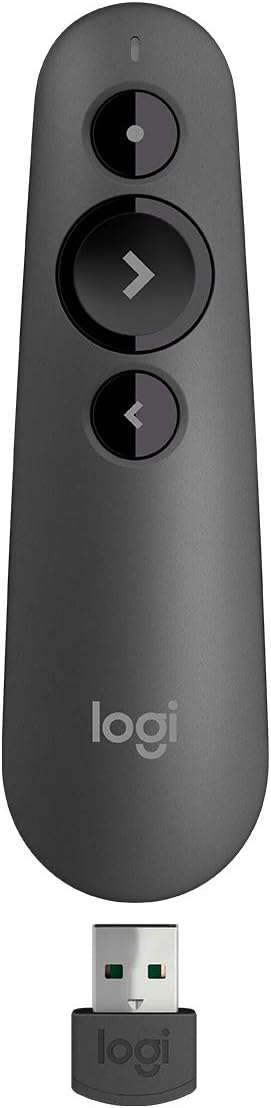
The R500s offers dual connectivity allowing you to choose between Bluetooth and a USB receiver. This flexibility makes it ideal for modern laptops that may lack standard USB ports. It works with Windows Mac and mobile systems for broad compatibility.
We may earn a commission when you buy through this link, at no additional cost to you.
A smart battery management system disables the laser when low to extend presentation time. This ensures you can continue speaking even if the battery is running low. You can also use the Logitech app to customize button functions for your workflow.
The operating range reaches up to 20 meters which is sufficient for medium to large rooms. However the red pointer might struggle on bright LCD screens compared to green options. It is a reliable tool for general office and classroom use.
Pick this model if you need Bluetooth pairing for newer Mac devices or tablets. It balances advanced features with standard presentation controls effectively. The ability to pair with your phone or tablet adds significant convenience.
Choose between USB receiver or Bluetooth low energy for maximum device compatibility.
Auto power saving mode keeps your presentation going even when battery levels drop low.
We may earn a commission when you buy through this link, at no additional cost to you.
This clicker delivers excellent value for those seeking an affordable wireless presenter. It offers a bright red pointer that is visible in large conference rooms. The long wireless range allows you to roam the entire hall freely during your talk.
We may earn a commission when you buy through this link, at no additional cost to you.
It includes useful features like volume control which is rare at this price level. The plug and play setup ensures you can start presenting immediately without installation. A convenient clip lets you attach it to a notebook or pocket for easy carrying.
The red pointer works well against most backgrounds but might fade on bright LED screens. Build quality is basic but sufficient for occasional use or budget constraints. It supports a wide range of software including PowerPoint Google Slides and Excel.
Select this option if you need a simple tool without spending much money. It is great for students or teachers who present frequently on a tight budget. The long range ensures you never lose connection during dynamic presentations.
The 328-foot range allows you to leave the stage and interact anywhere in the venue.
This model offers core presentation features at a fraction of the cost of premium brands.
We may earn a commission when you buy through this link, at no additional cost to you.
The Norwii N95 stands out for its USB-C and USB-A hybrid receiver option. This allows connection to iPads Macs and modern phones easily. The green pointer is brighter than red making it suitable for large auditoriums and bright rooms.
We may earn a commission when you buy through this link, at no additional cost to you.
Reprogrammable buttons offer customization so you can adapt the remote to your habits. You can switch between modes like up down or left right using the app. The device runs on a rechargeable battery providing weeks of use on a single charge.
Although it requires a separate cable for charging the battery life is impressive. The design is simple and practical with distinct buttons to prevent confusion during talks. It supports most major presentation software including Prezi and Keynote.
Choose this presenter if you need to connect to mobile devices or tablets. It is a strong tool for tech-savvy users who value customization. The green light ensures your points are visible even in challenging environments.
The hybrid receiver allows seamless connection to iPads and Android phones for mobile presentations.
Use the Norwii app to remap buttons so the remote fits your specific workflow needs.
We may earn a commission when you buy through this link, at no additional cost to you.
This remote is designed with ergonomics in mind for comfortable handling. It features a USB-C receiver that works on both USB-A and USB-C ports. The device supports a wide variety of operating systems including Linux and Android.
We may earn a commission when you buy through this link, at no additional cost to you.
The red pointer is visible on most backgrounds but not recommended for LED screens. You can easily switch between black screen or full screen modes during a talk. The USB receiver stores under the battery cover to keep it secure.
Setup is simple with plug and play functionality on most systems. Mac users might need a quick setup but the process is straightforward. It is lightweight enough to fit in a pocket for easy transport.
Pick this clicker for its comfortable design and broad system compatibility. It is a solid choice for users who switch between different devices. The ergonomic shape reduces hand strain during longer presentation sessions.
The compact size and rubber feeling material ensure a comfortable grip during use.
Compatible with Windows Mac Linux and Android ensuring versatile usage scenarios.
We may earn a commission when you buy through this link, at no additional cost to you.
This clicker solves dongle hunting with a receiver that has both USB-A and USB-C built-in. You can connect to modern Macs or older PCs without adapters. It features volume control and full screen toggles for comprehensive presentation management.
We may earn a commission when you buy through this link, at no additional cost to you.
The red pointer is bright and visible in conference halls up to 30 meters away. The ergonomic body fits naturally in your hand preventing fatigue. A magnetic slot at the bottom keeps the receiver secure so you never lose it.
It is compatible with Mac Windows Linux and most major software platforms. The low power consumption ensures standby times over 30 days on batteries. This makes it efficient for users who do not present daily but need readiness.
Choose this if you work with mixed devices needing both port types. It is an all-in-one solution for versatile connectivity. The built-in connectors save you from needing extra dongles or adapters.
No adapter needed as the built-in connectors work with any laptop USB port.
A magnetic slot at the bottom holds the receiver firmly so it never gets lost.
We may earn a commission when you buy through this link, at no additional cost to you.
The Clikbut Clicker is designed for portability weighing only 38 grams with battery. It fits easily in your pocket or bag for easy transport. The ergonomic design ensures comfort while you switch slides during your talk.
We may earn a commission when you buy through this link, at no additional cost to you.
Setup is straightforward with no drivers required. You simply plug in the dongle and press connect to begin. The device supports a wide range of software including Word Excel and Prezi.
It offers a 100-foot control distance which is adequate for most rooms. The red laser pointer helps mark key points clearly on slides. It uses a single AAA battery that lasts about two months on average.
Pick this lightweight option if you prioritize portability over extra features. It is perfect for mobile speakers who travel frequently. The simple design ensures it is reliable and easy to use anywhere.
At just 38 grams it is one of the lightest options available for travel.
Plug and play setup gets you presenting in seconds without technical hassle.
We may earn a commission when you buy through this link, at no additional cost to you.
Choosing the right wireless presenter involves balancing budget features and compatibility with your equipment. This guide explains the key factors you should consider before making a purchase.
Green lasers are generally brighter and more visible on LCD and LED screens compared to red lasers. If you present in bright rooms or on modern displays a green pointer is often worth the extra cost. Red lasers remain sufficient for projection screens and dimmer environments.
Prioritize a green pointer if you frequently present on modern monitors or in well-lit rooms.
Rechargeable models eliminate the need to buy disposable batteries regularly. They are more eco-friendly and convenient for frequent users. However disposable battery models may last longer between charges for infrequent presenters who want to swap cells quickly.
Choose rechargeable if you present daily to save money and reduce waste over time.
Ensure the receiver matches your laptop ports such as USB-A or USB-C. Some models offer both or Bluetooth connectivity for greater flexibility. This avoids the need for adapters when switching between different computers.
Verify your laptop ports and select a clicker with a matching receiver.
Range determines how far you can walk from the computer. Standard models offer 30 to 100 feet while some extend to 300 feet. Pick a longer range if you need to move across large stages or auditoriums.
Check the wireless range to ensure you can roam freely during your talk.
Most presenters work with PowerPoint Keynote and Google Slides. However advanced features like hyperlink navigation might not work on all platforms. Check the product specs to confirm support for your specific software tools.
Confirm that the clicker supports the specific software you use for presentations.
A comfortable grip reduces hand strain during long presentations. Look for rubberized buttons and contoured shapes that fit your hand. Easy-to-reach buttons prevent fumbling when you need to advance slides quickly.
Select a model with soft rubber buttons and a comfortable shape for daily use.
Battery life impacts how often you need to replace or charge the unit. Rechargeable units typically last weeks on a single charge. Disposable battery models can last months on one set of cells depending on usage.
Compare battery expectations based on your usage frequency.
Some presenters include volume control timer alerts or screen toggles. These features add value if you manage audio or strict time limits. Basic models focus solely on slide advancement and pointer functions.
Look for extra features like volume control if you need them during talks.
Start by inserting the USB receiver into your computer before turning on the device. If your unit uses batteries ensure they are correctly inserted before connecting. Most models connect instantly but some may require pressing a connect button on the back.
Test your clicker before your presentation to confirm slide navigation works smoothly. Advance a few slides and check the pointer visibility on your screen. Adjust volume settings if your device supports audio control during the test.
After use store the receiver in its dedicated slot to avoid losing it. Keep rechargeable models on a shelf where you can charge them periodically. Clean the exterior with a dry cloth to remove dust and oils from handling.
Yes green lasers are typically more visible on LCD and LED screens than red ones. This is because the human eye is more sensitive to green light in bright environments. If you present on modern monitors a green pointer ensures your dots remain crisp.
Most modern presenters are fully compatible with macOS. They usually function as standard HID devices requiring no special drivers. However some advanced features like timers might require installing specific software on Mac systems.
Many models use an LED indicator to signal low battery status. Some devices dim the laser or stop responding when power is critical. Rechargeable units often show a blinking light when charging is needed.
Yes you can connect many wireless presenters to tablets via USB-C adapters. Ensure the receiver is compatible with your tablet's port. Some newer models offer built-in USB-C connections for direct tablet use.
Disposable battery models often last months on one set of AAAs depending on usage. Rechargeable models typically run for weeks on a single charge. Check the specific product details for accurate life expectations.
Most plug and play clickers work without installing any drivers. They are recognized automatically as standard input devices by your operating system. Some advanced features might require software but basic slide navigation does not.
The top picks include versatile options like the Green Light Clicker for visibility and the Logitech R800 for timing features. Budget-friendly choices like the QUI Presentation Clicker offer reliable performance for basic needs. Consider your specific environment and software needs when making a final choice.
Prioritize visibility and battery life if you present frequently in varied lighting conditions. A comfortable ergonomic design will make your experience smoother during long sessions. Investing in a high-quality device can save time and stress during live talks.
Always check the current price and availability on the provided links before buying. Prices fluctuate and some models may have updated versions available. We hope this guide helps you find the perfect tool for your next presentation.