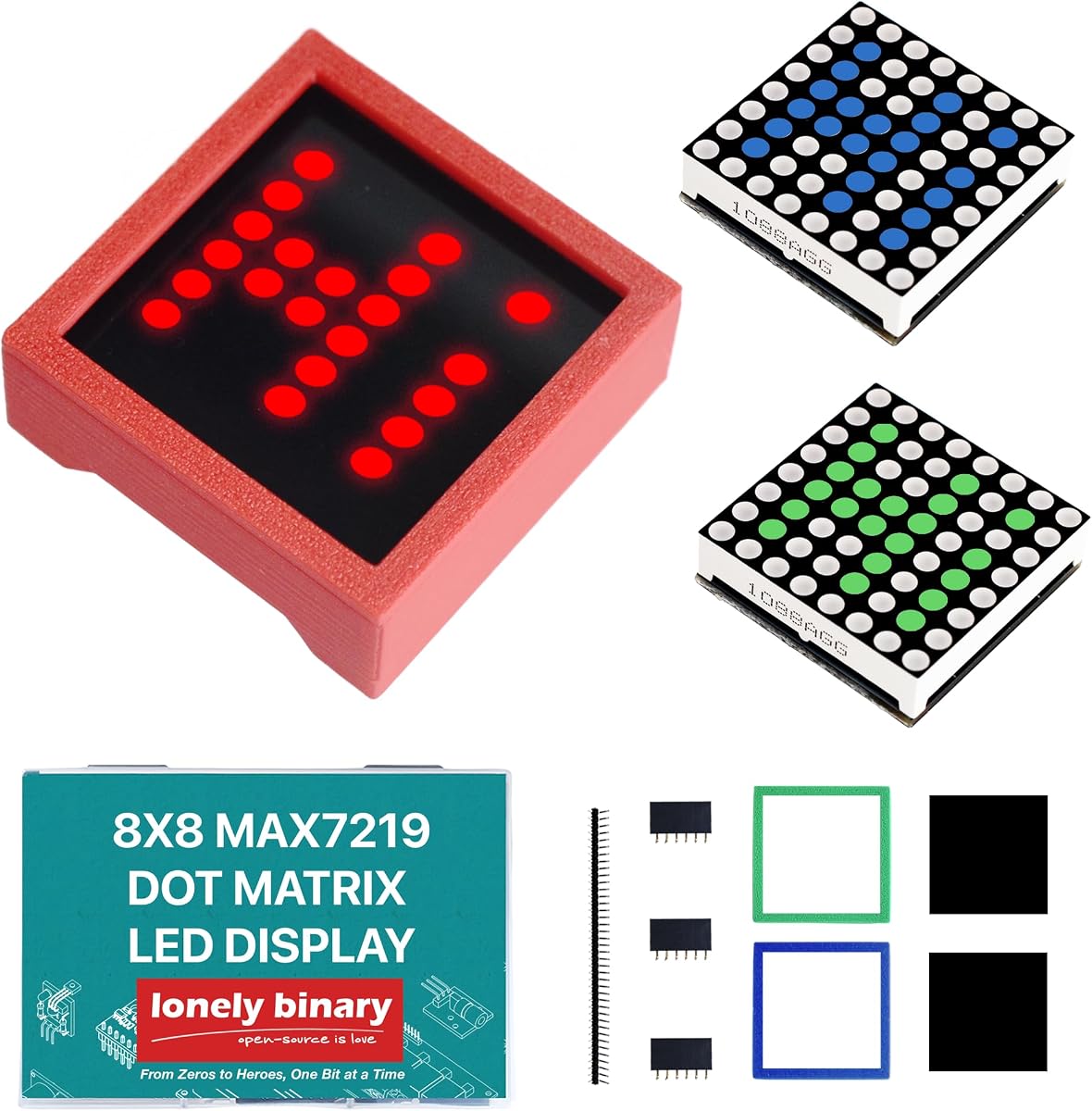
Lonely Binary 3-Pack 8×8 LED Matrix
4.7Editor score
Three color variety pack
3D printed enclosures
MAX7219 driver included
This guide compares the top ten LCD dot matrix modules for makers and engineers, focusing on display quality, compatibility, brightness, and value for money.
LCD dot matrix modules are essential components for displaying text and graphics in embedded systems. They provide a reliable way to output information without needing complex screens or large interfaces.
We evaluated ten popular models based on their display resolution, backlight quality, driver compatibility, and ease of integration with common microcontrollers like Arduino and ESP32.
Each pick highlights key strengths and weaknesses to help you choose the right module for your project. Please note that product availability and prices can change frequently over time.
4.7Editor score

4.1Editor score
4.5Editor score
The following table presents a side-by-side comparison of the top ten modules. It highlights critical specifications such as resolution, voltage, interface type, and physical dimensions to aid selection.


This module offers a robust graphical display option for projects requiring more than simple text. With a rating of 4.1 stars, it provides good value for its resolution of 128×64 dots.
We may earn a commission when you buy through this link, at no additional cost to you.
The integrated potentiometer allows for precise contrast adjustment without external components. Its dimmable blue backlight ensures visibility in various lighting conditions while saving power when needed.
Users should note that some units might arrive with minor cosmetic issues or dead pixels. Proper handling during installation is crucial to avoid damaging the delicate glass panel or connections.
This module is ideal for makers needing graphical output on a budget. It balances performance and cost effectively for embedded systems needing custom graphics or detailed information display.
Unlike standard character displays, this module renders custom graphics and images which expands project possibilities significantly.
Available libraries and examples simplify integration with common microcontrollers reducing development time.
We may earn a commission when you buy through this link, at no additional cost to you.
This module presents an alternative graphical display solution with similar specs to top brands. While it lacks reviews, its specifications suggest reliable performance for basic graphic tasks.
We may earn a commission when you buy through this link, at no additional cost to you.
Its wide viewing angle and bright high contrast make it suitable for outdoor or bright indoor environments. The included pin headers save time during initial setup and soldering processes.
The lack of user feedback means quality consistency might vary between batches. It is advisable to test the module immediately upon arrival to ensure all pixels function correctly.
Choose this for projects needing graphical output where budget is a primary concern. It offers essential features without the premium price tag of branded alternatives.
Bright high contrast ensures text remains readable even under direct sunlight or strong artificial lighting.
Pre-installed headers reduce soldering work allowing for quicker prototyping and testing phases.
We may earn a commission when you buy through this link, at no additional cost to you.
This pack includes two classic 1602 LCD modules which are staples in hobbyist projects. They offer a straightforward solution for displaying text data without complex graphics.
We may earn a commission when you buy through this link, at no additional cost to you.
The blue backlight provides good contrast for characters against a dark background. Operating across a wide temperature range ensures reliability in varied environmental conditions.
While reliable, these modules lack graphical capabilities which limits design flexibility. They are best suited for status updates or simple numerical data presentation in embedded systems.
Select this pack if you need multiple displays for distributed projects. The standard format ensures wide compatibility with existing libraries and codebases for microcontrollers.
Most Arduino libraries support the 1602 format making coding and integration significantly easier.
Getting two units allows for building dual display systems without sourcing matching components later.
We may earn a commission when you buy through this link, at no additional cost to you.
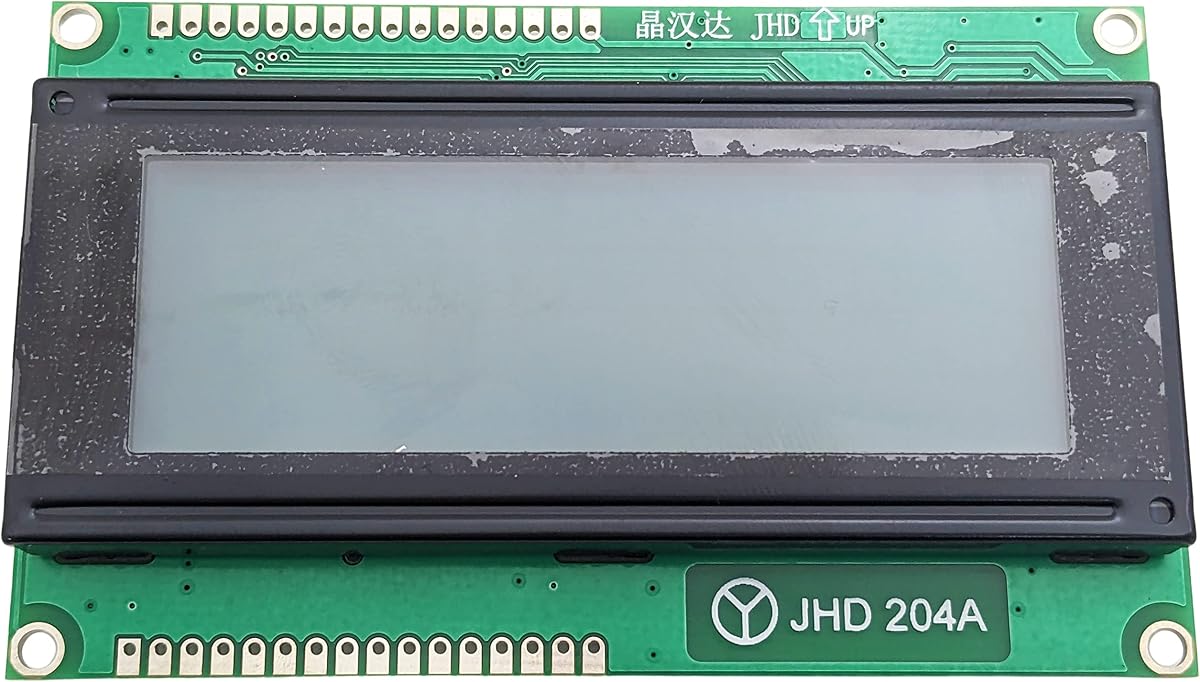
This module offers significantly more display space than standard 1602 modules. With four lines of twenty characters, it accommodates detailed text output efficiently.
We may earn a commission when you buy through this link, at no additional cost to you.
Its precise physical dimensions make it ideal for enclosures with tight tolerances. The included driver and controller simplify wiring reducing external component requirements.
The reflective display means it relies on ambient light for visibility. This limits use in dark environments unless external illumination is provided by users.
It is a premium choice for industrial or professional applications needing reliable text display. The build quality and standard features ensure long-term operational stability.
Eighty total characters allow for complex multi-line text without scrolling or frequent updates.
Built-in drivers reduce circuit complexity which saves space on breadboards or PCBs.
We may earn a commission when you buy through this link, at no additional cost to you.
This kit offers three distinct color LED matrices which provide unique visual options. The high rating of 4.7 stars indicates strong user satisfaction with performance and features.
We may earn a commission when you buy through this link, at no additional cost to you.
The MAX7219 driver simplifies control via SPI allowing easy connection to ESP32 or Arduino boards. Daisy-chaining enables larger displays like 24×8 scrolling text setups.
Users must solder pin headers for daisy-chaining which adds a step. The included cases protect components but limit direct PCB access for advanced modifications.
It is an excellent choice for hobbyists and educators needing colorful visual feedback. The variety pack encourages experimentation without purchasing separate color modules individually.
Having red green and blue modules allows for layered or distinct status indicators simultaneously.
Included 3D printed cases shield LEDs from dust and physical damage in portable devices.
We may earn a commission when you buy through this link, at no additional cost to you.
This module combines four 8×8 matrices into a single unit providing high pixel density. With a 4.4 rating, it is popular among makers needing larger text or pixel art.
We may earn a commission when you buy through this link, at no additional cost to you.
The included 5pin line simplifies connection to microcontrollers like Arduino. It uses common cathode LED technology for standard driver compatibility.
Managing the long wire can be challenging in tight enclosures. Fixed pixel grids limit custom shapes but are perfect for standard display patterns.
Use this for scoreboard or ticker projects needing more space than single 8×8 modules. It balances cost and pixel count effectively for intermediate projects.
Combining four modules increases total pixel count to 256 for detailed animations.
Integrated 5pin header reduces loose wires and potential connection errors.
We may earn a commission when you buy through this link, at no additional cost to you.
This module focuses specifically on numeric output using eight 7-segment digits. Its 4.5 rating reflects reliability for clock or counter projects needing precise numbers.
We may earn a commission when you buy through this link, at no additional cost to you.
Brightness control allows adjustment for different ambient light conditions. Low power shutdown mode extends battery life in portable applications.
It cannot display full graphics which limits versatility for complex visual feedback. Ideal for dedicated counters or clocks where text clarity is paramount.
Select this for projects requiring clear numeric readouts. Its specialized function ensures high readability for numbers in various lighting scenarios.
Low power features make this suitable for battery powered portable devices needing long runtime.
Dedicated segments ensure numbers remain sharp and distinct at any brightness level.
We may earn a commission when you buy through this link, at no additional cost to you.
This module provides extensive text capacity with four lines of twenty characters. Its 4.5 rating suggests consistent performance and reliability for standard projects.
We may earn a commission when you buy through this link, at no additional cost to you.
White characters on blue background offer excellent contrast. The integrated 50K potentiometer allows fine tuning of contrast without external components.
Larger size may require adjustments to project enclosures. It draws slightly more power than smaller 1602 modules which should be noted for portable use.
Use this for dashboards or control panels needing detailed information. The brand reputation ensures quality control and standard component reliability for makers.
White on blue offers better visibility than black on white in dark environments.
Larger characters improve readability for users with visual impairments.
We may earn a commission when you buy through this link, at no additional cost to you.
This pack provides wider 32×8 matrices ideal for scrolling text. A 4.1 rating indicates solid performance for visual feedback projects needing more horizontal space.
We may earn a commission when you buy through this link, at no additional cost to you.
Daisy-chaining allows for extended displays up to 96×8 pixels. Includes pin headers and 3D cases for protection and easy mounting.
Power consumption increases with larger pixel counts so ensure adequate power supply. Soldering headers is necessary for full functionality which may deter beginners.
It is best for sports scoreboards or long scrolling tickers. The wider format ensures messages are readable from a distance effectively.
Double width compared to standard 16×8 modules allows longer text without scrolling.
Included cases prevent physical damage ensuring longevity in portable setups.
We may earn a commission when you buy through this link, at no additional cost to you.
This pack offers two 4-in-1 modules providing significant visual capacity. With a 4.6 rating, it is highly rated for reliability in multi-unit setups.
We may earn a commission when you buy through this link, at no additional cost to you.
Each module combines four 8×8 matrices for large pixel counts. Daisy-chaining support simplifies wiring for multiple units in a single display.
Fixed configurations limit design flexibility but simplify coding for uniform grids. Soldering is required for headers which adds assembly time.
Use this for multi-panel displays needing uniformity. The high rating and bulk packaging make it cost-effective for larger projects.
Receiving two units reduces per-unit cost for large scale or classroom deployments.
Matching modules ensure consistent brightness and color across multi-panel setups.
We may earn a commission when you buy through this link, at no additional cost to you.
Selecting the right LCD dot matrix module involves balancing resolution, interface, and physical constraints. This guide outlines key factors to consider.
Higher resolutions allow more detailed graphics but increase complexity. Choose a resolution that fits your visual needs without overcomplicating your code.
For simple text, a 1602 or 20×4 module suffices. For graphics, opt for 128×64 or LED matrices.
Parallel interfaces are easier to code but use more GPIO pins. Serial interfaces like SPI save pins but require specific driver libraries.
Check your microcontroller's available pins before choosing parallel or serial modules.
Most modules operate at 5V. Ensure your power supply can handle the total current if daisy-chaining multiple units.
LED matrices consume more current than LCDs. Consider battery constraints for portable projects.
Blue backlights are common and bright. Contrast adjustment via potentiometer ensures readability in different lighting.
Avoid LCDs without backlight for low-light environments unless external light is added.
Measure your enclosure carefully. Larger modules like 20×4 offer more text but need more space.
Standard 1602 and 128×64 modules fit most hobbyist projects easily.
Modules with standard drivers like MAX7219 or HD44780 have extensive community support. This simplifies coding and troubleshooting.
Check documentation for example code before purchasing obscure modules.
Pre-installed headers save soldering time. Some modules require soldering headers for connection.
Choose modules with headers for rapid prototyping or projects requiring quick assembly.
Industrial temperature ranges are vital for outdoor use. Standard hobby modules work best indoors.
Ensure the module supports your project's environmental conditions before purchase.
Install the module carefully ensuring pins align correctly. Avoid forcing headers to prevent bent pins or cracked glass.
Use stable power supplies with proper current limits. Voltage spikes can damage sensitive drivers permanently.
Clean the display with soft cloth and compressed air. Avoid harsh chemicals that may damage the anti-glare coating or plastic.
LCD modules use liquid crystal to display text or graphics. They require backlighting. LED matrices use individual light-emitting diodes for graphics. LEDs are brighter but often display only monochrome.
Use logic level converters on data lines to prevent damage. Keep power supply separate. Ensure voltage levels match the module's input specifications for safe operation.
Yes using DOUT to DIN connections on MAX7219 drivers. This allows wider displays. Ensure adequate current supply for all connected modules.
This is often due to incorrect wiring or unstable power. Check all connections and use a stable voltage source. Verify code library compatibility.
Most standard LCDs allow custom CGROM characters. Check driver documentation. Custom characters are useful for icons but limited in number.
LED matrices generally perform better outdoors due to high brightness. Choose units with IP protection if needed. Avoid LCDs without strong backlighting.
Most LCDs include a potentiometer for contrast. Rotate until text is clear. Some modules may require voltage adjustment on V0 pin.
Yes they often require specific graphic libraries. They offer more flexibility but need more memory. Ensure your microcontroller has enough RAM.
The Ximimark 12864 LCD, Lonely Binary LED Matrix, and 20×4 LCD represent top choices for varying project needs. Evaluate your requirements carefully.
Prioritize compatibility and driver support to reduce development time. Always check physical dimensions to ensure fit in your enclosure.
Prices and availability change regularly. Verify current product details before purchasing to avoid unexpected delays or compatibility issues.