
Thermalright Trofeo Vision LCD
4.3Editor score
Plug and Play USB-C
TRCC Software Included
Slim Stylish Build
LCD screens for PC cases have become essential for modern builds, allowing users to display real-time hardware stats and custom visuals. These displays transform standard towers into interactive hubs that show temperature, usage, and media without consuming main monitor space.
We evaluated ten top models based on resolution, connectivity, mounting flexibility, and software support. Our analysis focuses on IPS quality, USB compatibility, and ease of integration with existing hardware to ensure each pick fits diverse build requirements.
Each selection highlights unique strengths from budget-friendly panels to premium touch-enabled units. Prices and availability fluctuate frequently, so always verify current listings before purchasing to secure the best value for your specific configuration.
4.3Editor score

4.5Editor score

4.2Editor score
As an Amazon Associate we earn from qualifying purchases.
The following table provides a side-by-side overview of all ten reviewed models. It highlights key specifications and features to help you quickly identify which unit aligns with your specific case type and software needs.




This panel offers a versatile 8-inch display that works as both a dedicated sensor monitor and an extended desktop screen. With a solid 4.5 rating it stands out for its ease of installation and flexible software options.
We may earn a commission when you buy through this link, at no additional cost to you.
The desktop mode allows users to extend their workspace rather than just show stats. Dynamic video themes bring life to the build with custom animations. The single cable connection simplifies routing inside tight cases significantly.
While the software is powerful it requires Windows 10 or 11 which limits Linux users. The white casing might not match all black builds though the aluminum housing feels durable.
Buy this if you want maximum flexibility between monitoring and desktop extension. It balances cost and features better than most competitors in its size class.
Unlike dedicated sensor panels this screen can function as a secondary monitor for your operating system extending your desktop space.
Users can upload custom video themes to animate the display creating a dynamic experience that changes with system status.
We may earn a commission when you buy through this link, at no additional cost to you.
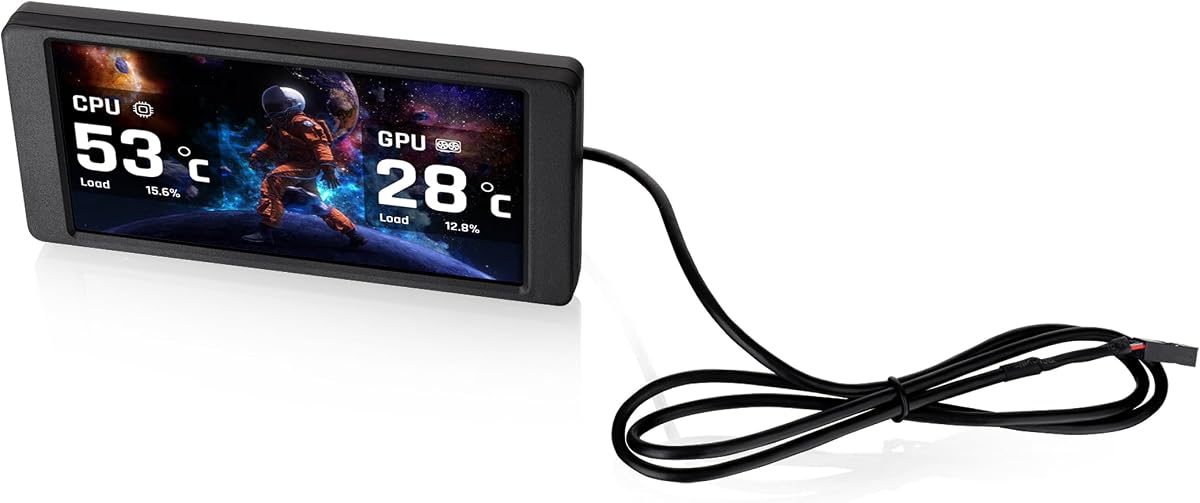
Thermalright delivers an affordable entry point into PC case screens with this 9.16-inch model. It holds a 4.3 rating due to its simplicity and clear display output without complex requirements.
We may earn a commission when you buy through this link, at no additional cost to you.
The TRCC software allows for quick customization of themes and monitoring data. Its slim profile ensures it fits inside most standard cases without adding bulk. The plug-and-play connection reduces setup time effectively.
Advanced features are minimal compared to higher-end units. Users seeking extensive animation control might find the interface too basic. It remains a solid choice for straightforward stat display.
This unit is ideal for budget-conscious builders wanting clean hardware monitoring. It provides essential functionality without the premium cost of larger branded alternatives.
The USB-C interface ensures quick connection without needing extra drivers or complex internal headers on most modern motherboards.
Measuring just 17mm in height it slides easily into tight spaces where other screens would block airflow or components.
We may earn a commission when you buy through this link, at no additional cost to you.
This 12.6-inch model stands out with a massive display and built-in audio capabilities. Rated 4.2 it offers a premium experience for users needing a true secondary monitor within their chassis.
We may earn a commission when you buy through this link, at no additional cost to you.
The included speakers remove the need for external audio devices. HDMI connectivity allows it to function as a standalone display on desks. The resolution provides crisp visuals for detailed system monitoring.
Installation requires an HDMI connection which uses GPU ports unlike USB headers. It is optimized for the Hyte Y60 case limiting flexibility for other chassis models.
Choose this if you want a high-end viewing experience inside your case. It delivers exceptional value for those needing audio and large display real estate.
Dual built-in speakers provide clear sound output directly from the screen eliminating clutter from separate external speakers.
A 60Hz refresh rate ensures smooth motion for video playback and responsive display updates during intensive gaming sessions.
We may earn a commission when you buy through this link, at no additional cost to you.
Lian Li combines screen visibility with aesthetic lighting through its ARGB frame. Rated 4.4 it appeals to enthusiasts looking for cohesive visual synchronization across their build.
We may earn a commission when you buy through this link, at no additional cost to you.
The L-Connect 3 software supports modular information and custom uploads. Mounting brackets allow for tilt and height adjustments on various surfaces. USB power keeps external connections minimal.
Users must ensure correct screw usage during stand installation to avoid damage. The lack of HDMI means it relies on internal USB headers or external ports.
Ideal for RGB-focused builds this screen adds personality beyond just stats. Its flexible mounting makes it adaptable to many different case types.
The built-in diffused ARGB lighting strip allows synchronization with your entire system for a unified visual style.
Versatile brackets allow you to mount the screen securely to fan frames or case panels with height and tilt adjustments.
We may earn a commission when you buy through this link, at no additional cost to you.
This 9.2-inch panel focuses on providing a dedicated sensor panel with high resolution. It holds a 4.1 rating for its clarity and ability to free up GPU video outputs.
We may earn a commission when you buy through this link, at no additional cost to you.
Station Space software supports plugins and widgets for extensive customization. The slim aluminum body ensures it looks professional inside any chassis. Internal headers keep power and data lines clean.
The software requires the Station Space app to remain active which may impact background resources. Linux and macOS users cannot utilize this unit due to OS limitations.
Buy this if you prioritize a dedicated monitoring surface. It delivers sharp visuals without compromising your main graphics card connections.
Using USB connections keeps HDMI and DisplayPort outputs free for your primary monitors or external displays.
Designed specifically for PC cases it shows key system metrics clearly without the overhead of a standard extended monitor.
We may earn a commission when you buy through this link, at no additional cost to you.
Touch control adds interactivity to this model allowing you to manage system stats with a tap. Rated 4.0 it is a versatile option for Raspberry Pi users and PC builders alike.
We may earn a commission when you buy through this link, at no additional cost to you.
Support for multiple systems including Ubuntu and Kali Linux offers flexibility for developers. The HDMI input allows connection to standard displays for easy setup. Power consumption remains low during operation.
Touch functionality depends on correct driver installation depending on the OS used. HDMI requires a dedicated video port rather than internal USB headers.
Choose this for projects requiring touch interaction or non-Windows environments. It bridges the gap between standard monitors and PC case panels.
Capacitive touch technology allows for smooth control of menus and widgets directly on the display surface.
Works seamlessly with Raspbian, Ubuntu, and Windows making it suitable for single board computers and PCs.
We may earn a commission when you buy through this link, at no additional cost to you.
This unit offers a compact solution for smaller cases where space is limited. With a 3.8 rating it focuses on integration with Thermaltake chassis while providing useful standalone features.
We may earn a commission when you buy through this link, at no additional cost to you.
TT RGB PLUS 3.0 improves UI control and system monitoring capabilities. Users can upload up to 20 custom graphics for personalization. Standalone mode allows usage outside the case.
Compatibility is primarily designed for Thermaltake View series limiting general use. The resolution is lower than competing models which may affect text clarity.
Buy this if you own a supported Thermaltake chassis and want tight integration. It is a solid secondary display for custom graphics.
Upload up to 20 custom graphics in formats like JPG and MP4 to personalize your display with images and videos.
TT RGB PLUS 3.0 provides expanded compatibility and control for a better monitoring experience and more customization options.
We may earn a commission when you buy through this link, at no additional cost to you.
GeeekPi provides a high-resolution touch experience with a massive 12.6-inch display. Rated 4.0 it is engineered specifically for the Hyte Y60 but offers great versatility.
We may earn a commission when you buy through this link, at no additional cost to you.
10-point multi-touch allows for complex gestures and control within your case. The built-in speakers add convenience for multimedia use. Plug and play setup ensures quick readiness.
Optimization for the Hyte Y60 case means fitting other models may be difficult. You must remove the protective film on arrival to get full screen clarity.
This model is perfect for Hyte Y60 owners wanting interactivity. It combines large screen utility with touch responsiveness for a premium feel.
Equipped with a touch screen sensitive enough for up to 10-points of multi-touch accuracy providing an excellent experience.
Compatible with Windows and macOS systems this screen is ready to use out of the box with no additional software required.
We may earn a commission when you buy through this link, at no additional cost to you.
This unique model uses magnetic suction for installation eliminating the need for screws. With a 4.3 rating it offers a sleek way to attach displays to metal chassis or radiators.
We may earn a commission when you buy through this link, at no additional cost to you.
Metal frame technology ensures the magnet holds securely during use. Software controls allow automatic startup with the computer. The resolution provides clear visibility for system health.
You must confirm wiring is complete before installing software. It relies on specific magnetic surfaces which may require extra mounting plates.
Choose this for a clean screw-free installation experience. It works well for water cooling systems where magnetic mounting is preferred.
Metal frame technology allows the screen to attach without screws making it easy to install and remove from metal surfaces.
The TRCC software enables the screen to start automatically with your computer and stay in the background permanently.
We may earn a commission when you buy through this link, at no additional cost to you.
Thermalright delivers an ultra-compact display ideal for liquid coolers. While it has a 3.4 rating it remains a functional option for minimalists wanting visual feedback.
We may earn a commission when you buy through this link, at no additional cost to you.
The magnetic panel lets you move the screen freely inside the chassis without fixed positions. DIY dynamic images allow personalization despite the smaller size. Software controls handle startup and display.
Smaller resolution limits text readability for detailed data. It lacks high-end features found in larger panels and may lack brightness.
Buy this if you need a tiny visual element for your cooler. It is a low-cost way to add personalization without bulk.
The magnetic attraction performance is compatible with chassis installation and can move freely in various positions without a fixed position.
Supports a variety of static and dynamic image switching allowing users to create personalized themes easily.
We may earn a commission when you buy through this link, at no additional cost to you.
Selecting the right screen involves considering size, connectivity, and software support. This section details the key factors to ensure compatibility with your build.
Larger screens like 12 inches provide better visibility but require more internal space. Look for resolutions over 1080p horizontal for crisp text and smooth animations.
Prioritize panels that fit your case dimensions and provide clear text at typical viewing distances.
USB headers save GPU ports and simplify internal cable management. HDMI offers versatility but uses video outputs that might be needed elsewhere.
Choose USB-C or internal headers for dedicated monitoring setups that leave your GPU free.
Quality software determines how easy it is to customize themes and monitor stats. Check if the vendor provides a user-friendly app or requires third-party tools.
Ensure the software supports your operating system and offers regular updates for longevity.
Adjustable brackets or magnetic mounts allow you to position the screen at the perfect angle. Fixed brackets limit where the screen can be placed within the chassis.
Select mounting options that match your case type and desired visual layout.
Touchscreen models allow for direct interaction with system widgets without external input devices. Standard panels rely on keyboard and mouse for navigation.
Consider touch features only if you need frequent adjustments from the case front.
Aluminum housings resist heat better and look more premium than plastic options. Protective films are standard but ensure they are easy to remove for clear visibility.
Verify material quality to ensure the screen survives the heat and handling inside a PC.
Built-in speakers eliminate the need for external audio cables or devices. This feature is rare and adds significant value to multimedia-focused builds.
If you need sound from the screen, check for dual speaker integration and audio cables.
Prices vary significantly based on features like touch and resolution. Budget units cover basic monitoring needs while premium units offer extensive customization and better materials.
Set a spending limit and compare feature lists to find the best balance for your needs.
Install the mounting bracket securely using provided screws to avoid loose fittings. Connect USB or HDMI cables ensuring they are routed away from fans to prevent damage.
Download and install the vendor software before powering on the unit. Follow specific guides like L-Connect 3 or TRCC to configure your preferred display settings.
Clean the display with a dry microfiber cloth to avoid scratches. Avoid using chemical cleaners that might damage the anti-glare coating on the panel.
Most units require specific vendor software like L-Connect 3 or TRCC for customization and monitoring. Some basic models may work with third-party tools like AIDA64.
Most options are designed for Windows 10 or 11. While some touch panels support Raspberry Pi and Ubuntu, dedicated case panels rarely offer official Linux drivers.
Many units use internal USB headers which leave HDMI and DisplayPort free. However, models using HDMI input require a dedicated GPU output slot.
Installation is generally straightforward with included brackets and USB-C connections. However, routing cables inside a tight case requires patience and planning.
Yes, most support video files via vendor software. Some HDMI-enabled models allow direct video playback without needing PC software.
Some specific units are designed with magnetic mounts to attach directly to radiator panels. Others can be mounted nearby using brackets if the cooler supports it.
We highlighted the WOWNOVA 8 Inch, Thermalright Trofeo Vision, and wisecoco 12.6 Inch as the top performers for versatility, budget, and premium features respectively.
Prioritize software support and connectivity that match your operating system and available ports. A screen that is easy to customize will offer the most satisfaction.
Check current pricing and compatibility with your specific case model before buying. Prices change often so verify the latest listings on Amazon for accurate details.