
ASUS Vivobook Go 15.6 FHD Slim Laptop
4.3Editor score
AMD Ryzen 3 7320U Processor
8GB DDR5 RAM and 128GB SSD
Military Grade Durability Design
This guide compares the top 10 lightweight ASUS laptops for October 2026, evaluating performance, battery life, display quality, and portability for students
Finding a lightweight ASUS laptop that balances portability with power is essential for modern users. Whether you are a student commuting to class or a professional traveling for work, having a machine that fits easily in your bag without sacrificing performance is key to maintaining productivity on the go.
We have carefully evaluated ten distinct models from the ASUS lineup to bring you this comprehensive roundup. Our analysis focuses on critical factors such as processor efficiency, memory capacity, storage speed, and overall build quality. We also consider the specific use cases each laptop targets to ensure you find the right fit for your needs.
Each pick in this list highlights unique strengths and potential trade-offs to help you make an informed decision. From budget-friendly options to premium ultrabooks, we cover a wide range of specifications and price points. Please note that product availability and pricing can change frequently, so verify details before purchasing.
4.3Editor score

4.8Editor score
3.7Editor score
This side by side comparison table allows you to quickly evaluate the core specifications of all ten laptops featured in this guide. We have distilled the key technical details into concise points so you can compare processing power, memory, storage, and display quality at a glance to identify the model that best suits your workflow.





The ASUS Vivobook Go 15.6 stands out as a highly affordable option for those seeking a lightweight laptop without breaking the bank. With a solid rating from users, it delivers reliable performance for everyday tasks like web browsing, document editing, and streaming media. The inclusion of DDR5 RAM ensures that system responsiveness is smooth even when multitasking between several applications.
We may earn a commission when you buy through this link, at no additional cost to you.
Key strengths of this model include its robust build quality which meets military grade durability standards. This means the laptop can withstand minor shocks and drops better than many consumer grade devices. The display features a NanoEdge design with slim bezels that maximize screen real estate while keeping the overall footprint compact. Connectivity is well covered with a variety of ports including USB Type C and HDMI for external monitors.
Trade-offs exist primarily in storage and screen refresh rate. The 128GB SSD is sufficient for system files and basic documents but might fill up quickly if you store large media libraries locally. However, the use of cloud storage can mitigate this issue for most users. The 60Hz refresh rate is standard for this price segment and works well for general productivity though gamers may prefer higher rates.
This laptop is ideal for students or home office users who need a dependable machine for basic computing tasks. Its light weight makes it easy to carry around campus or between home and work. If you prioritize durability and portability over heavy duty performance, this model offers excellent value for money in the current market.
The military grade certification ensures the chassis can handle the rigors of daily travel and accidental bumps without sustaining damage.
The AMD Ryzen 3 processor is optimized for thin laptops providing essential performance while maintaining good battery efficiency.
We may earn a commission when you buy through this link, at no additional cost to you.
This variant of the Vivobook Go series offers a significant upgrade in terms of internal specifications while maintaining the same sleek and lightweight chassis. The move to the Ryzen 5 processor provides a noticeable boost in multitasking capability compared to the base model. Users will appreciate the larger storage capacity which reduces the need for immediate cloud reliance.
We may earn a commission when you buy through this link, at no additional cost to you.
The 512GB SSD allows for faster boot times and more space for applications and files. This is particularly useful for users who keep multiple programs installed or store photos and videos locally. The military grade durability and fast charging features remain consistent with the brand reputation for reliability. The Cool Silver finish adds a touch of professionalism to the overall aesthetic.
While the display remains similar to the base model with a 250 nit brightness level, it is sufficient for indoor use but may struggle in direct sunlight. The price difference is minimal considering the hardware upgrades provided. For those who need more than basic functionality, this configuration strikes a good balance between cost and capability.
It is a strong choice for professionals or students who require a bit more power and storage without moving to a premium price tier. The added performance headroom helps future proof the device for more demanding software updates. If you want a versatile daily driver that handles heavy workloads with ease, this model is worth considering.
The Ryzen 5 processor offers better multitasking efficiency which is beneficial for running multiple browser tabs and apps simultaneously.
512GB storage ensures you have ample room for documents, media files, and applications without worrying about space constraints.
We may earn a commission when you buy through this link, at no additional cost to you.
The ASUS Vivobook 14 Snapdragon X earns the Editor's Choice award for its exceptional balance of performance and portability. With a impressive user rating, this laptop is designed to handle modern AI workloads and multitasking demands with ease. The 16GB of RAM ensures that you can run dozens of browser tabs and productivity apps without any lag or slowdowns.
We may earn a commission when you buy through this link, at no additional cost to you.
Powered by the Snapdragon X processor, this device brings Copilot+ PC capabilities to the table allowing for advanced AI features like Recall and Live Captions. The Qualcomm Adreno GPU provides a performance advantage for visual tasks while maintaining high efficiency. The 14 inch FHD+ display offers a crisp viewing experience with a resolution that enhances text clarity for work.
Potential limitations involve the ARM based architecture which may affect compatibility with some x86 specific legacy software. However, Windows 11 handles most common apps seamlessly through emulation. The battery life is a major plus allowing for all day use without needing a charger. For users who want future proofing and AI integration, this is a top contender.
This laptop is perfect for professionals who need a reliable machine that can handle complex tasks while remaining lightweight. The build quality and design focus on user experience with features like a privacy shutter and ergonomic keyboard. If you value innovation and performance in a compact form factor, this model represents a significant step forward.
Copilot+ PC features leverage the NPU for advanced tasks like image generation and real time language translation.
The Snapdragon chipset delivers performance efficiency that translates into longer battery life and cooler operation.
We may earn a commission when you buy through this link, at no additional cost to you.
For users who prioritize screen real estate, the ASUS Vivobook 16 offers a 16 inch WUXGA display that provides ample space for productivity. The Snapdragon X processor ensures that the system remains responsive even with a larger screen drawing pixels. This makes it an excellent choice for those who split windows frequently or work with large spreadsheets and documents.
We may earn a commission when you buy through this link, at no additional cost to you.
The 300 nit sustained brightness ensures that colors remain vibrant and text is readable in various lighting conditions. With 16GB of RAM and a fast SSD, multitasking is handled smoothly without any bottlenecks. The design maintains the slim profile expected from modern laptops despite the larger size. The Qualcomm Adreno GPU handles visual rendering efficiently.
The trade off is a slight increase in weight compared to 14 inch models which may matter for frequent travelers. However, the productivity gains from the larger screen often outweigh this minor inconvenience for desk based work. Battery life remains strong due to the efficient processor choice. This model bridges the gap between a laptop and a desktop replacement.
It is ideal for professionals who need more screen space but still want a lightweight machine. The Quiet Blue color adds a stylish touch to the professional look. If you spend most of your day in front of the laptop and need room for multiple windows, this 16 inch option is highly recommended.
The 16 inch WUXGA display provides significantly more workspace for multitasking and complex content creation.
High resolution and brightness ensure that details are sharp and colors are accurate for content work.
We may earn a commission when you buy through this link, at no additional cost to you.
This Intel based model is positioned as a highly accessible entry point into the laptop market for students and basic users. It focuses on providing essential functionality at a competitive price point without unnecessary extras. The 15.6 inch screen offers a comfortable viewing area for videos and documents while the overall weight remains manageable for daily carrying.
We may earn a commission when you buy through this link, at no additional cost to you.
The Celeron processor is adequate for web browsing and word processing tasks. While it may not handle heavy workloads or intensive applications, it serves well for online classes and communication. The inclusion of fast charging helps minimize downtime when batteries run low. The design includes a privacy shutter for webcam security which is a valuable feature for remote interactions.
Users should be aware of the 4GB RAM and eMMC storage limitations which can lead to slower performance over time or when running many apps. Upgrading is generally not possible on this model so choose based on your immediate needs. The build quality is decent for the price range. It is a budget friendly option for light usage.
Ideal for students who primarily need a machine for writing papers and browsing the web. The portability is a key selling point for campus life. If you have a tight budget and do not require high performance, this laptop provides the basics you need to get started with minimal investment.
This model offers one of the lowest price points in the lineup making it accessible for tight budgets.
Suitable for everyday tasks like email web browsing and document creation without demanding system resources.
We may earn a commission when you buy through this link, at no additional cost to you.
This Vivobook model offers a compelling mix of performance and value for general users. The Intel i3 processor combined with 16GB of RAM ensures that everyday tasks run smoothly without stuttering. The 512GB SSD provides plenty of space for files and applications. It is a reliable workhorse for students and office workers who need consistent performance.
We may earn a commission when you buy through this link, at no additional cost to you.
Features like Wi-Fi 6 enable faster and more stable wireless connectivity which is crucial for remote work and video conferencing. The variety of ports including HDMI and USB-C means you do not need dongles for most peripherals. The 14 inch display is compact and fits easily into bags for daily commuting. The keyboard is comfortable for long typing sessions.
The screen brightness is adequate for indoor use but may not be the best for outdoor environments. Build quality is functional and focuses on durability over premium materials. Battery life is decent for a full day of light usage. For the price point, the specifications offered are very competitive in the current market.
This laptop is a great choice for those who want a balance of power and affordability. It handles multitasking well and provides enough storage for most users. If you need a reliable machine for work or study that does not break the bank, this model is a strong candidate to consider for your next purchase.
Wi-Fi 6 ensures fast and stable internet connections which are essential for streaming and remote work tasks.
16GB RAM and 512GB SSD offer a robust foundation for multitasking and storing a substantial library of files.
We may earn a commission when you buy through this link, at no additional cost to you.
The ASUS Vivobook 14 in Cool Silver is a sophisticated device tailored for users who want AI integration and long battery life. The Snapdragon X processor is a game changer for efficiency allowing for all day usage without frequent charging. The NPU supports advanced AI features that enhance productivity and security within the Windows environment.
We may earn a commission when you buy through this link, at no additional cost to you.
The WUXGA display offers a higher resolution than standard FHD screens which improves text clarity and workspace. With 16GB of RAM, the system remains responsive even with demanding applications running. The chassis is designed to dissipate heat efficiently ensuring the device stays cool during intensive tasks. The sleek silver finish looks professional in any setting.
Potential buyers should consider that the ARM based architecture may require adjustments if you rely on specific legacy software. However for most modern workflows the experience is seamless and fast. The battery life is a standout feature allowing for true unplugged work. This model is forward looking and aligns with future software trends.
It is perfect for business professionals and creatives who value endurance and performance. The combination of high resolution screen and efficient processor makes it a joy to use for long periods. If you are ready to embrace new technology and want a laptop that lasts all day on a charge, this is a great option.
The integrated NPU supports local AI processing for features like live captions and recall without cloud latency.
The WUXGA screen provides sharp visuals and accurate colors ideal for productivity and media consumption.
We may earn a commission when you buy through this link, at no additional cost to you.
The 2026 Edition VivoBook brings the latest 13th Gen Intel processor to the lightweight category. This ensures that the laptop can handle more demanding tasks with higher clock speeds than previous generations. It is a solid choice for users who want recent hardware technology in a portable form factor. The 16GB RAM supports smooth multitasking across various applications.
We may earn a commission when you buy through this link, at no additional cost to you.
The PCIe SSD offers faster data access speeds compared to eMMC storage ensuring quick boot times and file loads. Connectivity is enhanced with Wi-Fi 6E which provides lower latency for streaming and calls. The privacy shutter on the webcam offers peace of mind for privacy conscious users. The design is sleek and fits well into professional environments.
While the storage is moderate at 256GB, it can be expanded via cloud services or external drives. The display quality is standard for this segment but sufficient for indoor work. Battery life is expected to be good due to the efficiency of the processor. This model targets users who want a balance of modern specs and portability.
It is suitable for students and professionals who need a fast reliable machine for daily tasks. The build quality and connectivity options make it a versatile tool for both work and entertainment. If you prioritize having the latest generation components without a huge price tag, this laptop is a strong contender.
The 13th Gen processor offers higher clock speeds for better single core performance and responsiveness.
Wi-Fi 6E and Bluetooth 5.3 ensure fast wireless connections and quick pairing with modern accessories.
We may earn a commission when you buy through this link, at no additional cost to you.
This configuration strikes a practical balance between performance and storage for everyday users. The 256GB SSD provides enough space for essential apps and files without feeling constrained. The Ryzen 3 processor ensures that the system remains responsive for web browsing and office tasks. The military grade durability certification adds confidence to the build quality.
We may earn a commission when you buy through this link, at no additional cost to you.
Battery life is a highlight with up to 11 hours on a single charge which reduces the need to carry a charger everywhere. The ergonomic keyboard with a numeric keypad is beneficial for users who input data frequently. Fast charging capabilities mean you can top up quickly before heading out. The privacy shutter is a nice touch for security.
The screen brightness and resolution are standard which is acceptable for indoor use but not ideal for bright environments. Webcam resolution is basic but works well for video calls. For the price, the value proposition is strong given the storage and battery upgrades. It is a reliable workhorse for home and office use.
It is ideal for those who need a sturdy laptop for general computing without advanced gaming or creative requirements. The storage capacity reduces the need for cloud reliance and keeps everything local. If you want a dependable device that can last through the day without plugging in, this model is a great pick.
The efficient battery design allows for extended use on a single charge keeping you productive all day.
A full size keyboard with numeric keypad supports efficient typing for data entry and general use.
We may earn a commission when you buy through this link, at no additional cost to you.
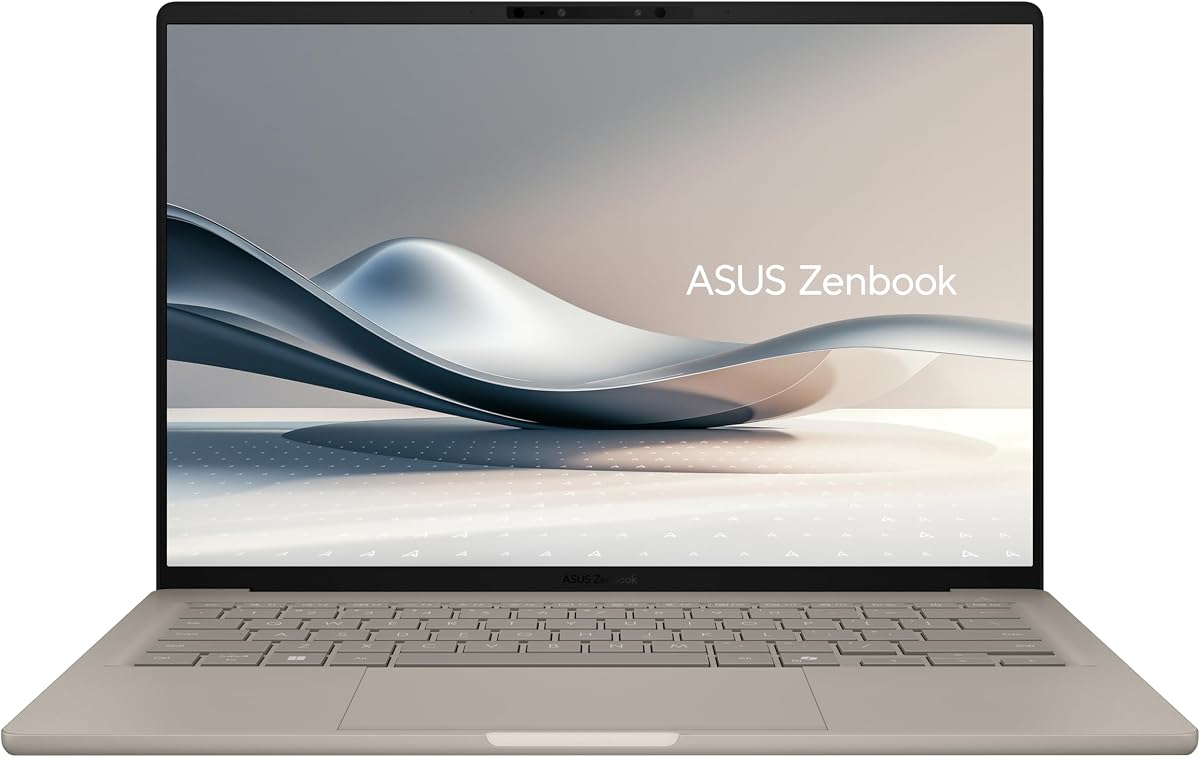
The ASUS Zenbook A14 redefines portability with an incredibly light design that weighs just 980 grams. It is the lightest 14 inch Copilot+ AI laptop available offering exceptional strength without sacrificing performance. The Ceraluminum build material provides scratch resistance and a unique texture that feels premium in hand. This device is for those who demand the best in mobility.
We may earn a commission when you buy through this link, at no additional cost to you.
The WUXGA OLED display delivers stunning visuals with deep blacks and vibrant colors that make media consumption a pleasure. The Snapdragon X processor supports advanced AI tasks and ensures efficient performance throughout the day. With up to 32 hours of battery life, this laptop can go days between charges for offline tasks. Wi-Fi 6E ensures top tier connectivity.
The main trade off is the price point which is higher than other options in this guide. Also OLED screens can carry a risk of burn in if static images are left for too long. However the build quality and features justify the cost for premium users. It is a standout choice for travelers and executives.
It is the ultimate choice for professionals who travel frequently and need a machine that feels almost weightless. The battery life alone is a game changer for long flights or workdays. If you want a laptop that combines beauty performance and portability, the Zenbook A14 is the definitive option.
Ceraluminum offers a unique blend of ceramic and aluminum providing strength and resistance in a lightweight package.
The OLED screen provides superior contrast and color accuracy enhancing the viewing experience for media and work.
We may earn a commission when you buy through this link, at no additional cost to you.
Choosing the right lightweight laptop involves balancing portability with the specific performance needs of your workflow. We have outlined the most critical factors to consider to help you narrow down your options efficiently.
The processor is the brain of your laptop and determines how well it handles tasks. For lightweight models, efficiency is key to balancing speed with battery life. AMD Ryzen and Intel Core processors offer strong performance, while the new Snapdragon X chips bring AI capabilities and extended battery life.
Look for at least a mid-range processor like an i3 or Ryzen 3 for daily tasks, or upgrade to i5/Ryzen 5 for heavier workloads.
RAM affects how many applications you can run simultaneously without slowing down. 8GB is the minimum for modern Windows usage, but 16GB provides better future-proofing for multitasking. Storage speed is also vital for boot times and file access.
Prioritize SSDs over eMMC or HDDs for speed, and consider 512GB as a comfortable minimum to avoid filling up storage quickly.
Display size impacts both portability and usability. A 14-inch screen offers a balance of mobility and workspace, while 15 or 16-inch screens provide more room for productivity. Resolution and brightness also matter for clarity in different environments.
Choose a FHD+ or WUXGA panel for sharper text and visuals, and ensure brightness is at least 250 nits for indoor use.
For a lightweight laptop, battery life is crucial for maintaining productivity on the go. Efficient processors and optimized software help extend usage time between charges. Manufacturers often provide estimates, but real-world use varies.
Aim for a model rated for at least 8 to 10 hours to ensure you can work through a full day without needing an outlet.
Portability means the laptop will move with you, so durability is important to withstand travel wear. Military grade certifications like MIL-STD-810H indicate resistance to shocks and temperature changes.
Look for sturdy chassis materials like aluminum or reinforced polycarbonate to ensure the device lasts longer during daily transport.
A good selection of ports reduces the need for dongles and adapters. Look for USB-C, USB-A, HDMI, and headphone jacks depending on your peripheral needs. Wi-Fi 6 or 6E ensures fast wireless speeds.
Ensure the laptop has the necessary ports for your monitors and accessories to keep your setup clean and functional.
Modern laptops include features like privacy shutters for webcams and fingerprint readers for secure login. AI features are becoming more common with Copilot+ PCs offering advanced tools for productivity and security.
Consider these extras based on your privacy needs and how much you value integrated security solutions in your workflow.
Prices vary widely across the lightweight laptop range from entry-level to premium models. Determine your budget early to avoid overspending on features you do not need or underspending on quality.
Focus on value by comparing specs like RAM and storage against the price to ensure you get the best performance for your money.
To maximize battery life, adjust your power settings to balance performance and energy savings. Use the built-in battery saver features when you are away from a power source to extend usage time. Regularly update your operating system and drivers to ensure optimal hardware performance and security.
Maintain the physical condition of your laptop by cleaning the screen and keyboard regularly with a microfiber cloth. Avoid exposing the device to extreme temperatures or humidity which can damage internal components. Use a protective sleeve or case when carrying the laptop in a backpack to prevent scratches and impacts.
Secure your data and device by setting up strong passwords and enabling fingerprint or facial recognition if available. Backup important files to cloud storage or an external drive to prevent data loss in case of hardware failure. Be mindful of software bloat and uninstall unused applications to keep the system running smoothly.
Yes, many ASUS lightweight models feature military grade durability certification. This means they undergo tests for shock, vibration, and temperature to ensure they withstand daily travel wear and tear. Look for specific MIL-STD-810H markings on the product details to confirm this level of ruggedness.
It depends on the specific model. Some Vivobook models allow you to upgrade the storage or RAM, while newer thin designs often have soldered components. Check the manufacturer specifications for the exact model number to see if there are accessible slots for upgrades before purchasing.
Most of these laptops include HDMI or USB-C ports that support external display connectivity. You can connect up to two external monitors on some models depending on the graphics capabilities. Always check the port types on the device to ensure compatibility with your monitor cables.
Battery life varies based on the processor, screen size, and usage intensity. Newer Snapdragon models typically offer longer battery life due to efficient architecture. Intel and AMD models usually provide good battery life for productivity but may vary if you run demanding applications frequently.
Copilot+ PCs are designed with specialized hardware like Neural Processing Units to support advanced AI features locally. These features include tools like Recall and Live Captions that enhance productivity and privacy. Standard laptops may offer AI features through software but lack the dedicated hardware acceleration.
Most lightweight laptops have screens around 250 to 300 nits which are sufficient for indoor use. For outdoor use in bright sunlight, a screen with higher brightness is preferable. You may need to use shade or lower the screen angle to improve visibility in direct sunlight.
We hope this guide has helped you identify the best ASUS laptop for your specific needs. The top picks range from the budget-friendly Vivobook Go to the premium Zenbook A14, offering options for every user. Each model brings unique strengths in performance, battery life, and build quality.
Prioritize what matters most to you whether it is screen quality, processing power, or sheer portability. For students, budget models with decent RAM are often enough, while professionals might benefit from OLED displays and AI features. Your workflow and budget should dictate the final decision.
Remember to check current prices and availability as deals change frequently. Investing in a quality lightweight laptop can significantly improve your daily productivity and comfort. We wish you the best in finding the perfect machine for your computing journey.