
2026 Mac OS Shortcuts Sticker for MacBook Neo, Air & Pro (1-Pack)
4.6Editor score
Essential shortcuts at a glance
Residue-free adhesive vinyl material
Water repellent matte finish
Your new MacBook Neo demands protection and productivity enhancements right out of the box. Finding the right accessories ensures your device stays safe while boosting your workflow efficiency significantly.
We compared ten top-rated products based on compatibility, build quality, and user reviews. Each item was selected to match the specific A3404 model released in 2026 for perfect fit.
Every pick highlights key features and real-world benefits for daily use. Please note that availability and pricing fluctuate frequently, so check current listings before purchasing your chosen items.
4.6Editor score

4.5Editor score

4.2Editor score
As an Amazon Associate we earn from qualifying purchases.
This side-by-side comparison covers all ten selected products to help you find the perfect fit for your needs.


This macOS shortcuts sticker provides a quick way to keep essential commands visible on your palm rest. It holds a strong 4.6 rating from users who value workflow efficiency.
We may earn a commission when you buy through this link, at no additional cost to you.
The sticker features 52 curated shortcuts grouped by task like Navigation and Screenshots. Its premium vinyl material resists water and smudges ensuring longevity despite daily use.
While application requires care to avoid bubbles, the residue-free adhesive ensures clean removal. This makes it a low risk addition to your device.
Ideal for students and professionals, this sticker boosts typing speed without expensive software. It is a cost effective way to master Mac commands quickly.
Having shortcuts visible reduces time spent searching online for commands while working.
The matte vinyl shrugs off coffee spills and sweat keeping your device clean.
We may earn a commission when you buy through this link, at no additional cost to you.
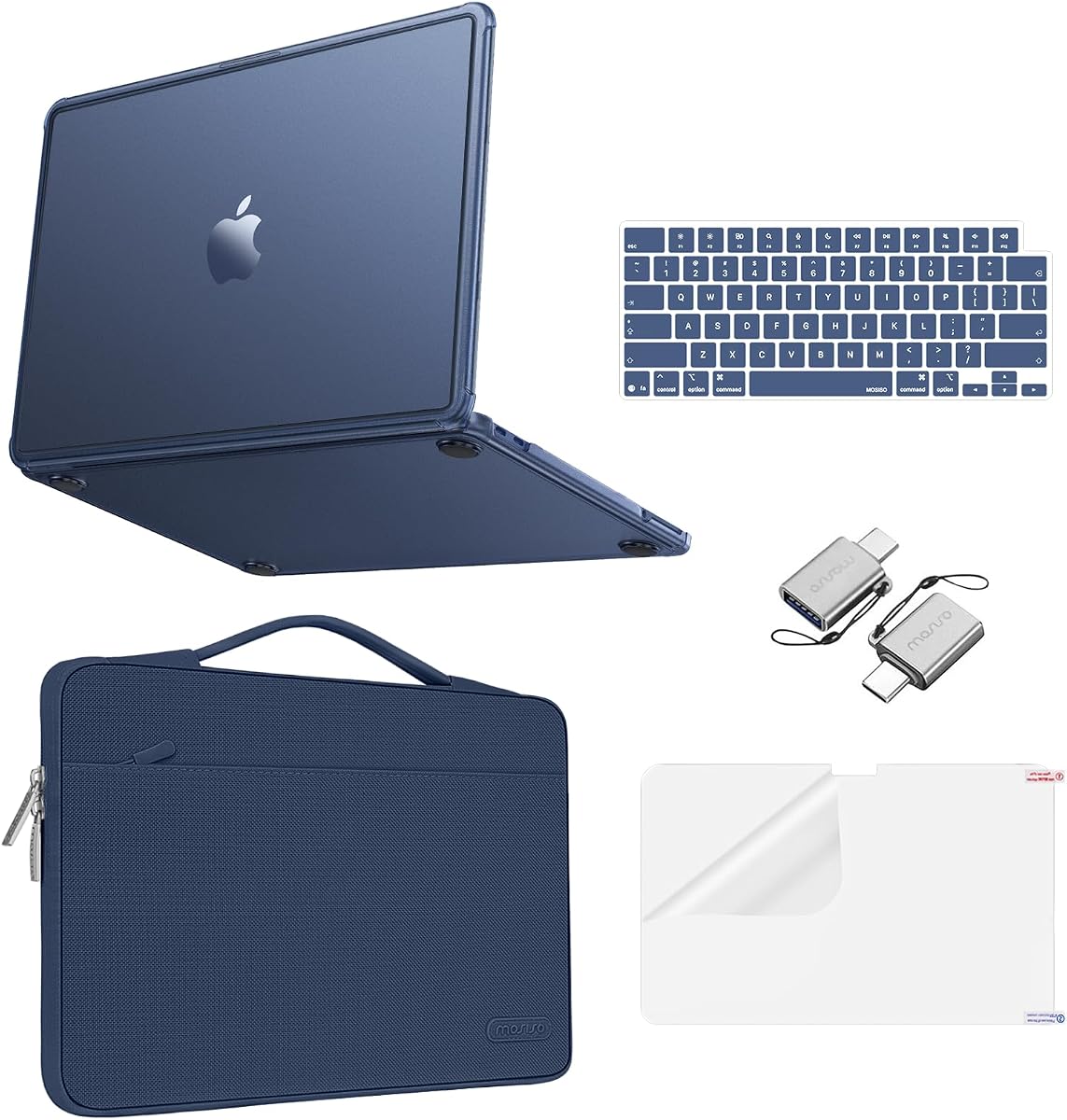
This MOSISO case offers a complete protection solution specifically designed for the 2026 MacBook Neo 13 inch model. Users praise its crystal clarity and sturdy build.
We may earn a commission when you buy through this link, at no additional cost to you.
The hard shell wraps every side of the laptop protecting against keys and dust. It includes keyboard covers and a screen protector for all around defense.
Installation is tool-free requiring only a gentle push to secure the top and bottom covers. The smooth surface reduces fingerprints compared to softer materials.
Perfect for daily commuters, this case maintains your laptop's appearance. It balances protection and style effectively for everyday business travel.
Includes dustproof keyboard covers and screen protector for full body security.
Built from engineering polycarbonate to guard against daily grind wear and tear.
We may earn a commission when you buy through this link, at no additional cost to you.
This variant of the MOSISO case focuses on keeping your device looking pristine with a matte fingerprint-resistant finish. It pairs with a 360-degree protective sleeve.
We may earn a commission when you buy through this link, at no additional cost to you.
The engineered surface actively repels smudges keeping your laptop clean longer than glossy cases. The included sleeve cushions the laptop against shocks during transport.
While the sleeve is lightweight, it provides essential protection for backpacks. The kit ensures your device stays safe from accidental spills.
Business travelers will appreciate the combination of hard case and soft sleeve. It offers robust defense without adding excessive bulk to your bag.
Matte finish actively repels fingerprints keeping the laptop pristine after unboxing.
Portable lightweight design slides easily into briefcases or backpacks.
We may earn a commission when you buy through this link, at no additional cost to you.
This package combines a crack-resistant hard case with a plush puffy sleeve for maximum daily security. It is tailored for the A3404 model.
We may earn a commission when you buy through this link, at no additional cost to you.
The hard case shields against minor bumps and scratches while the sleeve provides extra shock absorption. This dual layer approach suits heavy users.
Installation remains easy and the case slips off cleanly when needed. The quilted sleeve is lightweight and fits well into briefcases.
Students and office workers will value the comprehensive protection. It ensures your device survives daily transit without showing wear.
Hard case and puffy sleeve cushion against scratches bumps and everyday shocks.
Does not bulk up device and slides easily into bags.
We may earn a commission when you buy through this link, at no additional cost to you.
The EooCoo case is praised for its slim lightweight profile that highlights your MacBook Neo's design. It shows a high 4.7 rating from satisfied users.
We may earn a commission when you buy through this link, at no additional cost to you.
The transparent PC material offers full edge wrap protection against daily scuffs. It includes a matching keyboard cover and adapter for added utility.
This case is designed for those who prioritize aesthetics without sacrificing protection. The durable hard plastic exterior resists scratches effectively.
Ideal for freelancers and teachers, this case fits the office or classroom. It provides comprehensive protection while remaining visually unobtrusive.
Ultra-slim profile adds minimal bulk showing off your Mac Book Neo's design.
Perfect for office and classroom use where portability matters.
We may earn a commission when you buy through this link, at no additional cost to you.
This VENTION hub provides powerful connectivity with up to 80Gbps bandwidth for 8K video output. It features a magnetic detachable connector for ease of use.
We may earn a commission when you buy through this link, at no additional cost to you.
The docking station supports 140W pass-through charging ensuring your device stays powered while using peripherals. Its aluminum alloy shell aids heat dissipation.
While the standard plug may not fit with bottom cases, the magnetic design reduces wear. It offers stable long-term connection for business and travel.
Best for professionals needing external displays, this hub handles multimedia and work seamlessly. It is a practical and beautiful addition to your setup.
Equipped with 80Gbps bandwidth enabling ultra-clear 8K@240Hz video output.
Supports 140W pass-through charging for efficient battery life.
We may earn a commission when you buy through this link, at no additional cost to you.
This privacy screen blocks side views beyond 30 degrees ensuring your data stays private. It uses strong magnetic attachment for effortless installation.
We may earn a commission when you buy through this link, at no additional cost to you.
The anti-glare and blue light blocking technology relieves eye strain during long work sessions. The ultra-thin design fits most cases without affecting lid closure.
Made of scratch-resistant PET material it protects the screen from abrasion. This balance of privacy and comfort is key for sensitive work.
Ideal for airport or cafe use, it safeguards private data from peeping. It is a reliable portable protection for your privacy needs.
Blocks side views beyond 30 degrees keeping clear visibility only from front.
Effectively relieves eye strain during long-time use.
We may earn a commission when you buy through this link, at no additional cost to you.
The Peslv screen features an innovative magnetic mounting method for quick removal and storage. It includes a storage clip for easy transport.
We may earn a commission when you buy through this link, at no additional cost to you.
Imported high-quality materials reduce 95 percent of blue light protecting eyesight. The matte surface intercepts reflected light for a glare-free experience.
This filter ensures data privacy with a 30-degree viewing angle. Its super high light transmission rate maintains picture quality close to the original.
Perfect for travel where privacy needs change often. It ensures your computer data remains secure in shared spaces.
High-quality filter layer reduces 95 percent of blue light and UV light.
Reinforced magnetic strip installs in a second by aligning with top bezel.
We may earn a commission when you buy through this link, at no additional cost to you.
This sticker helps beginners and power users master essential commands instantly without searching online. It is designed for standard MacBook Air and Pro models.
We may earn a commission when you buy through this link, at no additional cost to you.
The laminated vinyl offers strong hold and reduces bubbles during application. Made in the USA it ensures trusted quality with a satisfaction guarantee.
Application requires folding back small sections for best results but it improves longevity. This tool helps you work faster and avoid frustration.
Ideal for seniors and creatives starting with Mac. It boosts skills and speeds up tasks effectively.
Keeps important shortcuts visible on your device making it easy to boost skills.
Designed and printed in USA with responsive customer support.
We may earn a commission when you buy through this link, at no additional cost to you.
These dust plugs protect ports from debris and liquid splashes without damaging your MacBook Neo. The high-quality silicone is flexible yet durable.
We may earn a commission when you buy through this link, at no additional cost to you.
The set includes covers for USB-C, HDMI, and headphone jack along with webcam covers. The low-profile design maintains your laptop's sleek aesthetics.
Insertion and removal are effortless and they stay securely in place during daily use. It is a practical and low cost way to keep ports clean.
Best for maintaining your device's longevity. It keeps ports clean while staying discreet in daily use.
Flexible yet durable silicone protects ports from scratches debris and liquid.
Effortless insertion removal that stays securely in place without residue.
We may earn a commission when you buy through this link, at no additional cost to you.
Choosing the right accessories requires understanding your specific needs and the unique features of the MacBook Neo model.
Ensure any case or accessory lists the A3404 model number specifically. The MacBook Neo released in 2026 has unique dimensions and ports that older accessories may not fit.
Always verify the model number on the back of your device before purchasing to avoid returns.
Look for high-quality polycarbonate or silicone materials that offer durability without adding bulk. Scratch-resistant surfaces help maintain the device's appearance over time.
Select materials that balance protection with ease of use for daily handling.
If you frequently travel, dust plugs and hubs are essential to prevent debris from damaging ports. Dust covers ensure your connections stay clean and functional.
Prioritize accessories that maintain the sleek look while securing sensitive areas.
For those working in public spaces, a privacy screen protector is a vital tool to protect sensitive data. These screens block side views to prevent prying eyes.
Choose magnetic options for easy installation without leaving residue on the display.
A high-speed USB-C hub allows you to connect multiple devices and external displays efficiently. Look for models that support fast charging to keep your device powered.
Check for Thunderbolt support to ensure compatibility with high-bandwidth peripherals.
Opt for accessories that are tool-free and easy to attach or remove. This flexibility ensures you can use or store them as needed without hassle.
Simple installation designs save time and reduce wear on your device.
Consider the weight and thickness of cases or sleeves to ensure they do not add excessive bulk. Lightweight options preserve the portability of your laptop.
Prioritize slim designs if you carry your device daily in a bag.
Evaluate whether the price matches the protection offered. Some kits include multiple items which may offer better value than buying them separately.
Invest in higher-quality items for critical protection like cases to save money long term.
Install cases and screens carefully to avoid air bubbles or misalignment. Clean your device before applying stickers or films to ensure a smooth fit.
Regularly clean cases and sleeves to remove dust and debris. This maintains their durability and prevents scratches on the device underneath.
Store privacy screens in their provided cases when not in use. This prevents scratches and ensures they remain clean for the next application.
Most accessories listed are specifically designed for the A3404 MacBook Neo model released in 2026. Using them on older models may result in poor fit or functional issues.
Use a soft damp cloth to gently wipe the silicone surface dry before reinstalling. Avoid harsh chemicals that might damage the material or leave residue.
Most thin hard cases do not interfere with wireless charging. However, thick cases or metal parts may block signals so check the specifications before use.
Some cases block ports so you may need to remove them to connect a hub. Check if the hub design allows for direct connection without obstruction.
High-quality privacy screens typically last for years if handled with care. Avoid excessive pressure or heat which can degrade the filter layer over time.
Most stickers use residue-free adhesive allowing for clean removal. Gently peel and warm soapy water may help if any residue remains.
We have reviewed ten top accessories ranging from protective cases to high-speed hubs. Each offers unique benefits tailored to different usage scenarios and needs.
Prioritize protection and connectivity based on your daily workflow to maximize productivity and safety for your device.
Prices and availability change regularly so verify the current details before making your final decision.