
DTECH DVI to HDMI Adapter
4.6Editor score
Bi-directional connection support
Gold plated durable connectors
Supports up to 4K resolution
This guide compares the top ten DVI I Dual Link to HDMI Adapter models for reliable video connectivity across monitors, projectors, and legacy systems in
Finding the right adapter to bridge legacy DVI ports with modern HDMI displays can be challenging. A quality DVI I Dual Link to HDMI Adapter ensures stable high resolution video transmission without signal degradation or compatibility issues for your setup.
We evaluated ten leading adapters based on build quality, connection stability, resolution support, and user feedback. Each product was scrutinized for its ability to handle dual link signals and maintain crisp visuals across various devices and configurations.
Each selection below highlights key features and limitations to help you choose the best match for your needs. Please note that prices and availability change frequently so verify current details before making your final purchase decision online.
4.6Editor score

4.8Editor score

3.5Editor score
The following comparison table provides a side-by-side overview of the top ten DVI I Dual Link to HDMI Adapter options available this month. Review each model's core specifications to identify the best fit for your specific display and source requirements.


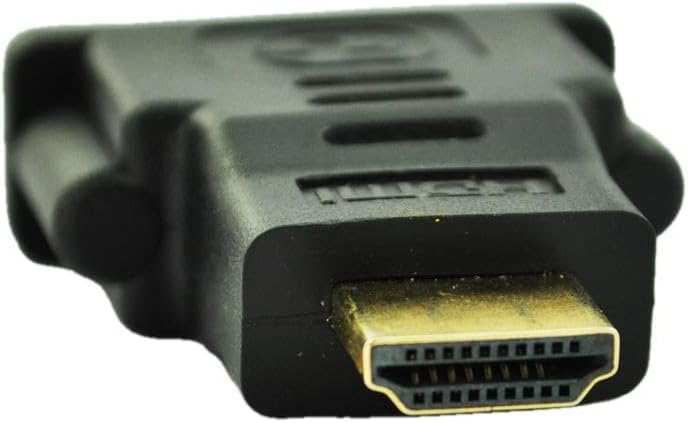

This adapter offers exceptional value with two units in one package and supports full HD 1080P video output. It features a bi-directional design that connects DVI-I sources to HDMI displays seamlessly.
We may earn a commission when you buy through this link, at no additional cost to you.
Users report reliable performance thanks to oxidation resistant gold-plated connectors and a secure screw-in DVI connection. The compact and lightweight design makes it ideal for office or home use.
Note that audio must be handled separately as this adapter only transmits video signals. Additionally you will need to source your own HDMI cable for connection.
Ideal for users needing multiple adapters or reliable connectivity across monitors and projectors this adapter delivers consistent performance for everyday needs.
Connects both DVI to HDMI and HDMI to DVI sources for versatile setup options.
Screw-in DVI ensures stable signal transmission without accidental disconnects during use.
We may earn a commission when you buy through this link, at no additional cost to you.
An affordable option that supports up to 4K 30Hz video resolution this adapter is ideal for budget conscious users needing reliable conversion between DVI and HDMI.
We may earn a commission when you buy through this link, at no additional cost to you.
Its bi-directional design allows use from DVI sources to HDMI monitors and vice versa with gold-plated connectors for long lasting performance.
Users should note that it does not support 144Hz refresh rates and audio must be transmitted separately via another connection.
This adapter is perfect for connecting game consoles like PS4 or laptops to HDMI displays without breaking the bank.
Provides 4K 30Hz support for high resolution displays without extra cost.
Gold-plated connectors resist corrosion and ensure stable video signal transmission.
We may earn a commission when you buy through this link, at no additional cost to you.
This premium adapter supports HDMI 2.0 technology offering enhanced bandwidth up to 18 Gbps for improved 4K and Ultra HD compatibility.
We may earn a commission when you buy through this link, at no additional cost to you.
Built with dual-link DVI-D compatibility and backed by a lifetime warranty it represents a long term solution for demanding setups.
Despite higher costs and mixed user feedback its premium specifications make it suitable for users prioritizing bandwidth and durability.
Ideal for professional setups where reliability and future proofing are critical this adapter delivers advanced connectivity options.
Supports HDMI 2.0 standards enabling higher bandwidth and better 4K performance.
Comes with a lifetime warranty providing extra peace of mind for your purchase.
We may earn a commission when you buy through this link, at no additional cost to you.
This adapter specializes in connecting HDMI cables to M1 digital inputs found on certain projectors offering specific utility for presentation setups.
We may earn a commission when you buy through this link, at no additional cost to you.
Gold plated connectors ensure reliable video transmission while the black design blends discreetly with most equipment in professional environments.
Its specialized design limits general use but makes it indispensable for users working with InFocus projectors or similar M1 equipped displays.
Ideal for office and classroom environments needing projector connectivity this adapter provides focused functionality for specific display interfaces.
Designed specifically to connect HDMI to M1 digital inputs on certain projectors.
Gold plated connectors maintain signal integrity for consistent video output quality.
We may earn a commission when you buy through this link, at no additional cost to you.
This adapter provides dual link support with DVI-I 24+5 pin compatibility ensuring connection to both analog and digital displays seamlessly.
We may earn a commission when you buy through this link, at no additional cost to you.
Gold plated connectors enhance durability and signal quality making it suitable for everyday home and office use.
While specifications are basic the focus on dual link ensures compatibility with a wider range of legacy devices and monitors.
Ideal for users needing a simple dual link adapter without extra features this model delivers reliable performance at a reasonable price.
Compatible with both analog and digital DVI-I signals for broad device support.
Dual link ensures higher bandwidth and better resolution support for large screens.
We may earn a commission when you buy through this link, at no additional cost to you.
A basic adapter designed for DVI-D dual link connections this model converts digital video signals to HDMI female ports easily.
We may earn a commission when you buy through this link, at no additional cost to you.
Gold plated connectors and black housing provide durability and a sleek appearance suitable for desktop and rack setups.
Limited user feedback makes performance verification challenging but specifications suggest standard dual link compatibility for most systems.
Ideal for users needing a straightforward DVI-D dual link adapter this model offers standard functionality for legacy video setups.
Supports DVI-D dual link for higher bandwidth and better resolution output.
Gold plated connectors ensure better corrosion resistance and stable signal transmission.
We may earn a commission when you buy through this link, at no additional cost to you.
Supporting DVI-I 24+5 ports this bi-directional adapter handles 4K 30Hz video and works for multiple device configurations.
We may earn a commission when you buy through this link, at no additional cost to you.
Its flexible design allows connection from DVI sources to HDMI monitors or vice versa making it versatile for mixed setups.
Users should note 144Hz support is absent and audio requires separate connection which limits use for gaming with high refresh rates.
Ideal for home office and basic multimedia setups this adapter provides reliable connectivity and resolution flexibility at a good price.
Supports both HDMI to DVI and DVI to HDMI connections for flexible usage.
Delivers 4K 30Hz video output suitable for modern high resolution displays.
We may earn a commission when you buy through this link, at no additional cost to you.
This adapter offers dual link support with gold nickel plated connectors designed to prevent signal loss and data degradation over time.
We may earn a commission when you buy through this link, at no additional cost to you.
Its compatibility with set-top boxes and LCD TVs makes it useful for home entertainment and satellite receiver setups.
Users highlight reliable performance and stable connections for daily use without requiring complex configuration or driver installations.
Ideal for connecting satellite receivers or DVD players to HDMI displays this adapter provides dependable connectivity for entertainment systems.
Gold nickel plated connectors prevent data and signal loss during video transmission.
Designed for satellite receivers and set-top boxes to connect to HDMI TVs.
We may earn a commission when you buy through this link, at no additional cost to you.
A basic adapter featuring DVI-I dual link female inputs to HDMI male plugs it connects legacy devices to modern HDMI displays.
We may earn a commission when you buy through this link, at no additional cost to you.
Its black housing matches common electronics and provides a compact profile suitable for tight desktop or rack spaces.
Limited information and reviews make exact performance verification difficult but dual link design supports higher resolutions and bandwidth.
Ideal for users needing a simple female DVI to male HDMI conversion this adapter offers standard functionality at a minimal price.
Dual link design supports higher bandwidth and better resolution for large screens.
Features HDMI male plug for direct connection to HDMI input displays and TVs.
We may earn a commission when you buy through this link, at no additional cost to you.
A newer arrival claiming high quality this adapter features DVI-I 24+5 male inputs to HDMI standard female outputs for broad compatibility.
We may earn a commission when you buy through this link, at no additional cost to you.
Its compact design supports standard HDMI inputs and is marketed for use with HDTVs and DVD players in modern setups.
With limited user feedback performance expectations are based on specifications highlighting dual link support for better video output.
Ideal for users seeking a fresh 2025 adapter model this unit offers modern compatibility and quality claims for HDMI connections.
Features standard HDMI female connectors for compatibility with most HDMI displays.
Recent 2025 arrival offering newer manufacturing and potential compatibility improvements.
We may earn a commission when you buy through this link, at no additional cost to you.
Selecting the right DVI I Dual Link to HDMI Adapter requires attention to compatibility signal type and build quality. This guide explains key factors to consider before purchasing to ensure seamless video performance.
Ensure your adapter matches your source and display ports exactly. DVI-I supports both analog and digital signals while DVI-D is digital only. Using the wrong type can result in no signal or distorted images.
Always verify whether your device uses DVI-I 24+5 or DVI-D 24+1 before purchasing to guarantee proper connection.
Dual link adapters provide higher bandwidth for better resolution support especially for large screens above 1080p. Single link adapters may limit resolution and refresh rate capabilities depending on the display.
For larger monitors or professional setups choose a dual link adapter to ensure smooth video playback without signal degradation.
Check the maximum resolution your adapter supports. Some models support up to 4K 30Hz while others may be limited to 1080p or 1920×1200. Confirm your display's native resolution matches adapter capabilities.
Always choose an adapter that supports your display's native resolution to avoid scaling issues or dropped frames.
Most DVI adapters transmit video only. Audio must be routed separately via 3.5mm or other connections. Some advanced HDMI 2.0 adapters may support audio but most do not.
If audio transmission is critical ensure you have separate audio cables or use adapters that specifically support audio output.
Gold plated connectors resist corrosion and maintain stable connections over time. A durable housing protects the adapter from wear during daily use or frequent plugging and unplugging.
Look for adapters with gold plated connectors and sturdy housings to ensure longevity and consistent performance.
Bi-directional adapters support DVI to HDMI and HDMI to DVI connections. This flexibility is valuable if you need to connect different device combinations frequently.
Choose a bi-directional adapter if you require flexible connectivity options between different device types and sources.
Established brands often provide better quality control and customer support. A warranty adds peace of mind against defects or premature failure of the adapter.
Prioritize adapters from trusted manufacturers with warranty coverage to protect your investment and ensure reliable service.
Many adapters are sold without HDMI or DVI cables. Verify what is included and source compatible cables separately to avoid unexpected costs or setup delays.
Always confirm whether cables are included and ensure compatibility before beginning your setup process.
First connect the adapter to your DVI-I source port securely using the screw-in mechanism if available. Then connect an HDMI cable to the adapter and the display ensuring both ends are firmly seated.
Power on your source device and monitor then configure display settings in your operating system to recognize the new connection. Set resolution to native display settings for best image quality.
Store the adapter in a dry cool place when not in use and avoid bending cables sharply. Clean connectors gently with a dry cloth if dust accumulates to maintain signal integrity.
Most DVI to HDMI adapters transmit video only since DVI does not natively support audio. You will need a separate audio cable or adapter to transmit sound from your source to speakers or monitors.
DVI-I supports both analog and digital signals while DVI-D supports digital only. If your source or display requires analog support ensure you select a DVI-I adapter specifically.
Single link adapters usually support up to 1080p well. Dual link is mainly needed for resolutions above 1920×1200 or larger displays requiring higher bandwidth for stable video output.
Check that all connections are secure and the correct source input is selected on your display. Ensure your adapter supports the resolution your display requires and that cables are functioning properly.
Yes many DVI to HDMI adapters work with gaming consoles that have HDMI output if used with a DVI to HDMI adapter in reverse. Ensure your display supports DVI input for direct connection.
Gold plated connectors resist oxidation and corrosion better than standard metal. This improves connection stability and longevity especially in environments with high humidity or frequent plugging cycles.
Choosing the right DVI I Dual Link to HDMI Adapter ensures your legacy hardware connects smoothly to modern displays. The selected adapters cover diverse needs from budget options to premium models with advanced specifications.
Prioritize compatibility with your specific DVI port type and display resolution. Consider features like bi-directional support and durable connectors for long term reliability and flexibility.
Prices and availability change frequently so always verify current details before purchasing. The best adapter delivers stable video quality matching your exact setup requirements.