
HP Chromebook 14
4.4Editor score
Long battery life
Lightweight design
Secure OS
Finding a cheap laptop for recording music requires balancing performance with affordability. You need enough power to run digital audio workstations smoothly without breaking the bank. This guide helps you navigate the options available in the current market.
We analyzed ten real products based on their processors, RAM, storage, and connectivity features. Each entry offers a unique value proposition for students and hobbyists looking to start producing tracks. Our goal is to highlight machines that handle audio tasks reliably.
Each pick shows key specs and real user ratings to inform your decision. Prices fluctuate frequently so check current listings before purchasing. These models provide a solid foundation for your music production journey today.
4.4Editor score
4.3Editor score

5.0Editor score
As an Amazon Associate we earn from qualifying purchases.
This table provides a side-by-side view of all ten laptops to help you compare specs quickly. Notice the differences in RAM storage and processor speeds across models.


This laptop offers a strong entry point for those seeking a cheap laptop for recording music. With a perfect rating and solid specs it balances cost and performance well. The 12GB RAM ensures smooth operation when running basic audio software.
We may earn a commission when you buy through this link, at no additional cost to you.
The Pentium Gold 6500Y processor handles daily tasks efficiently. You can load digital audio workstations without significant lag. The FHD IPS display provides clear visuals for tracking waveforms and managing session windows.
While the 128GB SSD fills up quickly with large audio files external storage options help. The M.2 slot allows upgrades to 1TB which is crucial for sample libraries. Connectivity is robust with USB C and HDMI ports.
Ideal for students or beginners on a tight budget this model delivers value. It supports light recording projects and mixing tasks. Ensure you plan for storage expansion early to maximize its utility.
The 12GB RAM allows you to run multiple plugins and virtual instruments simultaneously without crashing.
Upgrading the M.2 SSD slot provides room for large project files and sample collections.
We may earn a commission when you buy through this link, at no additional cost to you.
The HP Chromebook 14 is a compact choice for basic music tasks and web-based tools. Its lightweight design makes it easy to carry to coffee shops or classes. While not ideal for heavy DAWs it works for notation or light editing.
We may earn a commission when you buy through this link, at no additional cost to you.
With up to 13 hours of battery life you can work away from an outlet. The integrated dual array microphones are useful for capturing quick voice memos or ideas on the go. Security is handled efficiently by Chrome OS.
However 4GB RAM limits the number of plugins or tracks you can run. The 32GB eMMC storage requires cloud reliance for larger files. This machine is best for sketching melodies or managing metadata rather than full production.
Buy this if you need a secondary device for organization and light drafting. It complements a heavier home setup by allowing work anywhere. Just ensure your workflow supports web-based or Android music apps.
Weighing just 3.24 lbs the laptop stays portable while offering all-day battery for travel sessions.
Dual microphones allow for quick voice recording without external mics for demo purposes.
We may earn a commission when you buy through this link, at no additional cost to you.
This model emphasizes RAM and display quality which helps in audio workflows. The 12GB memory supports multiple tracks and effects better than 4GB systems. Anti-glare coating reduces eye strain during long mixing sessions in bright rooms.
We may earn a commission when you buy through this link, at no additional cost to you.
Boot times are quick thanks to the SSD allowing faster access to DAWs. USB C and HDMI ports enable external monitor connectivity for a dual-screen setup. A physical privacy slider adds security when not using the webcam.
Storage remains a limitation with only 128GB internal space. Audio projects and samples consume space rapidly so external drives become necessary. The 7W TDP processor is efficient but not built for heavy rendering tasks.
It suits home users who prioritize screen clarity and multitasking over raw power. Use an external drive for your sample library. The privacy feature is a bonus for those who value security in shared spaces.
The anti-glare coating on the FHD screen protects eyes during extended editing hours.
USB C and HDMI ports allow for versatile connection setups with external monitors.
We may earn a commission when you buy through this link, at no additional cost to you.
Blueing 2026 model brings modern connectivity like Bluetooth 5.2 for better wireless peripherals. This helps when using wireless headphones or MIDI controllers for music. The FHD display covers 100% sRGB ensuring accurate color for visuals in DAWs.
We may earn a commission when you buy through this link, at no additional cost to you.
USB C charging simplifies travel by using one cable for power. The manual privacy slider covers the camera lens securely when not in use. An 8GB RAM configuration offers a middle ground between basic and high performance needs.
Battery life is decent with 38Wh capacity though heavy use drains it quickly. The 128GB SSD boots fast but requires an external drive for large libraries. The thin design fits easily in backpacks for mobile recording.
Choose this for its balance of modern features and portability. It supports efficient workflows with good display color accuracy. Keep an external SSD handy to store your project files and samples.
Bluetooth 5.2 ensures stable connections for wireless audio devices and input tools.
100% sRGB color gamut provides vibrant visuals helpful for graphical equalizers and editors.
We may earn a commission when you buy through this link, at no additional cost to you.
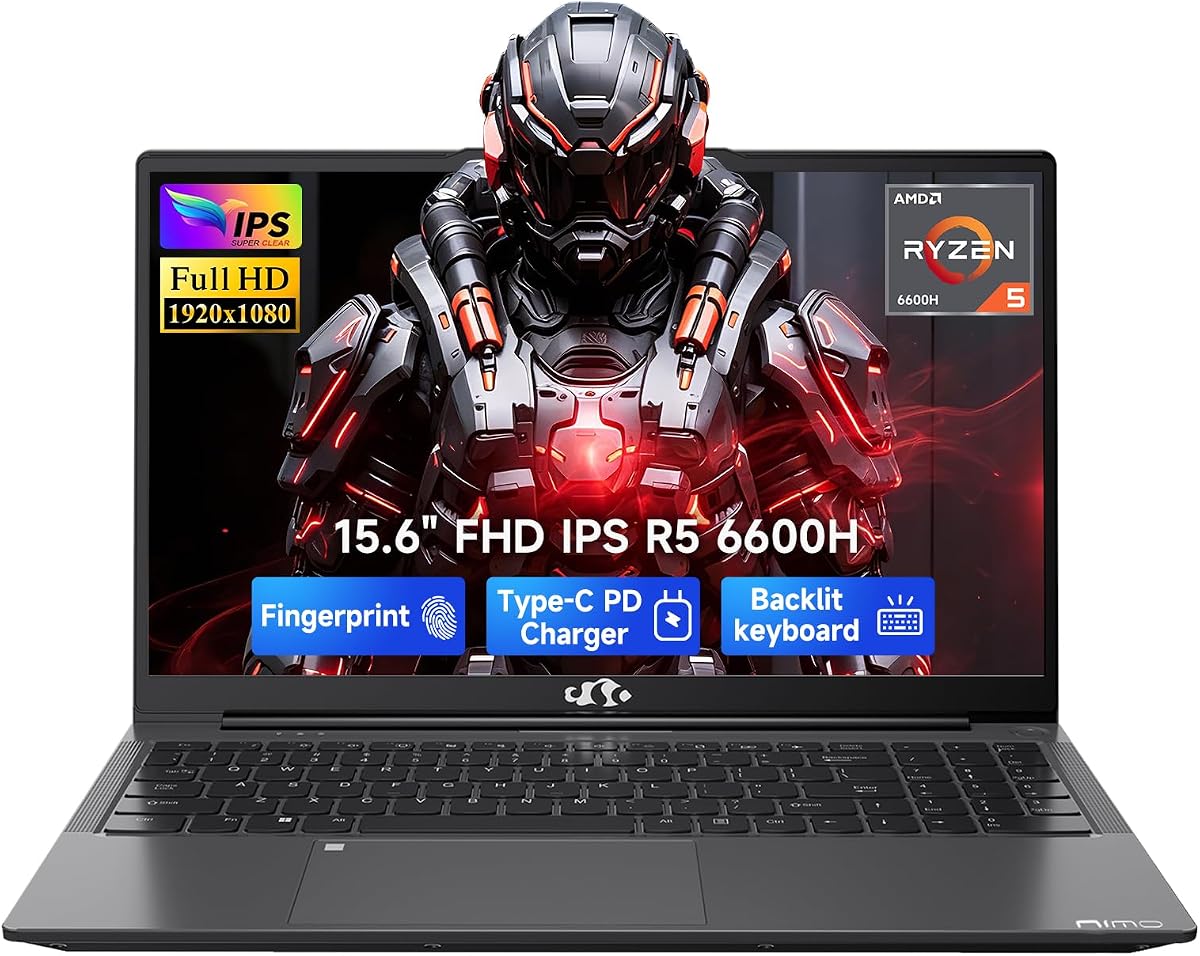
The NIMO laptop stands out with its AMD Ryzen 5 6600H processor. It handles demanding audio production and visual tasks effectively. 16GB RAM and 512GB SSD provide headroom for extensive sample libraries and plugins without slowing down.
We may earn a commission when you buy through this link, at no additional cost to you.
Radeon 660M graphics support smooth media playback and light rendering. The backlit keyboard aids typing in low light studio environments. Dual SO-DIMM slots allow future RAM upgrades up to 64GB for heavy projects.
While pricier than entry models this unit offers workstation-level value. A 100W PD charger supports fast power replenishment. It is ideal for those ready to move beyond basic recording into complex arrangement.
This is the top choice for serious hobbyists needing speed and capacity. It bridges the gap between budget and professional gear. The warranty support adds confidence for long-term use in production.
Six cores and twelve threads handle rendering and multi-track recording without lag.
Dual SO-DIMM slots let you expand memory to meet growing production demands.
We may earn a commission when you buy through this link, at no additional cost to you.
This variant improves on storage with a 256GB SSD. It fits more projects and samples than the 128GB models. The 12GB RAM ensures smooth operation for most daily tasks. It is a practical step up in internal capacity.
We may earn a commission when you buy through this link, at no additional cost to you.
Connectivity includes HDMI and USB C for versatile setups. The ergonomic keyboard supports long typing sessions comfortably. Privacy protection is handled via a physical camera slider above the lens.
The processor remains efficient but not designed for complex audio rendering. Battery life is decent with 38Wh capacity for travel. The 100% sRGB screen enhances visual accuracy for creative work.
Buy this if you need more internal space without a large jump in price. It works well for organizing files and basic mixing. Pair with an external drive for archival storage needs.
The 256GB SSD allows more room for local project files and sample libraries.
FHD IPS panel with 100% sRGB supports accurate color for creative visuals.
We may earn a commission when you buy through this link, at no additional cost to you.
Quiet operation is a key benefit for recording in noise-sensitive environments. The 12GB RAM and 256GB SSD provide sufficient local resources. It weighs only 3.5 lbs which makes commuting with your music setup easy.
We may earn a commission when you buy through this link, at no additional cost to you.
The FHD IPS display offers wide viewing angles for shared sessions. Dual Type-C ports allow for modern connection flexibility without adapters. Quiet performance ensures no fan noise bleeds into live recordings at home.
Battery life lasts up to 6 hours which covers most study sessions. You may need a charger for all-day use. The processor is efficient for daily tasks but lacks raw power for heavy rendering.
This model fits well for students needing a quiet and portable device. It handles light production and documentation tasks. Use headphones when recording to avoid ambient noise from the environment.
Minimal fan noise ensures your audio captures remain clean without interference.
A 3.5 lb frame fits easily into bags for travel to practice rooms.
We may earn a commission when you buy through this link, at no additional cost to you.
This model offers a decent balance with 8GB RAM and 256GB SSD. The SATA PCIE SSD ensures fast file access for your software. You can expand storage via TF card or upgrade to 4TB NVMe if needed.
We may earn a commission when you buy through this link, at no additional cost to you.
The display covers 100% sRGB for vivid visual feedback during mixing. Bluetooth 5.0 allows for stable connections to external devices. A full-size ergonomic keyboard aids comfortable input during long sessions.
While 8GB RAM is less than top picks it suffices for lighter apps. The CPU handles basic tasks smoothly. Privacy slider protects your camera when not recording video meetings.
Choose this for its storage flexibility and display color accuracy. It supports moderate workflow needs without high costs. Use an external drive if you run many virtual instruments daily.
TF card slots and NVMe upgrades allow you to scale storage over time.
Vivid FHD visuals help track waveform details and color-coded tracks clearly.
We may earn a commission when you buy through this link, at no additional cost to you.
This laptop runs absolutely silent due to its fanless design. It is perfect for recording audio without fan noise interference. The FHD anti-glare display offers a comfortable viewing experience for long sessions.
We may earn a commission when you buy through this link, at no additional cost to you.
Windows 11 ensures compatibility with modern software and security updates. Type-C PD fast charging lets you use a compact adapter for travel. Dual Type-C and USB 3.2 ports handle mice and drives well.
Performance suits light browsing and basic audio tasks. The 4GB RAM handles standard web tools but struggles with heavy production. Expandable storage allows up to 1TB TF card for extra data.
Ideal for voice recording or light sketching where silence matters. It works best for note-taking and planning sessions. Ensure you have enough cloud space for file storage.
Fanless design prevents background noise from ruining audio recordings.
Type-C PD adapter ensures quick power replenishment during busy days.
We may earn a commission when you buy through this link, at no additional cost to you.
This model scores high with reliable Comet Lake processing. The 128GB SSD boots fast and is expandable up to 512GB. It weighs only 1.63kg making it easy to transport to recording sessions.
We may earn a commission when you buy through this link, at no additional cost to you.
Security is enhanced by a Kensington lock slot to tether the device. Three USB 3.0 ports and HDMI offer versatile connectivity. The 5205U processor handles daily workloads without issues.
Battery life is decent with 38Wh capacity for moderate use. You might need an outlet for all-day tasks. The lightweight footprint suits small desks or shared office spaces.
Choose this for its expandability and light weight. It works well for organizing files and light mixing. Add an external drive for larger project storage needs.
Kensington lock slot prevents theft in shared spaces like libraries.
Multiple USB ports and HDMI support diverse peripheral setups.
We may earn a commission when you buy through this link, at no additional cost to you.
Selecting the right device involves evaluating key specs that impact audio performance. Here are the most critical factors to consider before buying.
Your CPU determines how many tracks and plugins you can run simultaneously. Multi-core processors like Ryzen or Intel Core i5 offer better headroom than Celeron or Pentium chips. Aim for at least 4 cores for smooth audio editing.
Look for processors with high clock speeds to handle real-time effects without latency.
RAM allows your system to load instruments and samples quickly. 8GB is the minimum baseline for recording; 16GB is preferred for complex projects. More RAM prevents crashes when running multiple applications.
Prioritize models with upgradeable slots to extend the laptop's lifespan.
Solid State Drives (SSD) ensure fast load times for DAWs and projects. eMMC storage is slower and not recommended for heavy workloads. Check if the model supports external expansion for larger sample libraries.
Choose at least 256GB SSD for a balance of speed and storage capacity.
Audio interfaces and MIDI keyboards need USB ports to connect. USB C is modern and versatile for future-proofing. HDMI allows you to connect an external monitor for more workspace.
Ensure the laptop has enough ports or supports hubs for your gear.
A clear screen helps you see waveforms and controls accurately. FHD resolution and IPS panels provide wide viewing angles. Good color accuracy is useful if you also edit visuals in your projects.
Anti-glare coatings reduce eye strain during long editing sessions.
Long battery life lets you work without constant access to power. Look for devices offering 6 hours or more of real-world usage. This is crucial for recording on the go or in studios without outlets.
USB-C fast charging can save valuable time during breaks.
Weight matters if you travel between locations. Laptops under 4 lbs are easier to carry in backpacks. Thin chassis designs also save space in small home studios.
Balance portability with performance needs based on your workflow.
Windows 11 offers broad compatibility with professional audio software. Chromebooks are limited to web apps and may restrict full DAW use. Ensure the OS supports your specific plugins and drivers.
Stick with standard systems if you plan to run heavy production tools.
Start by organizing your files into separate folders for samples and projects. Use an external drive to store large libraries to keep the internal SSD fast. This prevents slowdowns when loading plugins or tracks.
Protect your device from dust and spills by using a keyboard cover. Keep vents clear to prevent overheating during long rendering sessions. A cooling pad can also help maintain performance in warm environments.
Regularly update your drivers to ensure audio interfaces work smoothly. Check for BIOS updates from the manufacturer to optimize performance. Back up your work frequently to avoid losing critical recordings.
While you can record basic ideas on almost any laptop serious production needs decent RAM and a faster SSD. Look for at least 8GB RAM and avoid models with eMMC storage if you plan to expand your library.
Yes Windows 11 supports most major digital audio workstations and plugins. It offers improved performance for multi-core processors and better security features for your data.
Eight gigabytes is the practical minimum for recording and mixing. Sixteen gigabytes is better for using many virtual instruments without performance drops.
No a dedicated graphics card is not required for recording. Integrated graphics handle the UI of DAWs efficiently. This helps keep costs down while maintaining audio performance.
An SSD is essential for fast loading times and smooth playback. If the internal size is small use an external drive for sample libraries to save space.
USB-C offers faster speeds and versatility but USB-A also works. Ensure the model has enough ports or supports adapters to connect your gear effectively.
Some models allow RAM upgrades while others have soldered memory. Check the specs for available slots before buying to ensure future flexibility.
We explored ten models offering different trade-offs between cost and capability. The NIMO laptop stands out for power while the HP Chromebook offers portability and value. Each option fits specific needs depending on your project scale.
Prioritize RAM and storage speed when budgeting for your production setup. These factors directly impact your ability to work without interruptions. A balanced machine ensures a smoother creative process.
Always check current listings as prices and availability change frequently. Investing in a reliable device now saves money and time later. Start your music journey with a laptop that grows with your skills.