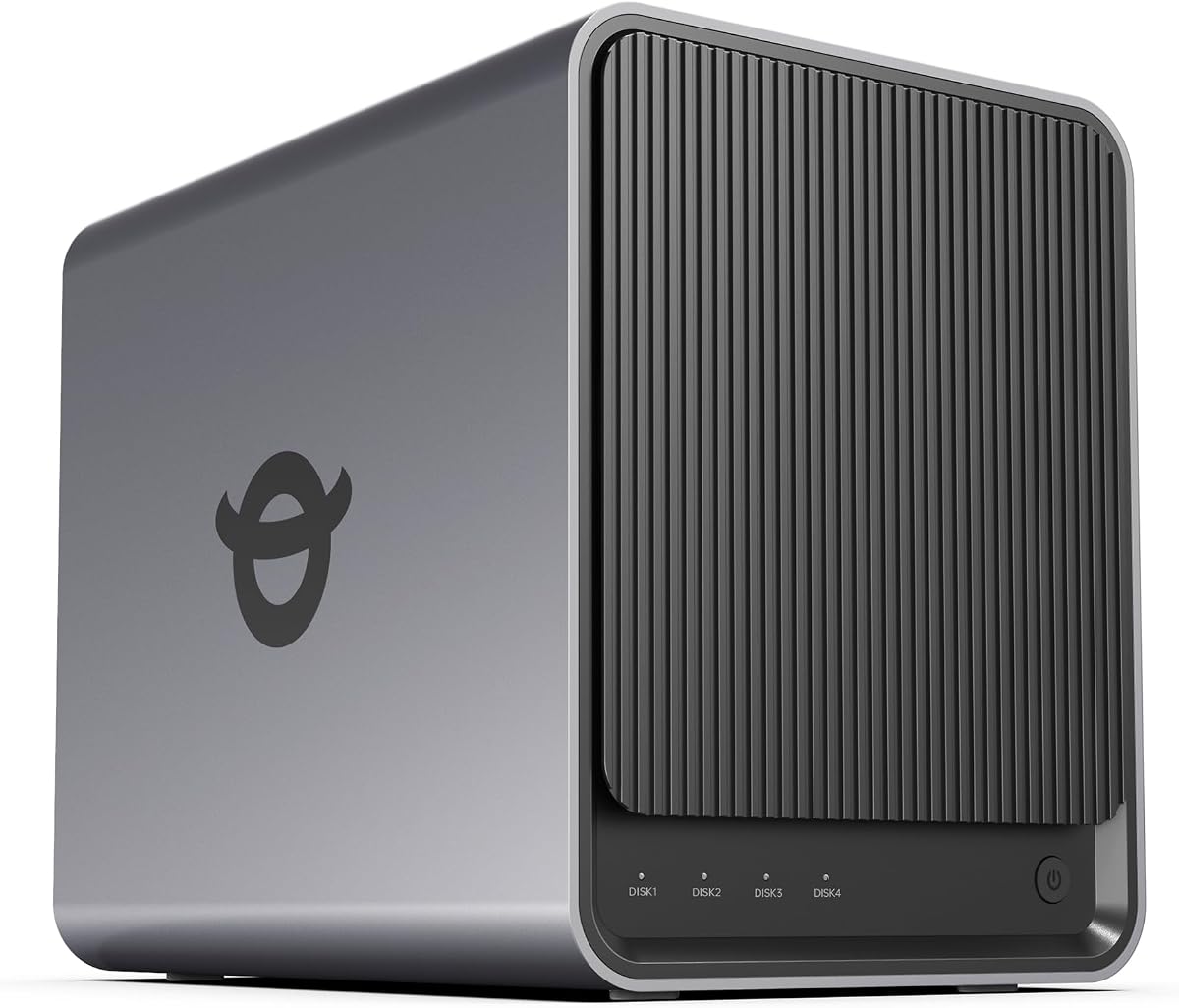
Yxk Zero1 Pro
4.4Editor score
Intel N100 processor
Beginner-friendly setup
Flexible third-party OS
Compare the top 4 Bay NAS drives for home and office use. We analyze performance, storage options, security features, and software ecosystems to help you
A 4 Bay NAS offers centralized storage, automatic backups, and private cloud access for homes and small businesses. It supports multiple users, media streaming, and robust data protection through RAID configurations for reliable file management.
We compared ten leading 4 Bay NAS models based on processor power, network speeds, software features, and ease of use. Our analysis covers budget-friendly options, premium workstations, and balanced choices for various user requirements and workflows.
Each pick highlights key strengths, trade-offs, and ideal use cases to guide your decision. Product ratings and availability may change over time, so verify current details before purchasing to ensure the best fit for your specific storage goals.
4.4Editor score

4.6Editor score

4.4Editor score
This side-by-side comparison highlights the core specifications, performance capabilities, and unique strengths of each 4 Bay NAS model to help you identify the best fit for your storage and workflow requirements.





The Synology DS425+ stands out as a top-tier private cloud media server with a 4.6 rating. It delivers strong performance for sharing large files and streaming media across your office at speeds up to 278 MB/s.
We may earn a commission when you buy through this link, at no additional cost to you.
Its centralized repository allows secure storage of company documents and client files with granular access controls and audit logs. Multi-layered data protection combines RAID redundancy, automated backups, and snapshot technology to prevent data loss.
While the price is higher than entry-level options, the inclusion of a professional surveillance system supporting up to 30 IP cameras justifies the investment. The 3-year warranty and enterprise support add peace of mind for business-critical production environments.
This NAS is ideal for small teams needing secure file sharing, media streaming, and robust data protection. The combination of performance, security features, and reliable support makes it a top choice for professional home offices.
The DS425+ facilitates efficient collaboration by enabling secure file sharing and media streaming across office networks.
Multi-layered protection through RAID, automated backups, and snapshot technology safeguards your files against various risks.
We may earn a commission when you buy through this link, at no additional cost to you.
The Yxk Zero1 Pro offers an affordable entry point into 4 Bay NAS with a 4.4 rating. Powered by an Intel N100 processor and 8GB RAM, it handles everyday storage needs efficiently for home and office use.
We may earn a commission when you buy through this link, at no additional cost to you.
It supports up to 144TB raw storage and includes AI Photo Album tools for organizing family memories. The aluminum housing with dual-fan cooling ensures stable performance during large file transfers or media access tasks.
While it requires separate drive purchases, the flexible support for Docker and third-party operating systems like TrueNAS adds significant value for users wanting customization. The 4K HDMI output enables direct media playback on TVs.
This NAS is perfect for families and beginners seeking cost-effective private storage without compromising on essential features. Its balance of price, performance, and flexibility makes it a standout budget choice.
First-time users can easily set up shared home storage using the mobile app's guided registration and configuration steps.
Face and scene recognition automatically organize vacation photos and milestones into smart albums for quick searching.
We may earn a commission when you buy through this link, at no additional cost to you.
The UGREEN DXP4800 Pro targets IT professionals with a robust 4.4 rating. Powered by an Intel Core i3-1315U processor and up to 96GB RAM, it serves as a versatile private workstation for demanding workflows.
We may earn a commission when you buy through this link, at no additional cost to you.
It supports massive 144TB capacity and dual M.2 PCIe 4.0 SSD slots for high-speed caching or storage. The local AI-powered Photo Album ensures privacy by processing data on-device for managing massive libraries effortlessly.
Enterprise-grade security features include Data Vault for encrypted sensitive files and granular user permissions supporting up to 2048 accounts. This level of control makes it suitable for growing teams with strict privacy requirements.
This NAS is ideal for power users, developers, and businesses requiring serious performance and advanced workflow support. Its comprehensive hardware and software capabilities justify the premium price for professional environments.
The Intel Core i3 processor and 96GB RAM provide significant performance lead for virtualization and multitasking.
Data Vault and granular permissions ensure sensitive files remain secure and access is tightly controlled.
We may earn a commission when you buy through this link, at no additional cost to you.
The UGREEN NAS DXP4800 GT excels for creators with a 4.6 rating. Powered by an AMD Ryzen Embedded R2514 and up to 64GB RAM, it handles backups, media processing, and multi-user workloads smoothly.
We may earn a commission when you buy through this link, at no additional cost to you.
It features dual 10GbE networking for speeds up to 2.5GB/s theoretical throughput. UOS Pro simplifies management with guided setup and an ecosystem supporting Docker, virtual machines, and apps like Plex and Home Assistant.
Built-in Surveillance Center allows connection of ONVIF cameras for local footage storage without cloud subscriptions. USB and SD instant backup streamlines importing files directly from cameras or card readers.
This NAS is perfect for tech enthusiasts and office teams needing high-speed transfers and local privacy. Its powerful hardware and flexible app ecosystem support diverse creative and professional workflows effectively.
Dual 10GbE ports enable smoother large file transfers and faster backups for demanding workflows.
Store files locally to reduce reliance on third-party cloud servers and maintain data ownership.
We may earn a commission when you buy through this link, at no additional cost to you.
The UGREEN DXP4800 Plus is ideal for small offices with a 4.6 rating. It features a powerful processor and 10GbE network port for fast transfers, enabling seamless collaboration across devices.
We may earn a commission when you buy through this link, at no additional cost to you.
Its secure private cloud retains 100% data ownership with advanced encryption. The AI-powered photo album automatically organizes photos by faces and scenes, removing duplicates to save space and time.
The user-friendly app allows simple setup and easy file sharing on Windows, macOS, and mobile devices. With support for Docker and virtual machines, it offers advanced capabilities for tech-savvy families and teams.
This NAS suits families and creators needing centralized storage and remote access. Its combination of speed, security, and intuitive software makes it a reliable choice for daily use and collaboration.
Back up 1GB in less than a second using the 10GbE network port or 10Gbps USB ports.
Automatic organization and duplicate removal help maintain a clean and searchable photo library.
We may earn a commission when you buy through this link, at no additional cost to you.
The UGREEN NAS DH4300 Plus offers entry-level home storage with a 4.2 rating. It provides a private cloud alternative to recurring cloud fees and supports Docker for basic app extensions.
We may earn a commission when you buy through this link, at no additional cost to you.
Its smart photo backup organizes family memories with AI albums and semantic search. NFC connects quickly for setup, and the magnetic dust cover design ensures precise alignment for convenience.
The storage capacity supports up to 128TB and automatic backups across multiple devices. Encryption certifications like TRUSTe and ETSI ensure data security and privacy for home and remote use.
This NAS is perfect for beginners moving from external drives to private cloud storage. Its intuitive features and cost-effective model make it accessible for families seeking reliable home storage.
One-time purchase offers significant savings compared to recurring monthly cloud storage fees over years.
AI-powered recognition helps organize and retrieve photos quickly with semantic search and duplicate removal.
We may earn a commission when you buy through this link, at no additional cost to you.
The Synology DS925+ offers solid business performance with a 4.2 rating. It supports up to 522/565 MB/s sequential read/write throughput for stable data transfers and dual 2.5GbE ports for redundancy.
We may earn a commission when you buy through this link, at no additional cost to you.
Built-in file and photo management combine with data protection and virtualization solutions for versatile use. The integrated surveillance option enhances security for home or office environments without extra hardware.
Its 3-year limited hardware warranty ensures reliability for professional environments. Compatible drives must be selected from the official list for optimal performance and support coverage.
This NAS suits businesses needing stable throughput and virtualization capabilities. Its robust build quality and comprehensive feature set make it a strong choice for growing office needs.
Up to 565 MB/s speeds support stable data transfers essential for professional file management.
Built-in tools enable virtualization and data protection to ensure business continuity and security.
We may earn a commission when you buy through this link, at no additional cost to you.
The Asustor Drivestor 4 Gen 2 offers optimized quad-core performance with a 4.0 rating. Powered by a Realtek RTD1619B 1.7GHz processor and 1GB RAM, it handles daily storage needs efficiently.
We may earn a commission when you buy through this link, at no additional cost to you.
It includes 2.5GbE networking for faster file transfers and Btrfs snapshots for enterprise-grade data protection against ransomware. RAID configurations ensure data redundancy for home and small office environments.
The home media server supports smooth 4K streaming for smart TVs and mobile devices. Personal cloud features enable secure remote access without relying on third-party cloud services.
This NAS suits budget-conscious users needing basic private cloud and media streaming. Its efficient design and data protection features offer good value for entry-level home offices.
Btrfs snapshots and WORM technology help protect critical business documents against accidental deletion and ransomware.
Smooth 4K playback supports streaming to smart TVs and mobile devices for home entertainment.
We may earn a commission when you buy through this link, at no additional cost to you.
The Synology DS423 offers secure private cloud with a 4.4 rating. It enables safe file access and sharing from anywhere, keeping collaborators on the same page with secure permissions.
We may earn a commission when you buy through this link, at no additional cost to you.
Comprehensive data protection includes multi-destination backups and snapshots for malware protection. Ransomware-resistant backup with immutable snapshots and versioned files adds an extra layer of security.
Its versatile video surveillance supports up to 30 IP cameras for home or business monitoring. File server features replace expensive SharePoint or Dropbox with local sharing and team folders.
This NAS suits families and businesses needing reliable backup and security. Its combination of protection features and flexible collaboration tools makes it a trusted choice for sensitive data.
Immutable snapshots and versioned files protect against malware threats and accidental data loss.
Intuitive monitoring and archiving tools support home or business video surveillance effectively.
We may earn a commission when you buy through this link, at no additional cost to you.
The TERRAMASTER F4-425 delivers powerful performance with a 4.0 rating. Equipped with an Intel x86 quad-core processor and 4GB RAM, it handles 4K transcoding and multitasking effortlessly.
We may earn a commission when you buy through this link, at no additional cost to you.
Its home multimedia hub supports hardware-level 4K decoding for Plex and Emby, with AI photo organization via the Photos app. Ultra-quiet operation at 21dB makes it suitable for bedrooms.
Tool-free HDD tray design simplifies installation in just 10 seconds. Massive storage support up to 120TB and flexible TRAID arrays ensure data redundancy and efficiency.
This NAS suits home users seeking cost-effective multimedia storage. Its strong hardware and silent operation make it an appealing choice for media streaming and file sharing.
Supports hardware 4K decoding for seamless HD video playback and multi-device streaming via DLNA.
Runs at just 21dB(A), making it suitable for quiet environments like bedrooms or offices.
We may earn a commission when you buy through this link, at no additional cost to you.
Selecting the right 4 Bay NAS requires evaluating performance, storage capacity, network speeds, and software features to match your workflow.
A powerful processor ensures smooth multitasking, media transcoding, and virtualization support. Look for Intel x86 or AMD Ryzen CPUs with multiple cores for demanding tasks.
Prioritize processors that match your workload intensity, from basic file storage to professional video editing and virtual machines.
Sufficient RAM supports simultaneous apps, file transfers, and virtual machines. Entry-level models may have 4GB while premium NAS offer 8GB or more.
Choose models with expandable RAM if you plan to run Docker containers or virtual machines to avoid bottlenecks.
Fast network ports like 2.5GbE or 10GbE enable quick file transfers and multi-user access. Dual ports can provide link aggregation for higher throughput.
Ensure your router supports the chosen network speed to fully utilize the NAS performance capabilities.
Evaluate total raw capacity and RAID options to balance storage space with data redundancy. Support for large capacity drives helps future-proof your setup.
Select RAID configurations that match your data safety requirements without sacrificing too much usable space.
Intuitive software simplifies setup and daily management. Look for features like photo albums, cloud sync, and mobile apps for remote access.
Consider support for Docker and third-party apps to expand functionality beyond basic file storage.
Advanced encryption, user permissions, and snapshot technology protect your data from threats. Ransomware-resistant backups add an extra layer of security.
Choose models with certified security standards to ensure data protection meets professional or personal needs.
Hardware transcoding enables smooth 4K streaming to various devices without overloading the processor. Look for compatibility with Plex, Emby, or Jellyfin.
Verify HDMI output if you plan to connect the NAS directly to a TV for local playback.
A solid warranty and responsive technical support reduce downtime risks. Enterprise options often include dedicated account management for critical environments.
Check warranty duration and support channels to ensure long-term reliability and assistance when needed.
Start by installing compatible hard drives and connecting the NAS to your network via Ethernet. Follow the setup wizard to configure network settings and install the operating system or OS.
Set up user accounts, shared folders, and access permissions to protect data privacy. Install necessary apps like backup tools or media servers from the NAS app store.
Regularly update the NAS firmware for security patches and new features. Monitor drive health and replace drives before failure to prevent data loss and maintain system performance.
A 4 Bay NAS provides centralized storage, automatic backups, and private cloud access. It supports multiple users, media streaming, and RAID configurations for data redundancy and reliability.
Most 4 Bay NAS models are sold diskless, meaning hard drives must be purchased separately. Always check product specifications for drive compatibility before buying storage.
Yes, many 4 Bay NAS devices support 4K transcoding and media servers like Plex or Emby. They enable smooth playback to smart TVs and mobile devices over your network.
Capacity depends on drive sizes and RAID configuration. Modern models support up to 120TB or more with high-capacity drives, offering room for growing file libraries.
Most manufacturers offer technical support via email, chat, or phone. Premium and business models may include longer warranties or dedicated account management options.
Many models support virtual machines via Docker or built-in virtualization tools. Ensure the device has sufficient RAM and processor power for your VM workloads.
For basic use, 2.5GbE is sufficient, but professionals may benefit from 10GbE. Ensure your router and network hardware support the selected speeds for optimal performance.
Enable immutable snapshots, multi-destination backups, and strong user permissions. Use NAS with encryption and regular firmware updates to minimize security risks.
The Synology DS425+ leads with strong team productivity tools and enterprise support, while the Yxk Zero1 Pro offers affordable versatility with third-party OS flexibility. The UGREEN DXP4800 Pro stands out for professionals needing high-end performance and security.
Prioritize processor power, network speeds, and software features based on your workload. Budget models suit basic storage, whereas premium options support virtualization and advanced collaboration tools.
Always verify current product availability and warranty terms before purchasing. Matching your specific storage goals to the right NAS model ensures long-term satisfaction and reliability.