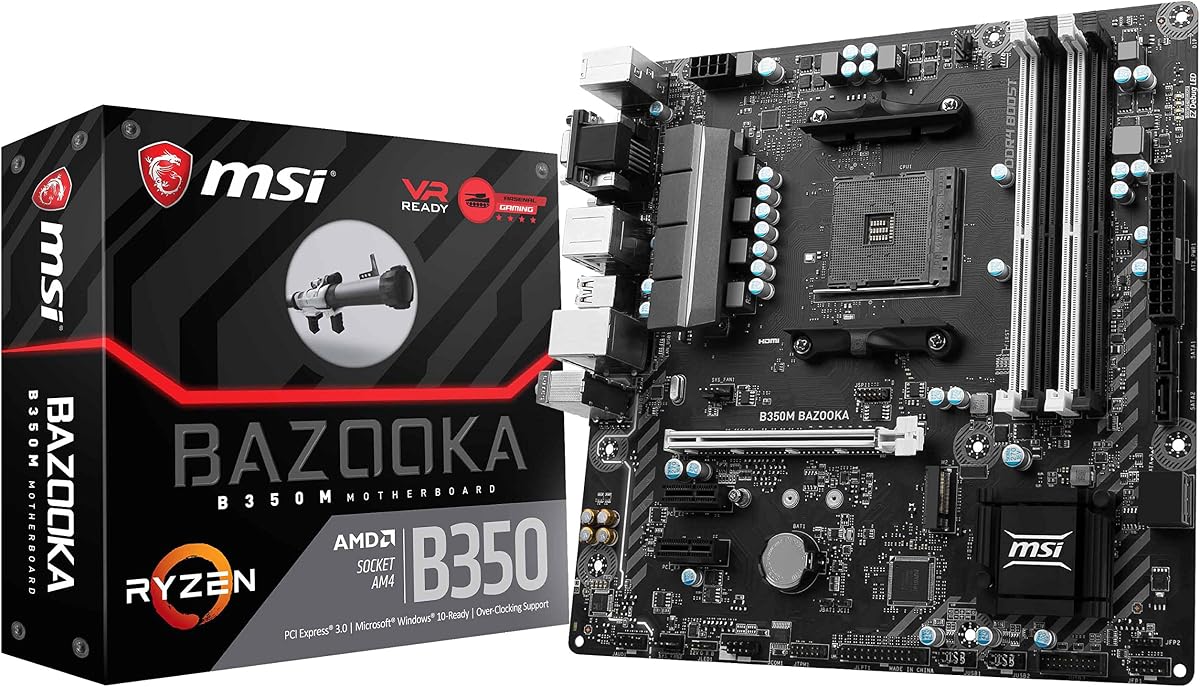
MSI Gaming B350
3.9Editor score
EZ Debug LED Lights
Studio Grade Audio
Game Boost Features
This guide compares the best AMD B350 motherboards available in October 2026 for Ryzen build performance and value.
Finding the right motherboard is crucial for any AMD Ryzen build. The B350 chipset offers a balance of features and affordability for many users seeking reliable performance without breaking the bank.
We have carefully analyzed top models based on VRM quality, connectivity options, and user feedback. This list covers a range of form factors and features to help you find the perfect match for your specific needs.
Each pick highlights key strengths and potential limitations so you can make an informed decision. Please note that prices and availability can change quickly so always verify current details before purchasing online.
3.9Editor score

4.4Editor score
4.5Editor score
This side-by-side comparison highlights the key specifications of each board to help you quickly identify the right fit for your system requirements and budget constraints.



The ASUS Prime B350-Plus stands out as a reliable choice for standard ATX builds. It holds a solid user rating reflecting its durability and straightforward features.
We may earn a commission when you buy through this link, at no additional cost to you.
This board features 5X Protection III which ensures component longevity through hardware level safeguards. The SafeSlot Core prevents GPU damage while FanXpert 2+ optimizes cooling effectively.
While it lacks extensive RGB lighting it provides essential connectivity including M.2 and USB 3.1. The straightforward design makes it ideal for users prioritizing function over flashy aesthetics.
Buyers seeking a dependable base for Ryzen processors will appreciate its balanced features. It remains a strong candidate for general purpose computing and light gaming tasks.
The SafeSlot Core reinforced PCIe slot protects your graphics card from physical damage during installation and use.
FanXpert 2+ software allows precise fan speed adjustments to keep your system cool without excessive noise.
We may earn a commission when you buy through this link, at no additional cost to you.
The MSI Gaming B350 offers a budget friendly entry point for Micro-ATX systems. Its features focus on practical utility for gamers needing essential connectivity and quick troubleshooting.
We may earn a commission when you buy through this link, at no additional cost to you.
EZ Debug LEDs provide an easy way to identify hardware issues without needing extra tools. Game Boost and X-Boost utilities simplify performance tweaks for average users effectively.
Build quality is adequate for the price but VRM cooling is minimal. This might limit sustained performance under heavy loads compared to more robust models.
This board suits small form factor builds where space and cost matter most. It delivers core functionality without unnecessary extras for tight budgets.
EZ Debug LEDs light up to indicate specific hardware faults so you can fix issues quickly.
Game Boost and X-Boost allow you to optimize system settings with a single click.
We may earn a commission when you buy through this link, at no additional cost to you.
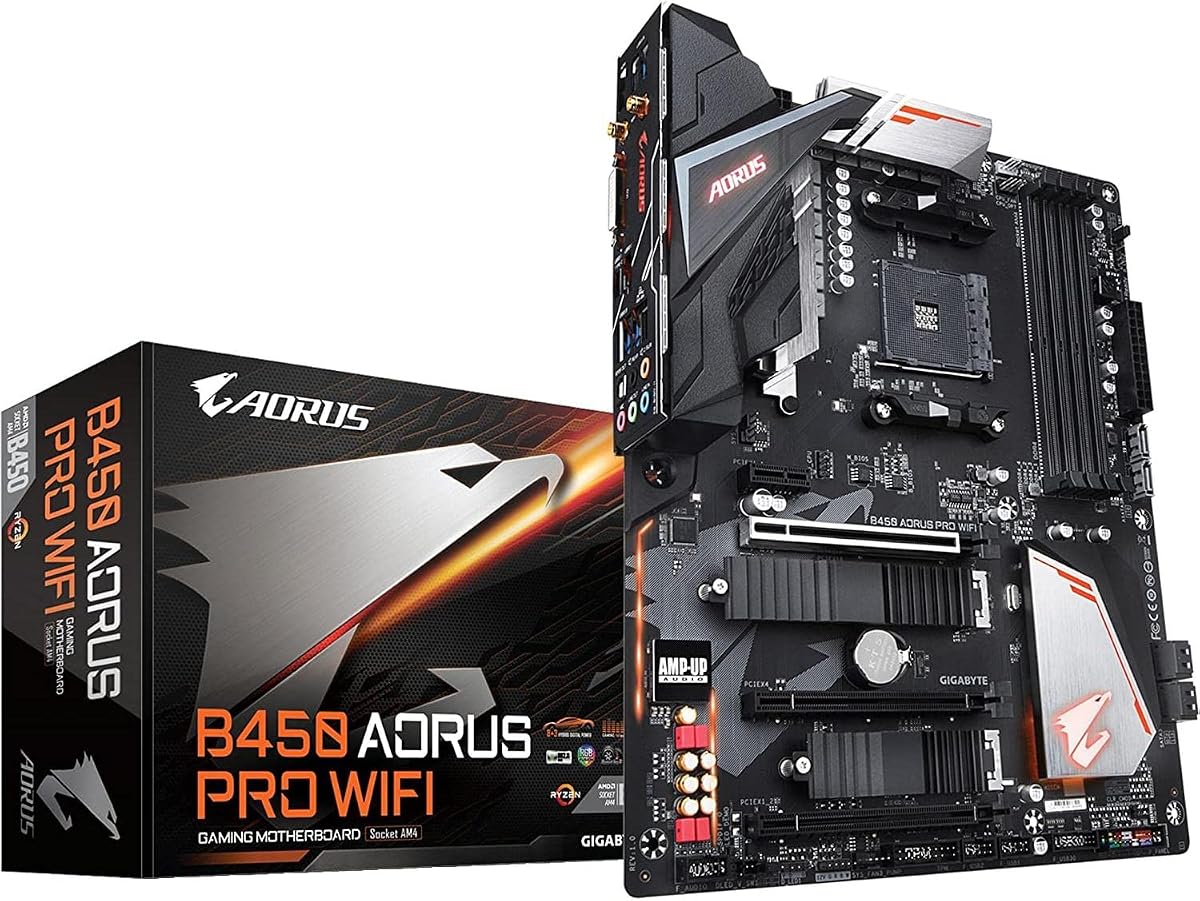
The GIGABYTE B450 AORUS PRO delivers premium features like onboard Wi-Fi and dual M.2 slots. Its robust power delivery supports higher performance Ryzen chips effectively.
We may earn a commission when you buy through this link, at no additional cost to you.
Features like RGB Fusion and USB Type-C provide modern connectivity. The ALC1220 audio codec with WIMA capacitors enhances sound quality for gaming and media.
Users might face driver limitations on older Windows versions due to the Intel Wi-Fi module. The price is higher than basic boards but justified by the feature set.
This is ideal for users wanting a complete package without extra expansion cards. It offers great value for those needing wireless and fast storage options.
Integrated Wi-Fi lets you connect to networks without extra cards or cables cluttering your setup.
Dual M.2 slots with thermal guards allow you to install fast NVMe drives safely.
We may earn a commission when you buy through this link, at no additional cost to you.
The ASUS B450 Prime CSM targets users needing legacy support and stability. It includes COM headers and PS2 ports which are rare in modern consumer boards.
We may earn a commission when you buy through this link, at no additional cost to you.
5X Protection III ensures reliable operation while Aura Sync allows for easy lighting customization. The board handles standard gaming tasks well with solid performance.
Lack of integrated Wi-Fi requires an adapter for wireless needs. It is designed for specialized setups needing old peripherals rather than general home use.
This board is perfect for office PCs or industrial setups with legacy hardware. It offers unique connectivity that many other boards lack today.
COM headers and PS2 ports support older keyboards and peripherals common in business environments.
Aura Sync RGB lets you synchronize colors across compatible components for a unified look.
We may earn a commission when you buy through this link, at no additional cost to you.
The ASUS ROG Strix B550-F is built for cutting edge performance with PCIe 4.0 and WiFi 6E. It delivers exceptional networking and storage speeds for modern systems.
We may earn a commission when you buy through this link, at no additional cost to you.
12+2 power stages ensure stable power for high-end Ryzen processors. BIOS Flashback makes updates easy without needing a CPU installed initially.
This board is likely overkill for older budget CPUs but perfect for new builds. The price reflects premium components and high-end features designed for enthusiasts.
Buyers wanting the fastest speeds and future-proofing will appreciate this choice. It is an excellent upgrade path for serious gamers and content creators.
WiFi 6E and 2.5Gb LAN provide the fastest wireless and wired speeds available for home networks.
BIOS Flashback allows you to update firmware without installing a processor or memory first.
We may earn a commission when you buy through this link, at no additional cost to you.
The GIGABYTE B550M K offers an affordable entry into PCIe 4.0 with a compact Micro-ATX form. It covers essentials for mid-range Ryzen builds effectively.
We may earn a commission when you buy through this link, at no additional cost to you.
With dual M.2 slots and Q-Flash BIOS updates it provides necessary modern features. The VRM handles mid-tier chips well but may struggle with sustained overclocking.
Lack of extra USB ports might limit peripheral options. It is best suited for simple builds prioritizing storage speed over expansion.
This is a great pick for budget conscious gamers who need PCIe 4.0 speeds. It balances cost and performance well for average users.
Dual M.2 slots let you install fast NVMe drives without compromising your PCIe slots.
Q-Flash makes updating the BIOS simple without needing to install extra hardware first.
We may earn a commission when you buy through this link, at no additional cost to you.
The GIGABYTE B550 Gaming X V2 strikes a perfect balance between cost and performance in an ATX layout. It includes strong power delivery for stable operation.
We may earn a commission when you buy through this link, at no additional cost to you.
Features like Front USB-C and Q-Flash Plus add significant convenience. The 10+3 power phases ensure reliable support for modern Ryzen processors under load.
Audio is functional but not exceptional compared to high-end models. It remains a solid choice for general gaming and productivity builds.
Buyers wanting a full sized board with modern features will find this appealing. It offers excellent value for the price in current markets.
Front USB-C header supports fast data transfer and charging for compatible front panel devices.
The 10+3 power phases keep power stable for your CPU even during intense gaming sessions.
We may earn a commission when you buy through this link, at no additional cost to you.
The MSI B550M PRO-VDH WiFi is a well rounded Micro-ATX option with integrated connectivity. It offers practical features for users needing wireless and video options.
We may earn a commission when you buy through this link, at no additional cost to you.
Flash BIOS Button allows updates without CPU installation which is very convenient. Core Boost technology ensures precise power delivery for stable operation.
The board is compact which limits expansion but saves space in smaller cases. It is best suited for users who need WiFi and video output.
This is a solid pick for compact gaming rigs needing wireless. It delivers reliable performance without unnecessary complexity or extra costs.
Integrated WiFi and Bluetooth save you from buying extra cards for network access.
Flash BIOS Button lets you update firmware without installing a processor or memory.
We may earn a commission when you buy through this link, at no additional cost to you.
The MSI PRO B550M-P is a no frills board designed for cost effective builds. It supports PCIe 4.0 and modern Ryzen processors well enough for basic needs.
We may earn a commission when you buy through this link, at no additional cost to you.
Memory Boost helps reach higher speeds easily. It lacks fancy features but includes what is needed for a functional small system.
VRM cooling is minimal so keep an eye on temperatures during heavy use. This board is perfect for simple office or entry level gaming PCs.
Buyers wanting a cheap reliable board will appreciate this choice. It delivers essential performance without unnecessary extra costs or features.
Memory Boost optimizes RAM speeds automatically to give you better performance out of the box.
The clean design makes installation straightforward for those new to building PCs.
We may earn a commission when you buy through this link, at no additional cost to you.
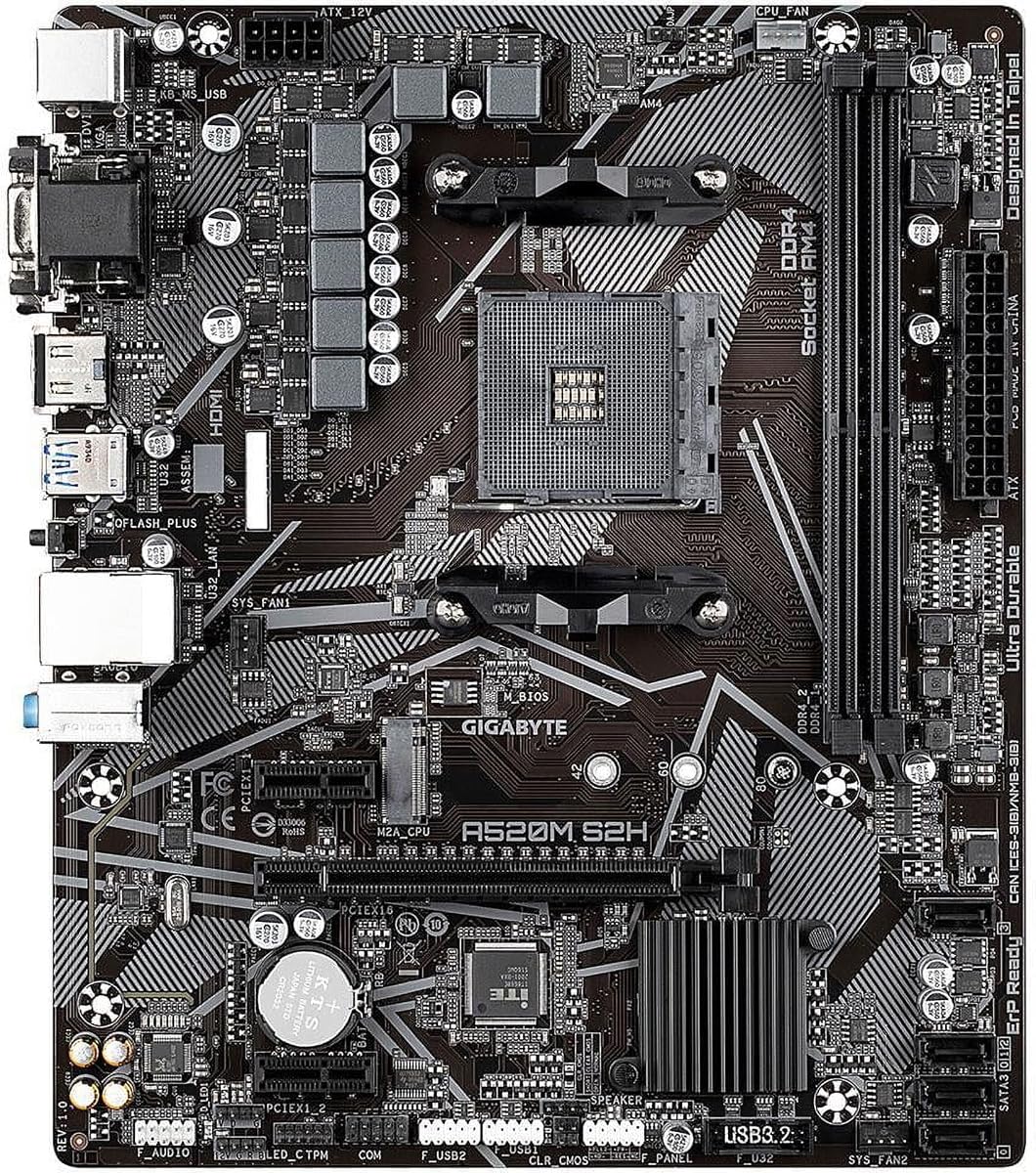
The GIGABYTE A520M S2H is designed for users on a tight budget needing a functional platform. It offers basic features that keep systems running smoothly for everyday tasks.
We may earn a commission when you buy through this link, at no additional cost to you.
Q-Flash Plus ensures BIOS updates are easy and safe. Three video outputs give you flexibility for connecting multiple monitors or displays.
Lack of PCIe 4.0 and overclocking limits performance for future upgrades. It serves well as a base for general computing without extra demands.
This is ideal for office PCs or entry level builds needing simple functionality. It provides reliable performance at a very accessible price point.
Q-Flash Plus lets you update the BIOS without needing a CPU installed first for safety.
Three video outputs allow you to connect multiple screens easily for productivity.
We may earn a commission when you buy through this link, at no additional cost to you.
Choosing the right motherboard involves understanding key features that match your specific needs and budget constraints effectively.
Ensure the board size matches your case. ATX is standard but Micro-ATX is smaller and cheaper for compact builds.
Check your case specs to avoid fit issues during installation.
A strong VRM ensures stable power for your CPU especially during high loads. Look for boards with robust heatsinks.
Choose boards with good cooling for Ryzen CPUs to prevent throttling over time.
Verify USB counts and types including Type-C. M.2 slots are critical for modern NVMe storage speeds.
Ensure you have enough ports for your peripherals and storage devices.
Integrated Wi-Fi saves space but wired LAN is often more stable. Audio codecs vary so check for quality if gaming.
Pick based on your network needs and audio quality preferences.
RGB headers allow synchronized lighting effects across components. Check if headers match your setup style.
Ignore RGB if you prefer a clean look over flashy lights.
Look for Flash BIOS Button or similar tools that let updates without a CPU installed. This avoids compatibility headaches.
This feature is useful when using newer CPUs with older BIOS versions.
Set a clear budget range. Some boards offer better warranty terms or customer support which adds value.
Read reviews to ensure reliable long-term performance and support.
Consider PCIe 4.0 support for future GPU and storage upgrades. DDR4 slots limit RAM speeds compared to newer DDR5 boards.
Plan for future needs to avoid replacing hardware too soon.
Start by checking static safety and grounding yourself before touching components to avoid electrical damage to the board.
Install the CPU gently without bending pins and apply thermal paste before mounting your cooler correctly.
Update the BIOS early to ensure compatibility with your CPU and enable XMP for faster RAM performance.
Yes they remain suitable for budget builds and basic tasks but they lack PCIe 4.0 support which newer boards have.
Yes but BIOS updates may be required for compatibility and performance on some models from different brands.
Micro-ATX is smaller than standard ATX and fits most ATX cases while offering lower cost and fewer expansion slots.
Only specific models include integrated Wi-Fi so check product specs carefully if you need wireless connectivity without extra cards.
Use manufacturer tools like BIOS Flashback if available to update firmware without needing CPU memory installed first.
No it is purely aesthetic and does not impact performance so choose based on personal style preferences.
Most boards have decent built-in audio for gaming but audiophiles may prefer external DACs for higher sound quality.
DDR4 3200MHz to 3600MHz is the sweet spot for Ryzen CPUs on these boards for balance performance value.
We reviewed ten top options offering reliability and performance for different needs across the market landscape today.
Prioritize VRM quality and connectivity based on your specific CPU and storage requirements for best long-term satisfaction.
Always check current prices and availability as market rates fluctuate quickly after publication of this guide.