
Square Reader for magstripe (USB-C)
4.6Editor score
Compact and portable design
Seamless Square app integration
Next day funding available
This guide compares the top credit card swipers for businesses and individuals, covering USB readers, mobile terminals, and full POS systems to help you choose
Credit card swipers are essential tools for businesses of all sizes to process transactions efficiently. Whether you run a small pop-up shop or a large retail store, having a reliable payment device ensures smooth customer experiences and secure data handling for your daily operations.
We have evaluated ten distinct models ranging from basic magnetic stripe readers to advanced all-in-one payment terminals. Our comparison focuses on compatibility, ease of use, security features, and overall value to help you find the device that best fits your specific transaction needs and budget constraints.
Each pick in this list highlights key strengths and potential limitations based on user feedback and technical specifications. Please note that product availability and pricing can change frequently, so we recommend verifying the latest details directly with the retailer before making your final purchasing decision today.
4.6Editor score

4.2Editor score

4.5Editor score
The following table provides a side-by-side look at the core specifications and capabilities of each selected credit card swiper to help you quickly identify which device matches your technical requirements and operational environment.



The MSR90 USB Swipe stands out as a reliable and versatile magnetic card reader for various business needs. With a solid rating, it offers straightforward functionality that integrates easily into existing systems without complex installation steps or heavy software dependencies.
We may earn a commission when you buy through this link, at no additional cost to you.
Its ability to read up to three tracks of information ensures compatibility with a wide range of card formats including ISO7811 and AAMVA standards. The bi-directional swipe reading feature enhances reliability even when dealing with worn or scratched magstripe cards.
While it lacks the sleek aesthetics of modern payment terminals, its robust construction and threaded inserts for mounting make it ideal for fixed POS setups. Users may need to configure settings manually, but the included software simplifies this process significantly.
This device is perfect for businesses needing a straightforward, no-frills solution for capturing card data quickly. If you prioritize reliability and broad compatibility over advanced features, the MSR90 remains a top contender in the budget-friendly magnetic stripe category.
Reads ISO7811, AAMVA, CA DMV, and most other card data formats with ease.
Reliable for over 1,000,000 card swipes with bi-directional reading technology.
We may earn a commission when you buy through this link, at no additional cost to you.
This USB Magnetic Stripe reader offers a simple and effective way to capture card data for point of sale systems. It functions as a keyboard emulation device meaning it sends typed data directly to your application without requiring extra drivers or background services.
We may earn a commission when you buy through this link, at no additional cost to you.
The reader supports high and low coercivity cards ensuring you can process various types of magnetic stripe cards reliably. It works seamlessly with text editors spreadsheets and dedicated POS software making it flexible for different operational environments.
One limitation is the basic red LED indicator which provides minimal feedback compared to more advanced models. However for users who need a straightforward input method for entering card numbers this device delivers consistent performance at a low cost.
Ideal for small businesses or individual users who need a quick swipe solution without investing in a full terminal. If you need a basic swiper that just works across Windows and Mac systems this is a solid choice.
Works on Windows, Mac, and other USB capable systems without driver installation.
Compatible with TXT, Notepad, Word, Excel, and various POS systems.
We may earn a commission when you buy through this link, at no additional cost to you.
The Square Terminal is a comprehensive payment device that allows you to ring up sales accept payments and print receipts all in one place. Its high rating reflects strong user satisfaction with its ease of use and reliable performance in retail environments.
We may earn a commission when you buy through this link, at no additional cost to you.
You can accept all major credit and debit cards including chip cards which are processed in just two seconds. The built-in battery means you can use it cordlessly anywhere in your store without needing a constant power source nearby.
While it requires a more significant investment than a simple swiper the convenience of having a full POS system outweighs the cost for many merchants. You get access to detailed sales reports and management tools without needing extra hardware.
This terminal is perfect for businesses looking to modernize their checkout process with a secure and efficient device. If you value mobility and all-in-one functionality the Square Terminal offers excellent value and peace of mind.
Process chip cards in just two seconds with no hidden fees or long-term contracts.
Use it cordlessly with the built-in battery designed to last all day.
We may earn a commission when you buy through this link, at no additional cost to you.
This ETEKJOY USB reader offers a compact design that fits well into tight spaces while still delivering reliable magnetic stripe reading capabilities. It supports reading data from all three tracks and works across Windows and Mac systems seamlessly.
We may earn a commission when you buy through this link, at no additional cost to you.
The inclusion of two screw holes at the bottom allows for secure mounting which is great for fixed POS setups where the device should not move. The 145cm USB cord provides enough flexibility to place the reader where it is needed most.
While it lacks some of the advanced configuration options found in higher-end models it remains a practical choice for standard transaction processing. Users can connect it directly to their systems and start typing data immediately without any setup hassle.
For businesses needing a small yet functional swiper that does not require extra power or drivers this model is a solid option. It balances cost and functionality well for simple point of sale needs.
Two 3mm-diameter screw holes for fixing at the bottom for stability.
145cm USB cord ensures you can place the reader at your convenience.
We may earn a commission when you buy through this link, at no additional cost to you.
The Square Reader for magstripe is an ultra affordable way to start accepting payments using your smartphone or tablet. With a strong rating it offers a seamless integration with the Square Point of Sale app for easy transaction tracking.
We may earn a commission when you buy through this link, at no additional cost to you.
You can get set up quickly without any long-term commitments by simply downloading the app and connecting the reader. It supports digital receipts and allows you to manage sales inventory and tips all in one place efficiently.
While it requires a connected device to function it offers unmatched portability and ease of use for small businesses or service providers. The USB-C connector ensures compatibility with newer devices without requiring extra adapters.
This is an excellent choice for entrepreneurs who want to minimize upfront costs while maintaining professional payment capabilities. If you need a simple reliable mobile payment solution this reader delivers great value and flexibility.
Get set up quickly with no long-term commitments using the free Square POS app.
Track your sales, manage inventory, accept tips, and send receipts digitally.
We may earn a commission when you buy through this link, at no additional cost to you.
This 2xhome POSMATE set includes two mini credit card readers making it a cost effective solution for businesses with multiple registers. Both units support 1, 2, and 3 tracks and are compatible with ISO ANSI and AAMVA standards.
We may earn a commission when you buy through this link, at no additional cost to you.
Each reader comes with a 5ft cable which provides enough length for most counter setups. While the build is simple it handles standard magnetic stripe data efficiently for tasks like loyalty programs or basic transaction logging.
It is important to note that these readers are not encrypted so they may not be suitable for systems requiring enhanced security protocols. For simple data capture needs however they offer great value by providing two units in one package.
Ideal for small businesses or home offices needing backup units or multiple entry points for data collection. If you prioritize quantity and affordability over advanced security this bundle is a practical choice.
Set of 2 units allows for multiple registers or backup options at low cost.
ISO, ANSI and AAMVA compatible including credit cards, gift cards, and licenses.
We may earn a commission when you buy through this link, at no additional cost to you.
The SumUp Plus Card Reader offers wireless flexibility by connecting via Bluetooth to your smartphone or tablet. It accepts all major credit and debit cards including contactless payments through NFC RFID technology for fast tap to pay.
We may earn a commission when you buy through this link, at no additional cost to you.
Using the free SumUp App allows you to start accepting transactions immediately without any long-term contracts or hidden fees. It is designed for merchants who need to accept payments anywhere and anytime with minimal hardware overhead.
While the rating suggests some users have experienced connectivity challenges the convenience of a truly mobile setup is often worth the trade-off. It works well for pop-up shops or food trucks where wiring a device is impractical.
If you need a portable reader that supports tap to pay and does not require cables this device is worth considering. Ensure your device has stable Bluetooth connectivity to maximize its performance during transactions.
Mobile card reader that accepts payments anywhere and anytime with Bluetooth.
Accepts contactless payments via NFC RFID for faster customer service.
We may earn a commission when you buy through this link, at no additional cost to you.
The PAX S300 v2 is an integrated retail payment solution designed for multilane merchants who require high levels of transactional security. It combines contactless, e-signature, and chip PIN capabilities in a single device with a large color touch screen.
We may earn a commission when you buy through this link, at no additional cost to you.
Security is paramount with this model as it meets PCI PTS 3.x standards and protects all transaction information through robust encryption. The device supports both USB and LAN connectivity options ensuring flexibility in different network environments.
While the setup can be more complex than a basic swiper it offers exceptional multimedia performance with a 32-bit ARM11 processor. This makes it suitable for environments where visual engagement and fast processing are equally important.
If you run a high-volume retail store needing secure versatile processing this terminal provides the reliability and features required. Its stylish design and comprehensive security make it a powerful choice for professional environments.
PCI PTS 3.x and SRED levels of security protect and encrypt transaction data.
Features USB and LAN connectivity options for versatile integration.
We may earn a commission when you buy through this link, at no additional cost to you.
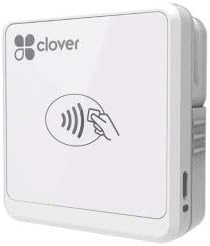
The Clover Go Contactless Reader is a straightforward way to accept payments without requiring a dedicated merchant account. It works with both iOS and Android devices providing flexibility for businesses that use mobile platforms for transactions.
We may earn a commission when you buy through this link, at no additional cost to you.
This reader is EMV and chip ready allowing for secure transactions that meet current industry standards. The contactless capability ensures you can process tap to pay payments efficiently during busy periods.
Please note that quantities of this specific version may be limited as it could be nearing end of life. Orders may be fulfilled with the most current version which typically maintains similar functionality but ensures longer support lifecycles.
If you need a versatile reader that does not lock you into a specific merchant account this is a solid choice. Verify availability before purchasing to ensure you get the hardware that best fits your needs.
No Merchant Account Required for easy setup and immediate use.
Works with iOS and Android smartphones or tablets for mobile payments.
We may earn a commission when you buy through this link, at no additional cost to you.
The Generic Dejavoo QD2 Mobile Wireless Terminal offers secure payment processing anywhere and anytime for businesses needing mobility. It supports chip cards EMV and NFC ensuring compatibility with modern payment methods.
We may earn a commission when you buy through this link, at no additional cost to you.
The device features a 2.4 inch color LCD with backlight making it easy to view transaction details in various lighting conditions. It comes with 192 MB of memory which helps in smooth performance during processing.
However you must note that this equipment requires a new merchant account with SwyftPAY prior to shipping. This means it is not an standalone unit but part of a specific payment processing agreement that you must agree to.
Ideal for businesses willing to enter a processing agreement for a fully wireless terminal solution. If you need a mobile device with a clear display and chip support this model provides those capabilities effectively.
Secure Payment Processing Anywhere, Anytime with wireless terminal capability.
192 MB of Memory (128 MB RAM / 64 MB DDR RAM) for smooth operation.
We may earn a commission when you buy through this link, at no additional cost to you.
Selecting the right credit card swiper involves considering several key factors to ensure your transactions are processed securely and efficiently. We will explore the most important aspects to help you make an informed decision.
Connectivity determines how the swiper communicates with your POS system. Options include USB, Bluetooth, and Ethernet. USB is great for stationary setups while Bluetooth offers mobility for sales staff.
Choose a connection that matches your device availability and workspace layout for seamless data transfer.
Ensure the device supports the types of cards your customers use. Modern swipers should handle EMV chip, contactless NFC, and magnetic stripe. Compatibility prevents declined transactions at the point of sale.
Prioritize models that accept current payment standards to avoid friction during customer checkouts.
The swiper must work with your existing hardware software. Check if it supports Windows, Mac, iOS, or Android. Incompatibility can lead to driver issues and costly delays in adoption.
Verify system requirements on the product page before purchasing to ensure smooth integration.
Security is critical for protecting sensitive card data. Look for devices with PCI compliance and encryption capabilities. Basic readers may not suffice if you process high volumes of transactions.
Opt for encrypted readers to reduce the risk of data breaches and maintain customer trust.
A sturdy device withstands daily wear and tear in busy environments. Look for features like LED indicators and robust housing materials. Durability ensures longevity and less frequent replacements.
Choose a model designed for commercial use if your business operates at high volume.
A user-friendly interface reduces training time and errors during transactions. Plug-and-play models are preferable as they do not require complex setup. Intuitive designs help staff process payments quickly.
Select a device that allows staff to start processing payments without extensive technical knowledge.
Consider both the upfront cost and any associated fees. Some devices have low hardware costs but may require higher processing fees. Evaluate the total cost of ownership over time.
Balance your budget with the features you need to avoid overspending on unnecessary capabilities.
A reliable warranty protects your investment against defects or failures. Longer warranties often indicate manufacturer confidence in product quality. Review warranty terms before finalizing your purchase.
Ensure the seller offers support for any hardware issues that may arise during use.
To start using your swiper, connect it to your device using the specified cable or pair it via Bluetooth. Install any required software or apps and follow the on-screen setup instructions to ensure proper configuration.
When swiping a card, move it steadily through the slot until you hear a beep or see a confirmation light. For chip cards, insert them fully into the slot and wait for the transaction to complete on the screen.
Maintain your device by keeping it clean and free of debris. Avoid exposing it to moisture or extreme temperatures. Regularly check cables for wear and update your software to ensure continued security and performance.
Yes, most credit card swipers need an internet connection to process transactions securely. This allows the device to communicate with the payment processor to verify funds and complete the sale. Some mobile readers use cellular or Wi-Fi to stay connected.
Many modern swipers support chip cards through EMV technology. However, basic magnetic stripe readers might not handle chips. Always check the product specs to ensure the device supports chip insertion if needed.
To secure card data, use encrypted readers and secure payment gateways. Avoid using unencrypted hardware in high-risk environments. Encryption ensures that sensitive information is protected during transmission and storage.
Yes, many swipers are designed for mobile use via Bluetooth or headphone jacks. They connect to smartphones or tablets to allow mobile transactions. Ensure your device OS is compatible with the specific reader.
Basic swipers are often affordable ranging from under twenty to several hundred dollars. More advanced terminals cost significantly more. Always factor in any processing fees associated with the hardware when budgeting.
With proper care, card swipers can last for several years. High-use environments may see shorter lifespans. Regular maintenance and careful handling help extend the operational life of the device.
In conclusion, the MSR90 USB Swipe Square Reader for magstripe and Square Terminal represent the top choices across different categories. Whether you need a simple budget-friendly option or a full payment terminal these picks cover essential needs.
Prioritize security and compatibility when selecting your device to ensure smooth daily operations. Evaluate your specific business requirements to determine the best fit for your transaction volume and processing needs.
Remember to verify current pricing and availability before purchasing as these details can change over time. Choose the device that offers the best balance of features and value for your unique situation.